Blog

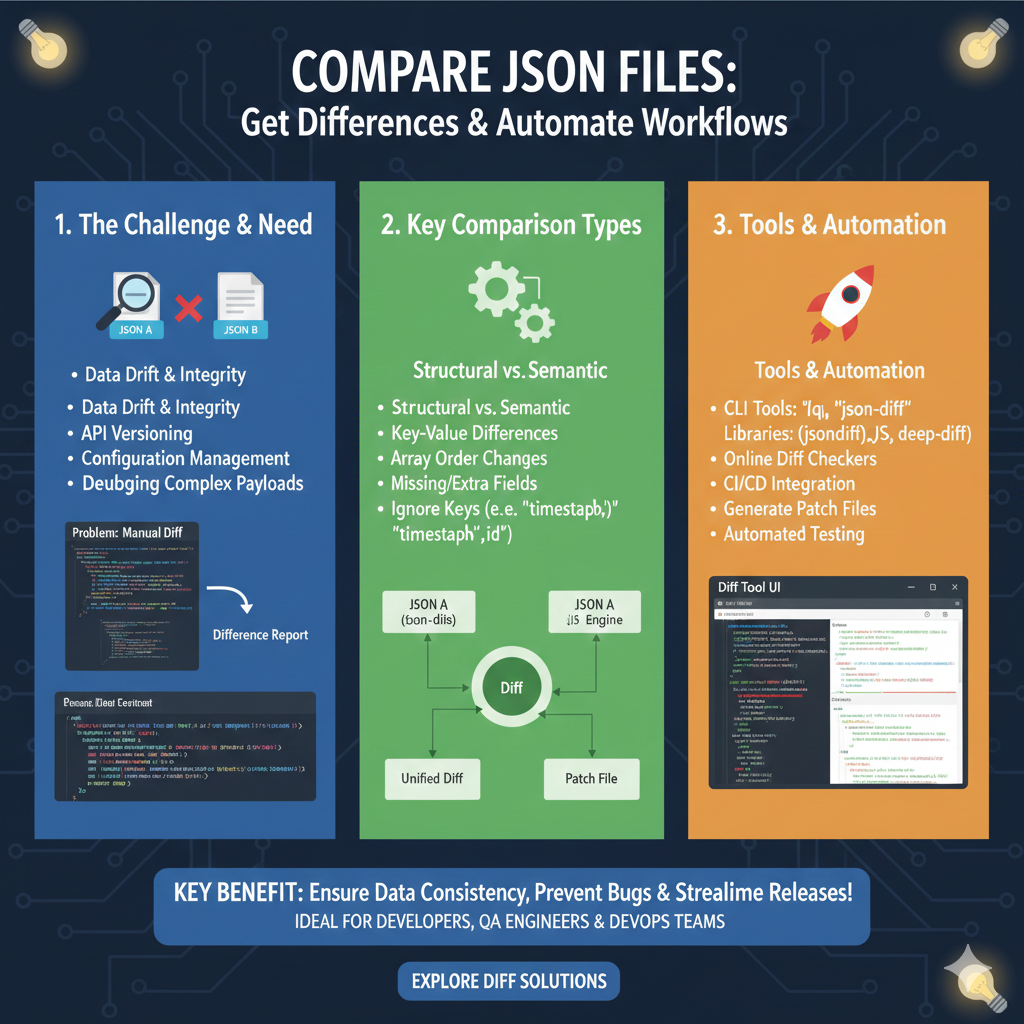
  • How to compare two json files and get differences: A Comprehensive Guide

    How to Compare Two JSON Files and Get Differences: A Comprehensive Guide

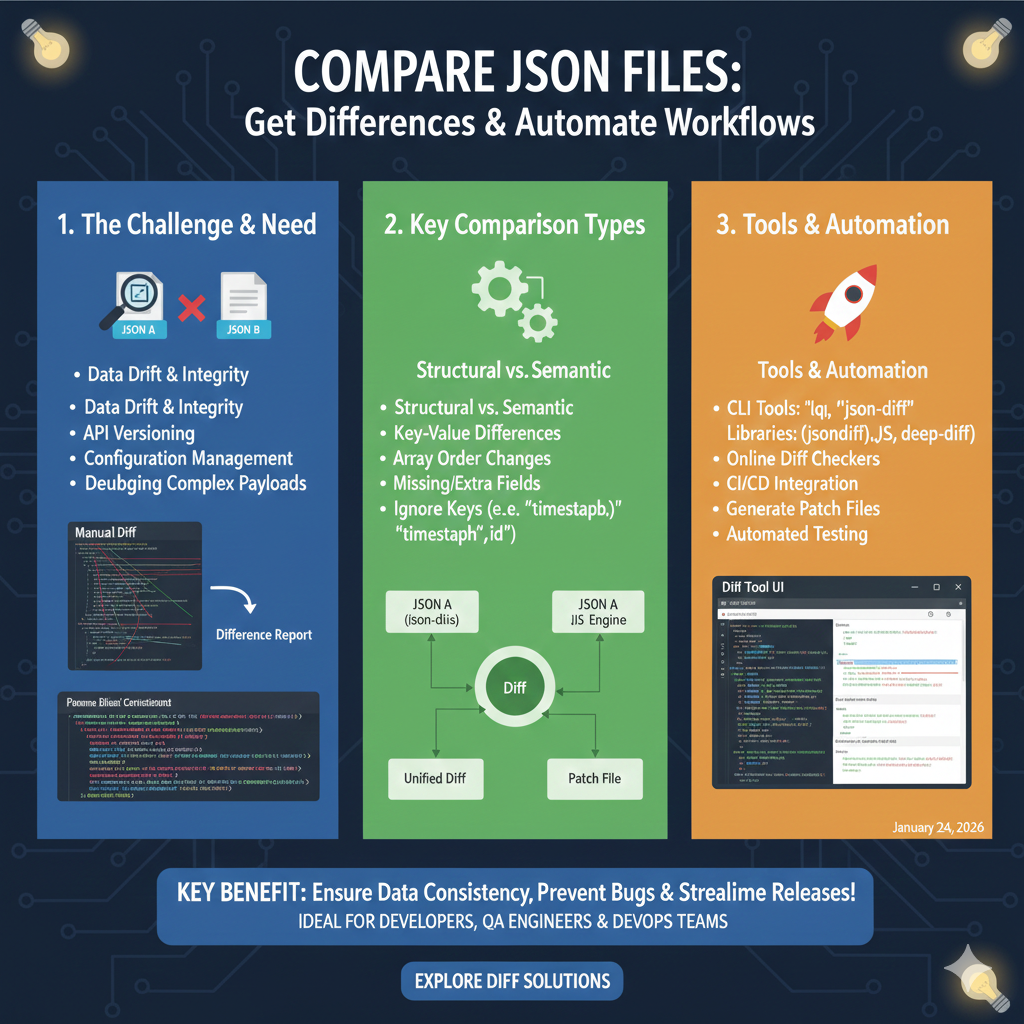
    JSON (JavaScript Object Notation) has become the de facto standard for data interchange on the web, used extensively in APIs, configuration files, and data storage. As applications evolve, so does their data, making it crucial to compare different versions of JSON files to identify changes, debug issues, or validate data integrity. But how do you efficiently compare two JSON files and pinpoint their exact differences?

    This guide will walk you through various methods, from simple manual checks to powerful programmatic solutions, helping you choose the best approach for your specific needs.

    Why is Comparing JSON Files Important?

    • Debugging and Troubleshooting: Quickly identify what changed between two API responses or configuration versions that might be causing unexpected behavior.
    • Data Validation: Ensure that expected data structures and values remain consistent across different datasets.
    • Configuration Management: Track modifications in application settings or deployment configurations.
    • API Development: Compare different versions of an API’s output to understand breaking changes or new features.

    Methods to Compare JSON Files

    1. Manual Inspection (For Small Files)

    For very small and simple JSON files, you might be able to visually scan them side-by-side. However, this method is highly prone to errors and impractical for anything beyond a few dozen lines.

    2. Online JSON Diff Tools

    Several web-based tools offer a quick and easy way to compare two JSON inputs. You simply paste your two JSON strings, and the tool highlights the differences.

    • Pros: User-friendly, no setup required, great for quick comparisons.
    • Cons: Privacy concerns for sensitive data, limited features, usually no programmatic access.

    3. Command-Line Tools (e.g., diff, jq)

    While standard diff works well for text files, JSON’s structure can sometimes make its output noisy. Tools like jq can help normalize JSON before diffing, or specialized diff tools can provide more structured output.

    
    # Basic diff after pretty-printing with jq (not perfect for structural diffs)
    diff <(jq -S . file1.json) <(jq -S . file2.json)
    

    4. Programmatic Comparison (Python)

    Python is an excellent choice for automating JSON comparisons due to its robust standard library and rich ecosystem of third-party packages. Here’s how you can do it:

    Using Python’s json Module

    A simple approach involves loading both JSONs and performing a deep comparison. For a more sophisticated diff, you might need to write custom logic or use a library.

    
    import json
    
    def compare_json(json1_path, json2_path):
        with open(json1_path, 'r') as f1, open(json2_path, 'r') as f2:
            data1 = json.load(f1)
            data2 = json.load(f2)
    
        if data1 == data2:
            print("JSON files are identical.")
        else:
            print("JSON files are different.")
            # For a deeper dive, you'd need a more complex recursive comparison function
            # or a dedicated library like 'jsondiffpatch' or 'jsondiff'.
    
    # Example usage:
    # Create dummy files for demonstration
    with open('file1.json', 'w') as f:
        f.write('{"name": "Alice", "age": 30, "city": "New York"}')
    with open('file2.json', 'w') as f:
        f.write('{"name": "Alice", "age": 31, "city": "London"}')
    
    compare_json('file1.json', 'file2.json')
    
    Using the jsondiff Library

    The jsondiff library provides a more powerful and human-readable way to find differences. First, install it: pip install jsondiff.

    
    import json
    from jsondiff import diff
    
    def compare_json_with_library(json1_path, json2_path):
        with open(json1_path, 'r') as f1, open(json2_path, 'r') as f2:
            data1 = json.load(f1)
            data2 = json.load(f2)
    
        differences = diff(data1, data2)
    
        if not differences:
            print("JSON files are identical.")
        else:
            print("Differences found:")
            print(json.dumps(differences, indent=2))
    
    # Example usage:
    # Assuming file1.json and file2.json are created from the previous example
    compare_json_with_library('file1.json', 'file2.json')
    
    # Expected output with jsondiff:
    # Differences found:
    # {
    #   "age": [
    #     30,
    #     31
    #   ],
    #   "city": [
    #     "New York",
    #     "London"
    #   ]
    # }
    

    5. Programmatic Comparison (JavaScript/Node.js)

    For front-end developers or Node.js backend users, JavaScript offers similar capabilities.

    Using JSON.stringify() for Basic Comparison

    While simple, this only works if the order of keys is identical and values are strictly equal. It’s often insufficient for real-world JSON differences.

    
    const fs = require('fs');
    
    function compareJsonStrings(path1, path2) {
        const data1 = JSON.parse(fs.readFileSync(path1, 'utf8'));
        const data2 = JSON.parse(fs.readFileSync(path2, 'utf8'));
    
        // A naive comparison that doesn't account for key order or deep structural differences
        if (JSON.stringify(data1) === JSON.stringify(data2)) {
            console.log("JSON files are identical (stringified).");
        } else {
            console.log("JSON files are different (stringified).");
        }
    }
    
    // Example usage:
    // (Create dummy files if needed)
    // fs.writeFileSync('js_file1.json', '{"name": "Bob", "age": 25}');
    // fs.writeFileSync('js_file2.json', '{"name": "Bob", "age": 26}');
    // compareJsonStrings('js_file1.json', 'js_file2.json');
    
    Using a Library like deep-diff or json-diff

    For robust JSON comparison in JavaScript, libraries are indispensable. Install deep-diff: npm install deep-diff.

    
    const fs = require('fs');
    const diff = require('deep-diff').diff; // or similar for 'json-diff'
    
    function compareJsonWithDeepDiff(path1, path2) {
        const data1 = JSON.parse(fs.readFileSync(path1, 'utf8'));
        const data2 = JSON.parse(fs.readFileSync(path2, 'utf8'));
    
        const differences = diff(data1, data2);
    
        if (!differences) {
            console.log("JSON files are identical.");
        } else {
            console.log("Differences found:");
            console.log(JSON.stringify(differences, null, 2));
        }
    }
    
    // Example usage:
    // (Assuming js_file1.json and js_file2.json exist from previous example)
    // compareJsonWithDeepDiff('js_file1.json', 'js_file2.json');
    
    // Expected output with deep-diff:
    // Differences found:
    // [
    //   {
    //     "kind": "E",
    //     "path": [
    //       "age"
    //     ],
    //     "lhs": 25,
    //     "rhs": 26
    //   }
    // ]
    

    Choosing the Right Comparison Method

    • For quick, ad-hoc checks of non-sensitive data: Online JSON diff tools.
    • For small, structured changes in version control: Command-line tools like diff combined with jq.
    • For automated scripts, data validation, or complex comparisons: Programmatic solutions using Python (jsondiff) or JavaScript (deep-diff).

    Conclusion

    Effectively comparing JSON files is a fundamental skill for developers and data analysts. Whether you’re debugging, validating, or managing configurations, choosing the right tool and method can save you significant time and prevent errors. Python and JavaScript libraries provide the most flexible and powerful solutions for deep, structural comparisons, making them invaluable for robust data management workflows.

    compare json files

    learn for more knowledge

    Mykeywordrank-> Search for SEO: The Ultimate Guide to Keyword Research and SEO Site Checkup – keyword rank checker

    json web token->jwt react Authentication: How to Secure Your react app with jwt authentication – json web token

    Json Parser ->How to Effectively Use a JSON Parser API: A Comprehensive Guide – json parse

    Fake Json –>fake api jwt json server: Create a free fake rest api with jwt authentication – fake api
  • compare large json files: A Complete Guide to json compare json files and online json compare tool Methods

    compare large json files, especially when they are a massive json file, can be a daunting task. Whether you’re debugging api responses, tracking configuration changes, or validating data migrations, finding json differences between two massive json structures requires the right software and workflow. This guide will walk you through various comparison tools to compare two json documents effectively, helping you pinpoint discrepancies in your json data quickly.


    Why is json comparison of large json Challenging?

    When you compare json files of significant size, you encounter several technical hurdles designed to slow you down:

    • Memory Consumption: Loading a large json file into a standard editor can lead to out-of-memory errors.
    • Performance: A naive json comparison is slow with deeply nested keys and extensive arrays.
    • Semantic vs. Syntactic: The json structure might have the same data but in a different order, making a basic diff tool unreliable.

    Method 1: CLI comparison tools for Quick json diff

    For quick checks, command-line utilities are the most efficient workflow to compare large json files.

    Using jq and diff for json comparison

    You can use jq to normalize the json format (sort keys) before passing it to a diff tool. This ensures that the comparison results focus on actual data changes rather than just modified text.

    1. Normalize the json files:jq -S . file1.json > file1_normalized.json
    2. Compare the results:diff file1_normalized.json file2_normalized.json

    Method 2: custom code steps for Deep json comparison

    When you need to compare two json documents with complex json objects, a programmatic approach is often best.

    Python json compare Example

    Using libraries like DeepDiff, you can compare json data while ignoring array order or specific json structure segments.

    Python

    import json
    from deepdiff import DeepDiff 
    
    # Load the json file
    with open('data1.json') as f1, open('data2.json') as f2:
        data1 = json.load(f1)
        data2 = json.load(f2)
    
    # Find json differences
    diff = DeepDiff(data1, data2, ignore_order=True)
    print(diff)
    

    Method 3: Using an online json compare tool or json editor online

    If your json file isn’t too large (under 10MB), an online json compare tool is a convenient way to get a visual diff view.

    Tool TypeBest Use CasePros
    json compare onlineSmall snippets/Quick checksVisual diff view, no setup.
    json editor onlineFormatting and editingIntegrated formatter and validator.
    diff tool (Desktop)large json filesHandles massive data without crashing.

    Security Note: Avoid using an online json compare tool for sensitive api keys or private user data. Use local software instead.


    Best Practices to compare large json files

    • Normalize First: Always sort keys and handle indentation to avoid seeing modified text that isn’t a real json difference.
    • Stream Large Data: If the file is too big for memory, use a streaming json parser to compare chunks.
    • Hash Check: To quickly see if a json comparison is even necessary, compare the MD5 hash of the normalized files.
    • Filter Keys: Use jq to strip out timestamps or IDs before running your diff tool to focus on the core json structure.

    Conclusion

    Whether you choose a json compare online method for small tasks or custom code steps for a large json file, the goal is to identify json differences accurately. By choosing the right comparison tools and following a structured workflow, you can manage your json data and api responses with confidence.

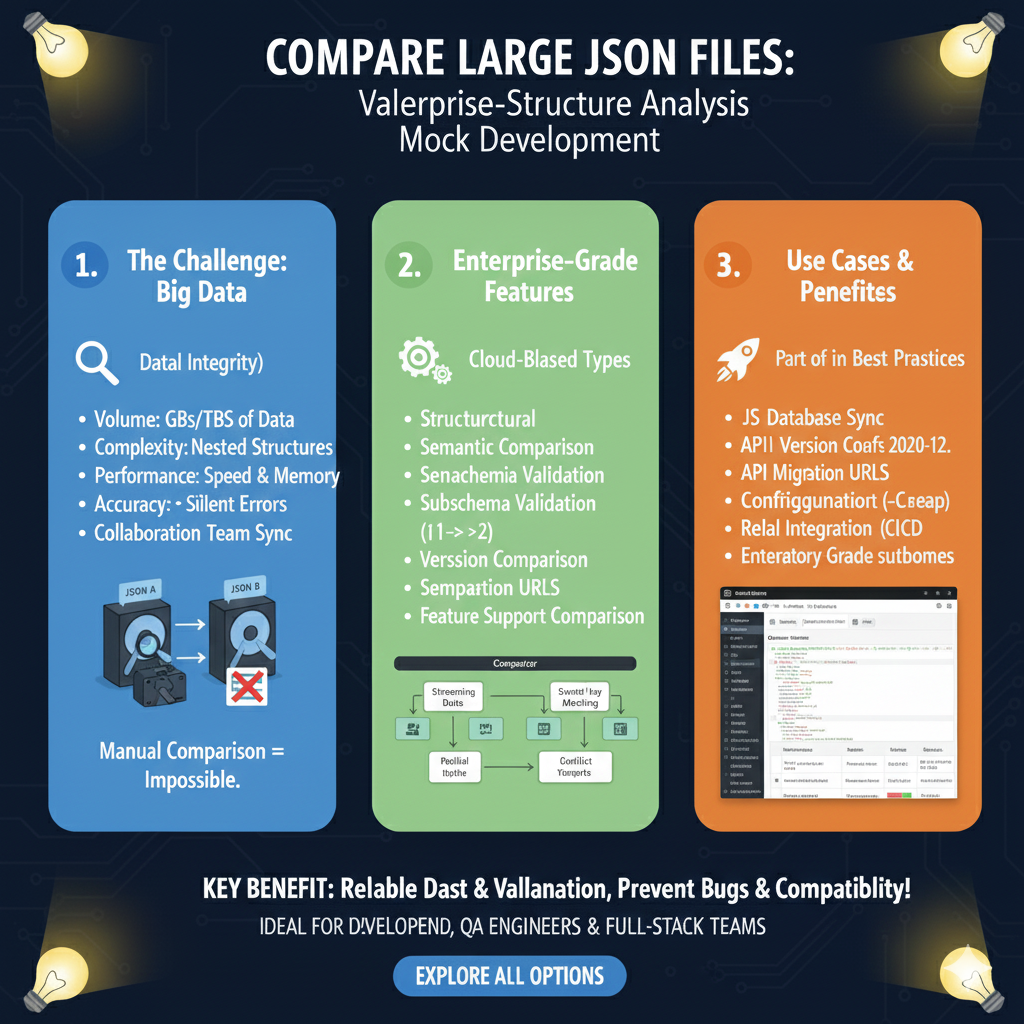
    Handling Big Data at Scale

    The workflow is categorized into three critical areas: the challenges of high-volume data, enterprise-specific features, and practical use cases for professional teams.

    1. The Challenge: Big Data (Blue)

    This section highlights why standard comparison tools often fail with large-scale datasets:

    • High Volume: Built to handle GBs or even TBs of data that would crash standard editors.
    • Complexity: Manages highly nested structures that are difficult to track manually.
    • Performance: Optimized for high speed and low memory usage to maintain system stability.
    • Data Integrity: Designed to catch silent errors and facilitate collaboration team sync across complex projects.
    • Visual Aid: Includes a diagram illustrating that while comparing two massive JSON files (JSON A and JSON B) is “Manual Comparison = Impossible,” automated tools make it seamless.

    2. Enterprise-Grade Features (Green)

    This pillar details the advanced technical logic used to identify differences in enterprise environments:

    • Advanced Logic: Supports structural and semantic comparisons to look beyond simple text differences.
    • Schema Support: Includes subschema validation and full schema validation to ensure data conforms to established rules.
    • Version Tracking: Features version comparison and specialized comparison URLs for sharing specific diff results.
    • Cloud-Based Processing: Utilizes cloud-based types and streaming data to process files without exhaustive local resources.

    3. Use Cases & Benefits (Orange)

    The final section outlines how these tools integrate into modern developer best practices:

    • System Synchronization: Ideal for database sync tasks and managing API version changes.
    • Migration Support: Facilitates API migration and configuration checks to prevent deployment failures.
    • DevOps Integration: Designed for CI/CD integration, ensuring that large data changes are automatically validated during the build process.
    • Professional Standards: Provides enterprise-grade subhomes for organized, team-wide data management.

    learn for more knowledge

    Mykeywordrank-> Search for SEO: The Ultimate Guide to Keyword Research and SEO Site Checkup – keyword rank checker

    json web token->jwt react Authentication: How to Secure Your react app with jwt authentication – json web token

    Json Parser ->How to Effectively Use a JSON Parser API: A Comprehensive Guide – json parse

    Fake Json –>fake api jwt json server: Create a free fake rest api with jwt authentication – fake api
  • compare json schema: The Ultimate json compare tool and schema comparator Guide

    JSON Schema is a powerful tool for describing the structure and constraints of your data.1 It’s widely used in api design, data validation, and documentation.2 As systems evolve, so do their data structures, making the ability to effectively compare json schema definitions crucial for maintaining consistency, managing changes, and preventing compatibility issues.

    Whether you are looking for a json compare online solution or a local json diff workflow, understanding how a schema comparator works is essential for modern developers.


    Why Use a json comparison tool?

    Comparing schema files isn’t just a technical exercise; it’s a fundamental practice for robust software development. A dedicated json schema validator or schema comparator identifies exactly what has changed between versions.3

    Version Control and Collaboration

    In collaborative environments, multiple developers might work on different parts of an api or data model. To compare json effectively helps identify changes, merge work, and resolve conflicts, ensuring everyone is working with the latest and correct schema definitions.4

    API Evolution and Compatibility

    When you update an api, changes to the json schema can have significant impacts on clients. Using a json compare tool to perform a schema comparison allows you to:

    • Identifies breaking changes in nested keys.
    • Plan migrations between a source schema and a destination schema.5
    • Communicate updates effectively to consumers to maintain backward compatibility.

    Data Migration and Transformation

    During data migrations from formats like xml or yaml, understanding the json differences is vital. A json diff check helps in mapping fields and ensuring data integrity throughout the process.


    Methods and json compare Tools

    Several approaches and tools can assist you in finding a schema diff, ranging from manual inspection to automated programmatic solutions.

    json compare online Tools

    Several web-based platforms offer jsonschema-compare-and-view functionality.6 These are great for a quick json compare without installing software. You can simply paste your source schema and destination schema to see a visual diff.

    Text-Based json diff Tools

    If you need to compare json files locally, standard text comparison tools highlight line-by-line differences:

    • VS Code’s built-in diff viewer: Excellent for schema comparison.
    • Beyond Compare: A professional json comparison tool.7

    Programmatic schema comparison

    For automated workflows, using a json schema validator library is the best approach. Here is a Python example that identifies json differences:

    Python

    from jsondiff import diff
    
    # source schema
    schema_v1 = {
        "type": "object",
        "properties": {
            "name": {"type": "string"},
            "age": {"type": "integer"}
        }
    }
    
    # destination schema
    schema_v2 = {
        "type": "object",
        "properties": {
            "age": {"type": "integer"},
            "email": {"type": "string"}
        }
    }
    
    # Perform json diff
    differences = diff(schema_v1, schema_v2, syntax='symmetric')
    print(differences)
    

    Challenges in schema comparison

    To compare two json documents or schemas isn’t always straightforward due to their flexible nature:

    1. Order Insensitivity: json compare results can be cluttered if the tool doesn’t realize that property order in an object doesn’t matter.
    2. Nested Keys: Deeply nested structures require a json compare tool that can recurse through the data.8
    3. External References ($ref): A true schema comparator must resolve external links to find the actual json differences.
    4. Format Differences: Comparing json against yaml or xml versions of the same schema requires a specialized json schema validator.

    Best Practices for an Effective schema diff

    PracticeDescription
    Normalize SchemasSort nested keys alphabetically before you compare json to reduce “noise.”
    Use Version ControlStore all schema files in Git to track how the json schema evolves.
    AutomateIntegrate a json compare tool into your CI/CD pipeline to catch breaking changes.
    Use a ValidatorAlways run a json schema validator after a merge to ensure the new schema is still valid.

    Conclusion

    Effectively using a schema comparator to compare json schema is a critical skill for anyone working with modern APIs. By leveraging the right json compare tool and understanding the schema comparison process, you can ensure data consistency and manage api evolution gracefully.

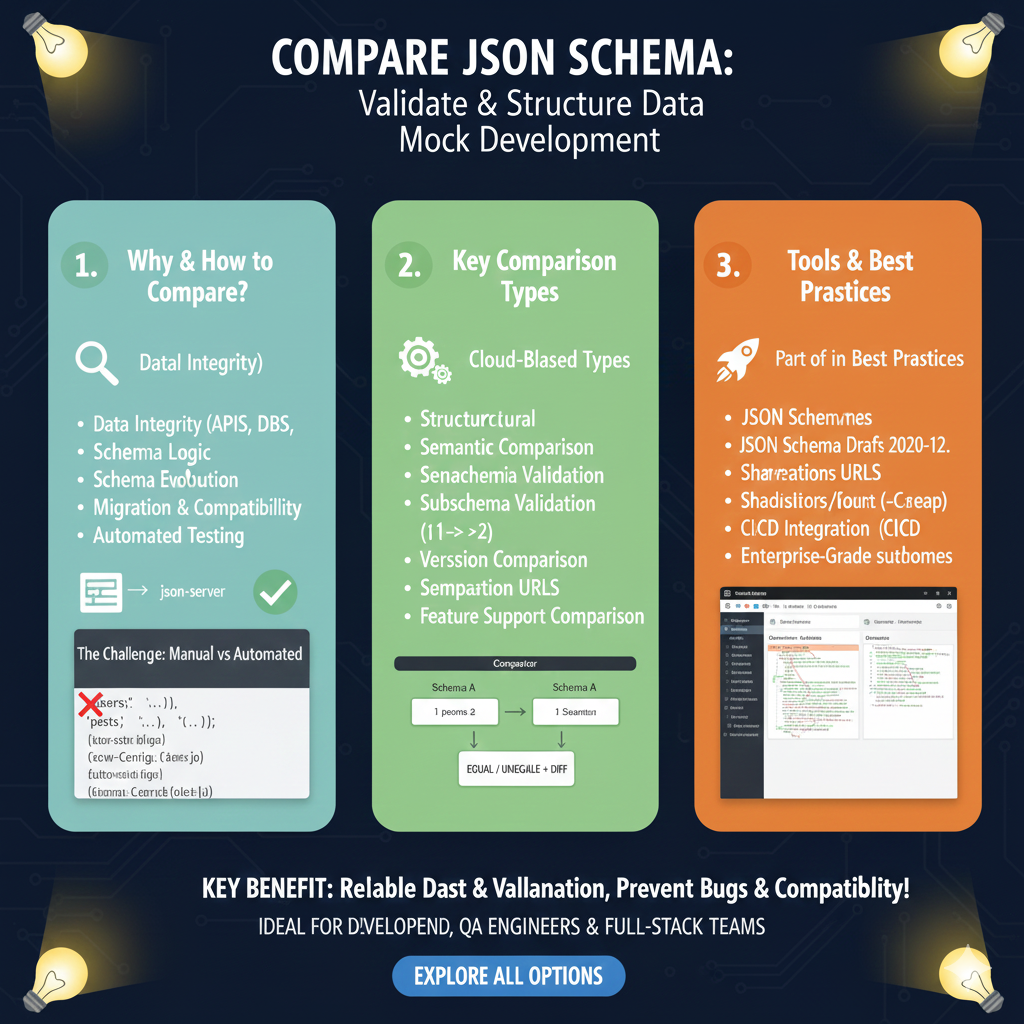
    The infographic titled “COMPARE JSON SCHEMA: Validate & Structure Data Mock Development” provides a detailed framework for ensuring data consistency and accuracy across complex development environments.

    📐 Mastering JSON Schema Comparison

    This guide outlines a three-pillar strategy for validating data structures, identifying logical shifts, and utilizing enterprise-grade tools:

    1. Why & How to Compare? (Blue)

    This section addresses the foundational need for structural oversight in modern data systems:

    • Data Integrity: Ensures accuracy across APIs and Databases (DBS).
    • Evolution Management: Tracks Schema Logic changes and manages Schema Evolution over time.
    • Lifecycle Support: Assists in Migration & Compatibility planning and supports Automated Testing workflows.
    • The Manual Challenge: Contrasts slow manual checks against automated solutions to avoid errors in complex codebases.

    2. Key Comparison Types (Green)

    This module explores the different technical methods used to analyze schema differences:

    • Structural & Semantic: Compares the physical structure and the underlying logic of the data.
    • Validation Depth: Includes Subschema Validation and full Schema Validation checks.
    • Versioning: Handles Version Comparison to detect breaking changes between iterations.
    • Visual Diff: Illustrates a “Comparator” workflow where two schemas are processed to yield an EQUAL / UNEQUAL + DIFF result.

    3. Tools & Best Practices (Orange)

    The final pillar recommends industry standards for professional-grade schema management:

    • Modern Standards: Support for JSON Schema Drafts 2020-12 and earlier versions.
    • Collaboration Features: Utilize Shareable URLs to communicate differences across teams.
    • DevOps Integration: Seamlessly connects with CI/CD Integration for automated deployment checks.
    • Enterprise Features: Offers high-performance solutions for large-scale Enterprise-Grade projects.
    compare json schema

    learn for more knowledge

    Mykeywordrank-> Search for SEO: The Ultimate Guide to Keyword Research and SEO Site Checkup – keyword rank checker

    json web token->jwt react Authentication: How to Secure Your react app with jwt authentication – json web token

    json Parser->json parse use: A Developer’s Guide to json parse, json.parse, and parse json strings – json parse

    Fake Json –>fake api jwt json server: Create a free fake rest api with jwt authentication – fake api
  • compare json online free: Master json compare online with the Best json compare tool and online json Resources

    In the fast-paced world of web development, data exchange often relies on the json format. As projects grow and data evolves, the need to compare json strings or a json file becomes a common, yet critical, task. Whether you’re debugging an API, verifying json data integrity, or tracking json differences, accurately identifying a json difference can save hours of manual effort.

    This guide will walk you through how to compare json online free, providing you with the best comparison tools to efficiently spot every json diff.


    Why Use a json compare online and free online json diff tool?

    A json comparison is more than just finding mismatches; it’s a vital process for modern data management. Using an editor online or a diff tool allows you to:

    • Debug APIs: Quickly identify json differences in API responses that might be causing application crashes.
    • Data Validation: Ensure that the structure and schema of your json data are consistent.
    • Configuration Management: Track modified text in application configuration files.
    • Code Reviews: Verify json comparison results within code changes to prevent production errors.
    • Migration Testing: Use a validator to confirm data integrity after migrating from yaml, csv, or database systems.

    How to compare json files and compare two json documents: A Step-by-Step Guide

    Several free online resources allow you to perform a json compare effortlessly. Here is the optimal workflow to compare json online free:

    Step 1: Choose a Reliable json compare tool

    Start by selecting a trustworthy online json website. Many developers prefer a free online json diff tool that is user-friendly, secure, and offers a clear diff view.

    Step 2: Input Your json data

    Most comparison tools provide two input fields. Copy and paste your first json file content into the left field and the modified text into the right field. Some advanced editor online tools also support converting from yaml or csv before starting the comparison.

    Step 3: Initiate the json diff

    Once both inputs are ready, click the “Compare” button. The json compare tool will process the structure and highlight the json differences.

    Step 4: Analyze the diff view

    The results are typically displayed side-by-side. A professional diff tool will use:

    • Green: Additions in the json data.
    • Red: Deletions from the original json file.
    • Yellow/Blue: Modifications in values within the json format.

    Key Features to Look for in an editor online and json online Tool

    When selecting comparison tools, ensure they offer these essential features to save time:

    1. Side-by-Side Diff View: Essential for easy visual json comparison.
    2. Syntax Formatter: Automatically cleans up “minified” code into a readable json format.
    3. Schema Validator: A built-in validator to ensure the json file is syntactically correct before you compare json online free.
    4. Ignore Whitespace/Order: Crucial for comparing json that is semantically identical but has a different structure.
    5. Export Options: The ability to save your results or convert the json diff into other formats.

    Advanced json comparison: Handling yaml, csv, and Large json data

    Sometimes, your data isn’t just in a simple json format. You might need to compare json files against a yaml config or a csv export. High-end comparison tools allow you to:

    • Convert yaml to json for a structural diff.
    • Verify the schema to ensure the json difference doesn’t break your database.
    • Identify differences in deeply nested json data structures that are impossible to spot manually.

    Conclusion

    Mastering how to compare json online free is an indispensable skill for anyone working with modern data. By utilizing a robust json compare tool and understanding the json comparison process, you can significantly streamline your development and debugging workflows. Whether you are looking for a simple json diff or a complex validator, these free online resources are here to boost your productivity.

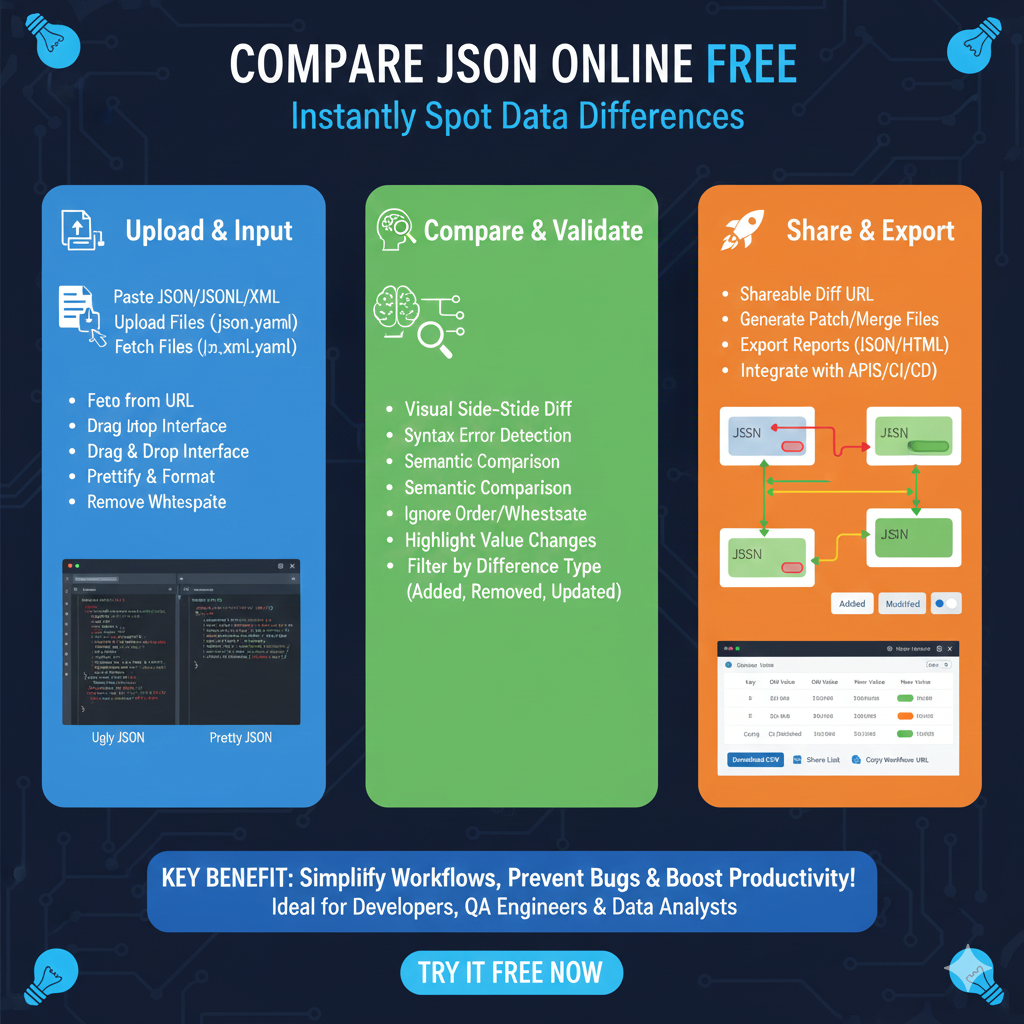
    The Online JSON Comparison Workflow

    This visual guide outlines a three-step professional process for identifying discrepancies between JSON documents directly in your browser:

    1. Upload & Input (Blue)

    This stage focuses on getting your data into the comparison engine quickly and cleanly:

    • Flexible Entry: Support for pasting JSON, JSONL, or XML, and uploading files in .json or .yaml formats.
    • Source Connectivity: Ability to fetch files from a URL directly for live data testing.
    • Interface Tools: Features a Drag & Drop interface for ease of use.
    • Data Preparation: Includes tools to Prettify & Format messy code and remove whitespace to ensure a clean starting point for comparison.

    2. Compare & Validate (Green)

    This section highlights the intelligent features used to analyze data integrity:

    • Visual Analysis: Provides a Visual Side-by-Side Diff to immediately spot changes.
    • Syntax & Logic: Combines Syntax Error Detection with Semantic Comparison that ignores key order and whitespace.
    • Granular Detailing: Automatically highlights specific value changes across the datasets.
    • Smart Filtering: Allows users to filter by difference type, such as identifying only those fields that were Added, Removed, or Updated.

    3. Share & Export (Orange)

    The final stage transforms comparison findings into shareable assets for a team environment:

    • Collaboration: Generates a Shareable Diff URL for team reviews.
    • Developer Assets: Create Patch/Merge files to synchronize different versions of data.
    • Reporting: Export reports in standard JSON or HTML formats.
    • Workflow Integration: Designed to integrate with APIs, CI/CD pipelines, and other automated developer workflows.

    learn for more knowledge

    Mykeywordrank-> Search for SEO: The Ultimate Guide to Keyword Research and SEO Site Checkup – keyword rank checker

    json web token->React JWT: How to Build a Secure React Application with JSON Web Token – json web token

    json Parser->Mastering JSON: The Ultimate Guide to json parse tool and How to Use Them – json parse

    Fake Json –>dummy user data json- The Ultimate Guide to fake api, jsonplaceholder, and placeholder json data – fake api

  • Compare json javascript: Mastering json compare and json diff for two json structures

    In modern web development, the ability to compare json javascript objects is an essential skill. Whether you are validating a response from an API, managing state in a react application, or comparing json in a post request, ensuring data integrity is paramount.

    However, comparing json is notoriously tricky because JavaScript compares objects by reference, not by value. Two json objects can be identical in content but will return false if compared using standard operators. This comprehensive guide explores how to identify differences in json structures effectively.


    Why Comparing JSON in json structures is Tricky

    When you have two json variables, a simple == or === check only tells you if they point to the same memory location. To find the actual object diff, you need to look at the json structure. This involves:

    • Checking if every key is present.
    • Ensuring values in arrays are the same (array diff).
    • Handling undefined or null values.

    Method 1: The Quick (But Often Flawed) JSON.stringify() Approach

    For a fast json compare, many developers use JSON.stringify(). This converts the json data into a string for a literal match.

    JavaScript

    const obj1 = { id: 1, name: "Data" };
    const obj2 = { id: 1, name: "Data" };
    console.log(JSON.stringify(obj1) === JSON.stringify(obj2)); // true
    

    Limitations of this json diff style:

    • Key Order: If the keys are swapped, the strings won’t match, even if the json data is the same.
    • Undefined values: JSON.stringify() often ignores undefined properties, leading to false positives.

    Method 2: Crafting a Robust Deep Comparison Function

    A deep comparison is the most reliable way to compare json and identify differences. This function recursively traverses the object and arrays to ensure every nested json structure is identical.

    Core Logic for deep comparison:

    1. Type Check: Ensure both inputs are objects or arrays.
    2. Key Count: If the objects have a different number of keys, they aren’t equal.
    3. Recursive Step: For every key, run the function again to compare json values.

    JavaScript

    function deepCompare(obj1, obj2) {
      if (obj1 === obj2) return true; // Identical reference
    
      if (typeof obj1 !== 'object' || obj1 === null || typeof obj2 !== 'object' || obj2 === null) {
        return false; // Primitives or nulls that didn't match
      }
    
      const keys1 = Object.keys(obj1);
      const keys2 = Object.keys(obj2);
    
      if (keys1.length !== keys2.length) return false;
    
      for (const key of keys1) {
        if (!keys2.includes(key) || !deepCompare(obj1[key], obj2[key])) return false;
      }
      return true;
    }
    

    Method 3: Using Tools and the lodash isequal() method

    If you don’t want to write a custom function, professional tools and libraries are available. The lodash isequal() method is the gold standard for comparing json in production environments. It handles array diff, object diff, and complex json structures out of the box.

    json compare online and External Tools

    Sometimes you need to compare json files or compare two json documents visually. Using a json compare online tool allows you to see a difference tree. This is helpful for:

    • compare only specific sections of a large response.
    • Using a keysonly” option to see if the structure matches without checking values.
    • Generating a visual difference tree for debugging.

    Summary of JSON Comparison Methods

    MethodBest ForIdentify Differences?Ignores Key Order?
    JSON.stringify()Simple, flat objectsNoNo
    Deep ComparisonComplex json dataYesYes
    lodash isequal()Production-ready appsYesYes
    json compare onlinecompare json filesVisual TreeYes

    Conclusion

    Mastering how to compare json javascript requires understanding when to use a simple string match and when to implement a deep comparison. By using the right tools—whether it’s a custom function, a library like Lodash, or a json compare online viewer—you can ensure your json structures are always accurate and your data remains consistent.

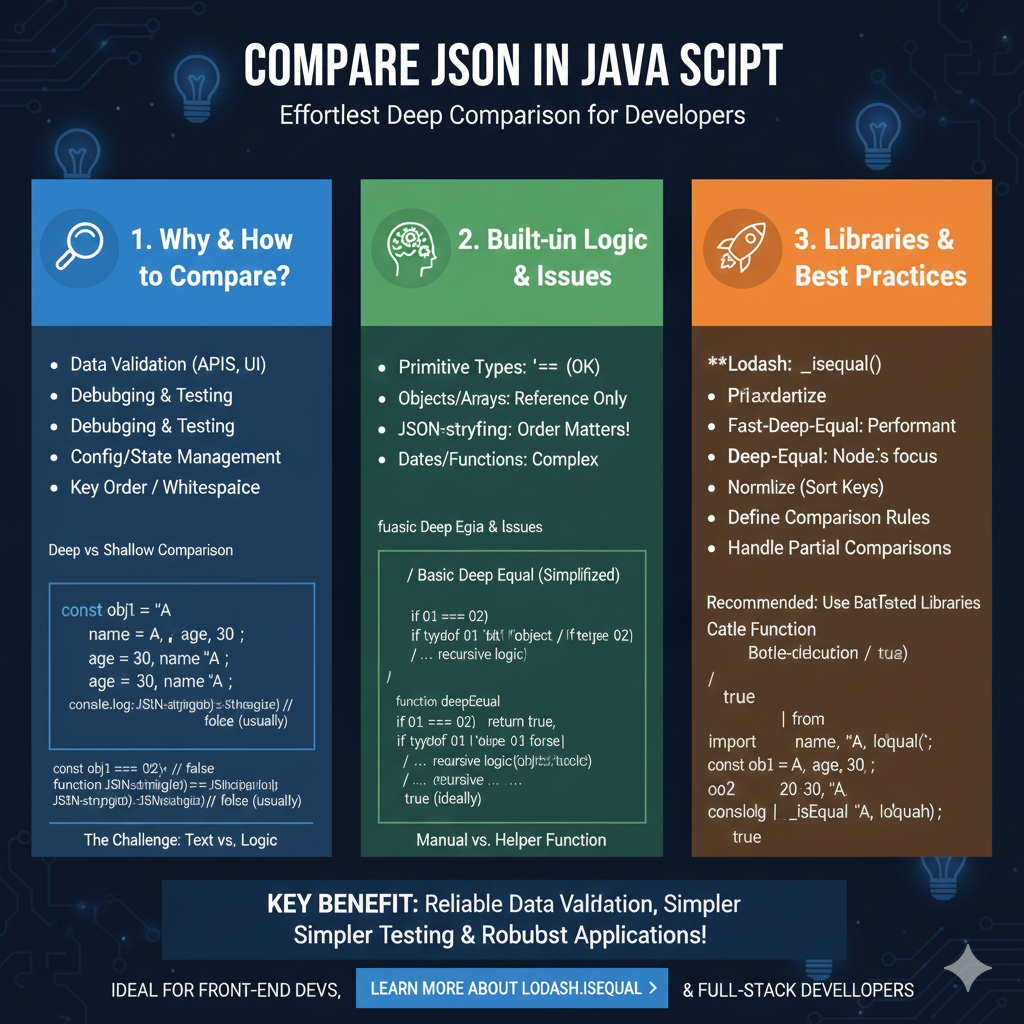
    The infographic titled “COMPARE JSON IN JAVASCRIPT: Effortless Deep Comparison for Developers” provides a technical roadmap for accurately identifying differences between data objects in a JavaScript environment.

    🛠️ The JavaScript JSON Comparison Framework

    This guide breaks down the challenges of data comparison and offers industry-standard solutions for front-end and full-stack developers:

    1. Why & How to Compare? (Blue)

    This section establishes the necessity of robust comparison for application stability:

    • Common Use Cases: Essential for Data Validation (APIs, UI), Debugging & Testing, and Config/State Management.
    • The Structural Challenge: Highlights how non-semantic factors like Key Order and Whitespace can interfere with basic comparisons.
    • Text vs. Logic: Illustrates the “The Challenge” where JSON.stringify() often returns false for semantically identical objects due to differing key orders.

    2. Built-in Logic & Issues (Green)

    This module explores the limitations of native JavaScript operators when handling complex objects:

    • Primitive Types: Standard operators like === work reliably for simple strings or numbers.
    • Reference Pitfalls: Objects and Arrays are compared by Reference Only, meaning two identical-looking objects will not be equal unless they point to the same memory location.
    • Complex Data Types: Notes that comparing Dates and Functions requires specialized logic.
    • Manual Helper Functions: Introduces the concept of a deepEqual recursive function to manually traverse object trees for a “True” logical comparison.

    3. Libraries & Best Practices (Orange)

    The final pillar recommends battle-tested tools to handle deep comparisons efficiently:

    • Top Libraries: Recommends Lodash (_.isEqual()), Fast-Deep-Equal for high performance, and Deep-Equal for Node.js environments.
    • Professional Workflow: Encourages developers to Normalize (Sort Keys), Define Comparison Rules, and Handle Partial Comparisons.
    • Practical Implementation: Provides a code example showing how Lodash accurately returns true for objects that native JavaScript might fail to match.

    learn for more knowledge

    Mykeywordrank-> Search for SEO: The Ultimate Guide to Keyword Research and SEO Site Checkup – keyword rank checker

    json web token->React JWT: How to Build a Secure React Application with JSON Web Token – json web token

    json parser-> How to Parse json format parser: A Comprehensive Guide – json parse

    Fake Json –>dummy user data json- The Ultimate Guide to fake api, jsonplaceholder, and placeholder json data – fake api

  • Compare JSON Data Using a JSON Compare Tool for JSON Data

    Mastering how to compare online and identify discrepancies in json data is essential for modern development. By using a dedicated json compare tool, you can ensure your json compare tasks are accurate and efficient.


    Why You Need Professional JSON Comparison Tools

    When working with json files, a manual check isn’t enough. Using high-quality json comparison tools allows you to compare json structures regardless of their size. Whether you are looking for a compare tool for local development or a way to compare online, these comparison tools provide the clarity needed for complex json comparison tasks.

    The Power of a JSON Compare Tool for JSON Files

    A modern json compare tool does more than just look at text. It allows you to compare json data by looking at the semantic structure. When you compare json, the json comparison engine should be able to compare online in your browser to save time.


    How to Compare Two JSON Documents Online

    To effectively compare two json documents, it is best practice to compare sorted copies. This ensures that the json comparison focuses on the data values rather than just the field order. When you compare json files using an online compare tool, the system outputs differences in a clear, visual diff json format.

    Step-by-Step: Using Online Comparison Tools

    1. Load & Input: Open your json compare tool in your browser and paste JSON/YAML (Source/Target) or upload files (.json, .yaml).
    2. Smart Compare & Analyze: The software will compare json using semantic comparison, ignoring whitespace and detecting missing/added keys.
    3. Review the List: Check the interactive results tree and highlight value changes to ensure your api is sending the correct field values.
    4. Export & Share: Generate patch/merge files or export reports in JSON/HTML to synchronize your dev environments.

    Boost Your Workflow with Automated JSON Comparison

    Using an online json compare tool is the fastest way to compare data and find json differences without writing custom software. From checking api responses to validating a yaml or csv list, a professional comparison workflow reduces errors and speeds up dev cycles. Whether you need to compare json data for a small project or a massive software deployment, the right compare tool is your best asset.

    Conclusion

    Whether you choose to compare json using a custom script or a professional json compare tool, the goal is the same: ensuring data integrity. By understanding how to compare json files and outputs differences effectively, you can speed up your api development and reduce production errors.

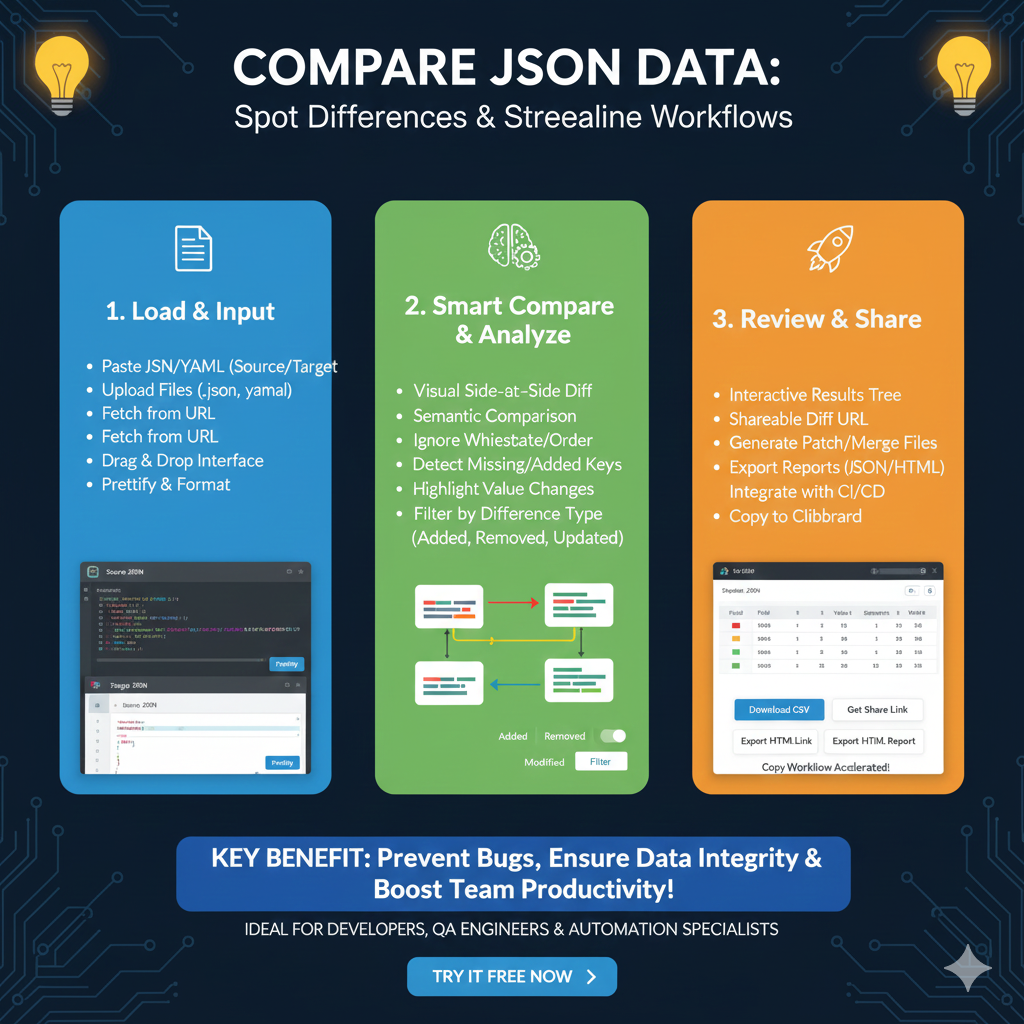
    The infographic titled “COMPARE JSON DATA: Spot Differences & Streamline Workflows” details a three-step professional approach to identifying discrepancies between data sets to ensure integrity and prevent bugs.

    🔄 The JSON Comparison & Analysis Lifecycle

    This workflow is optimized for developers and QA engineers who need to validate complex data structures across different environments:

    1. Load & Input (Blue)

    This initial stage focuses on making the data ingestion process as seamless as possible:

    • Flexible Data Sources: Users can paste JSON or YAML (Source/Target) directly, upload files (.json, .yaml), or fetch data directly from a URL.
    • Ease of Use: Features a Drag & Drop interface for rapid file handling.
    • Pre-Processing: Includes a Prettify & Format function to ensure both datasets are organized and readable before comparison begins.

    2. Smart Compare & Analyze (Green)

    This section highlights the intelligent algorithms used to find meaningful differences:

    • Visual Side-by-Side Diff: Provides a clear, dual-pane view to instantly see changes.
    • Semantic Intelligence: Performs a Semantic Comparison that ignores whitespace and key order, focusing only on actual data discrepancies.
    • Deep Detection: Automatically identifies missing or added keys and highlights specific value changes.
    • Granular Filtering: Users can filter results by difference type, such as Added, Removed, or Updated, to isolate specific issues.

    3. Review & Share (Orange)

    The final stage transforms comparison findings into actionable reports and developer assets:

    • Interactive Exploration: View differences through an Interactive Results Tree for deep hierarchical data navigation.
    • Collaboration & Sharing: Generate a Shareable Diff URL or export reports in JSON or HTML formats.
    • Development Tools: Create Patch/Merge Files to synchronize data and integrate findings directly with CI/CD pipelines.
    • Quick Integration: Includes a “Copy to Clipboard” feature for immediate use in code editors or documentation.
    compare json

    learn for more knowledge

    Mykeywordrank-> https://mykeywordrank.com/blog/what-is-search-optimization-beginner-friendly-explanation/

    json web token->How to Use JWKS: A Practical Guide to JSON Web Key Sets – json web token

    json Parser->Json file parser online- Mastering json format, json file Management, and json editor online Tools – json parse

    Fake Json –>dummy user data json- The Ultimate Guide to fake api, jsonplaceholder, and placeholder json data – fake api

  • How to Compare 2 JSON Files Online: A Comprehensive Guide

    Introduction to JSON Comparison

    In the world of web development, APIs, and data exchange, JSON (JavaScript Object Notation) has become an indispensable format. Whether you’re debugging an API response, verifying configuration files, or simply understanding data changes, the need to compare 2 JSON files online arises frequently. Manual comparison of large JSON structures can be tedious and error-prone. Fortunately, numerous online tools offer efficient solutions to highlight differences, making your development workflow smoother and more accurate.

    Why Use Online Tools to Compare JSON?

    Online JSON comparison tools provide several advantages over local software or manual inspection:

    • Accessibility: You can access them from any device with an internet connection, without installing software.
    • Speed: They often provide instant results, especially for moderately sized files.
    • Ease of Use: Designed with user experience in mind, they typically feature intuitive interfaces.
    • No Setup: Simply open your browser, paste your JSON, and compare.

    Key Features to Look for in a JSON Comparison Tool

    When you’re looking to compare 2 JSON files online, here are some crucial features that make a tool effective:

    • Side-by-Side View: Clearly displays both JSON inputs side-by-side.
    • Diff Highlighting: Visually emphasizes additions, deletions, and modifications.
    • Ignore Order/Whitespace: The ability to ignore differences in object key order or insignificant whitespace, focusing only on meaningful data changes.
    • Tree View: Presents JSON in an expandable tree structure for easier navigation.
    • Formatting and Validation: Often includes built-in JSON formatter and validator to ensure your input is correct before comparison.

    How to Compare 2 JSON Files Online (Step-by-Step)

    Comparing two JSON files online is a straightforward process:

    • Step 1: Choose a Reliable Online Tool. Search for “compare JSON online” or “JSON diff tool” to find popular options.
    • Step 2: Paste Your JSON Data. You will typically find two input fields. Paste your first JSON file’s content into the left field and the second into the right field. Some tools also allow uploading files.
    • Step 3: Initiate the Comparison. Click the “Compare” or “Diff” button.
    • Step 4: Review the Differences. The tool will display the comparison results, often highlighting the exact lines or values that differ. Pay attention to color-coding (e.g., green for additions, red for deletions, yellow for modifications).

    Example of JSON Difference Highlighting

    Imagine you have two JSON objects:

    // File 1
    {
    "name": "Product A",
    "price": 100,
    "features": ["color", "size"]
    }

    // File 2
    {
    "name": "Product A",
    "price": 120,
    "features": ["color", "material", "size"]
    }

    An online tool would likely highlight "price": 120 as modified from 100, and "material" as an addition to the features array in File 2.

    Tips for Effective JSON Comparison

    • Validate Your JSON First: Ensure both your JSON inputs are valid before comparing. Most tools have built-in validators.
    • Use Pretty Print: Formatted (pretty-printed) JSON is much easier to read and compare. Many tools offer this functionality.
    • Understand the Options: Explore options like ignoring array order, ignoring whitespace, or specific key exclusions if the tool provides them.
    • Secure Data: For sensitive data, ensure you are using a trusted tool or consider local comparison methods.

    Conclusion

    The ability to efficiently compare 2 JSON files online is a vital skill for anyone working with data and APIs. By leveraging the right online tools, you can quickly pinpoint discrepancies, validate data, and maintain high accuracy in your projects. Make these tools a regular part of your development toolkit to save time and reduce errors.

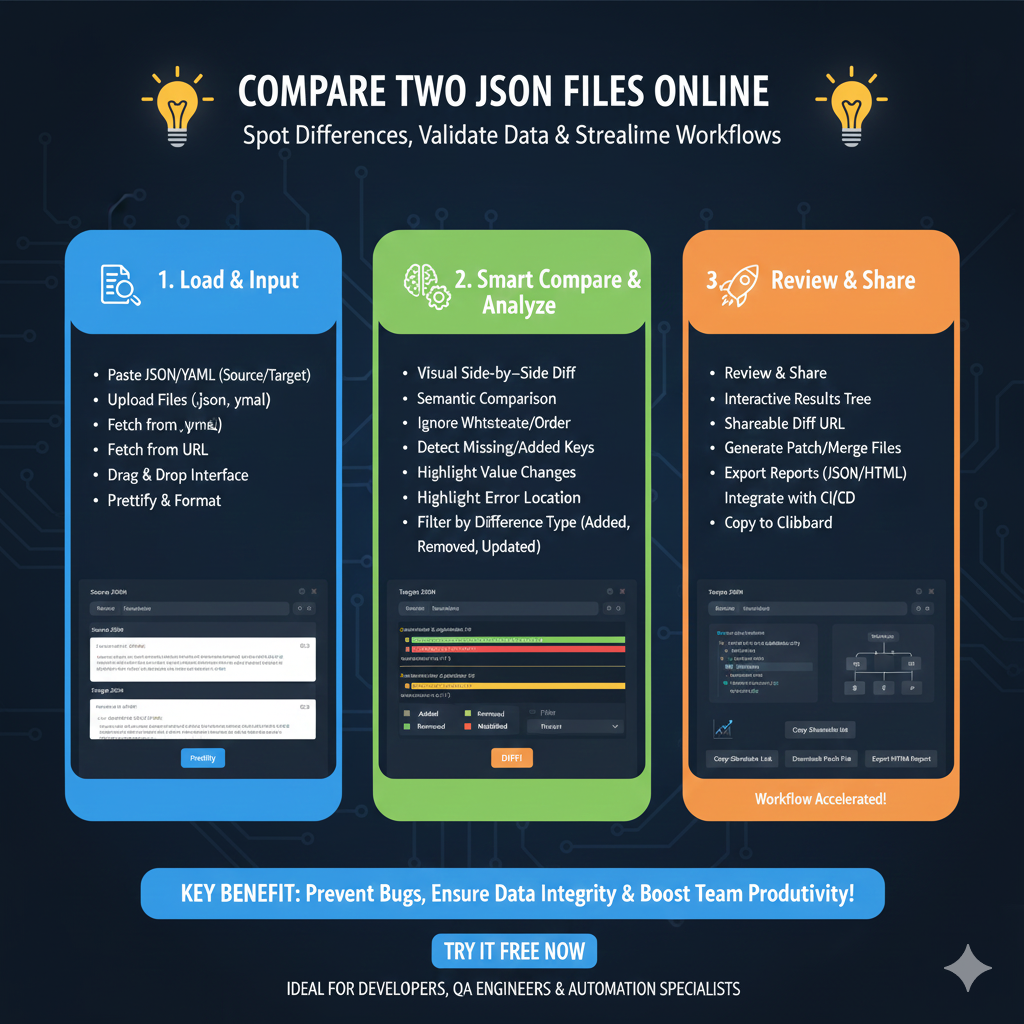
    The infographic titled “COMPARE TWO JSON FILES ONLINE: Spot Differences, Validate Data & Streamline Workflows” outlines a professional process for identifying discrepancies between data sets through an intuitive online interface.

    🔄 The Online JSON Comparison Lifecycle

    This tool is designed to help developers and QA engineers quickly resolve data inconsistencies across three core stages:

    1. Load & Input (Blue)

    This initial phase focuses on getting your data into the comparison engine with maximum flexibility:

    • Multiple Ingestion Methods: Users can Paste JSON/YAML directly, Upload Files (.json, .yaml), or Fetch from a URL.
    • User-Friendly Interface: Features a Drag & Drop interface for rapid file loading.
    • Pre-Processing: Includes a Prettify & Format function to ensure both data sets are readable before the comparison begins.

    2. Smart Compare & Analyze (Green)

    This section highlights the intelligent logic used to find meaningful differences:

    • Visual Side-by-Side Diff: Displays changes in a dual-pane view for easy manual inspection.
    • Semantic Intelligence: Performs a Semantic Comparison that ignores non-essential factors like whitespace or the specific order of keys.
    • Deep Detection: Automatically identifies Missing or Added Keys and highlights specific Value Changes.
    • Targeted Filtering: Users can filter results by difference type, such as Added, Removed, or Updated, and quickly jump to error locations.

    3. Review & Share (Orange)

    The final stage transforms the analysis into shareable assets and actionable code:

    • Interactive Exploration: View results through an Interactive Results Tree for hierarchical data exploration.
    • Collaborative Tools: Generate a Shareable Diff URL to show findings to team members instantly.
    • Data Export: Export comprehensive reports in JSON or HTML formats, or generate Patch/Merge Files to synchronize the data sets.
    • Workflow Integration: Seamlessly integrate results into CI/CD pipelines or simply Copy to Clipboard for immediate use.

    learn for more knowledge

    Mykeywordrank-> SEO Search Engine Optimization: Mastering the Search Engine for Traffic – keyword rank checker

    json web token->jwt spring boot: How to Secure Your spring boot APIs with jwt authentication and jwt token – json web token

    json parser->How to Parse json file parser- A Comprehensive Guide for Developers – json parse

    Fake Json –>How to Easily Use Dummy JSON URL for Efficient Testing and Development – fake api

  • How to Effectively Use a JSON Compare Tool for Data Analysis

    Understanding the Need for a JSON Compare Tool

    JSON (JavaScript Object Notation) has become the de facto standard for data interchange between clients and servers. As applications grow in complexity, so does the volume and intricacy of JSON data. Whether you’re debugging APIs, migrating data, or simply verifying configurations, identifying subtle differences between two JSON objects manually can be a daunting and error-prone task. This is where a reliable JSON compare tool becomes indispensable.

    What is a JSON Compare Tool?

    A JSON compare tool is an application or service designed to highlight the discrepancies between two JSON documents. It helps developers, QA engineers, and data analysts quickly pinpoint changes, additions, or deletions in JSON structures and values. This guide will walk you through how to compare JSON effectively using various methods.

    How to Compare JSON Manually (Not Recommended for Large Data)

    For very small JSON snippets, you might attempt to compare them visually. However, this method is highly inefficient and prone to errors. It involves:

    • Side-by-side inspection: Opening both JSON files and scrolling through them simultaneously.
    • Value-by-value checking: Manually verifying each key-value pair and array element.

    While this approach might seem straightforward, it quickly becomes unmanageable with larger or more nested JSON structures. This is precisely why automated tools are preferred.

    How to Compare JSON Using Online Tools (Quick and Easy)

    Online JSON compare tools are a popular choice due to their accessibility and ease of use. They typically offer a user-friendly interface where you can paste your JSON data and get an instant comparison.

    Steps to Use an Online JSON Compare Tool:

    1. Open your preferred online JSON compare tool (e.g., JSON Diff, Diffchecker, Online JSON Tools).
    2. Paste your first JSON data into the ‘Left’ or ‘Original’ input area.
    3. Paste your second JSON data into the ‘Right’ or ‘Modified’ input area.
    4. Click the ‘Compare’ or ‘Diff’ button.
    5. The tool will display the differences, often highlighting changes in different colors (e.g., green for additions, red for deletions, yellow for modifications).

    These tools often provide options for ignoring whitespace, sorting keys, and pretty-printing JSON before comparison, which can significantly improve the accuracy of the json difference report.

    How to Compare JSON Programmatically (For Automation and Integration)

    For developers and those working with automated pipelines, comparing JSON programmatically is often the most efficient method. Most programming languages offer libraries that can parse JSON and provide diffing functionalities.

    Example: Python JSON Comparison

    In Python, you can use built-in modules like json and custom logic or third-party libraries for comparison.

    import json
    
    json_data1 = """
    {
      "name": "Alice",
      "age": 30,
      "city": "New York",
      "hobbies": ["reading", "hiking"]
    }
    """
    
    json_data2 = """
    {
      "name": "Alice",
      "age": 31,
      "city": "London",
      "hobbies": ["reading", "cycling"]
    }
    """
    
    dict1 = json.loads(json_data1)
    dict2 = json.loads(json_data2)
    
    # Simple comparison for equality (not diffing)
    if dict1 == dict2:
        print("JSON objects are identical.")
    else:
        print("JSON objects are different.")
    
    # For actual diffing, you might need a library like `jsondiff`
    # pip install jsondiff
    # from jsondiff import diff
    # print(diff(dict1, dict2))
    

    Similar libraries exist for JavaScript, Java, C#, and other languages, enabling robust and automated JSON comparisons within your workflows.

    Key Features to Look for in a JSON Compare Tool

    When choosing a JSON compare tool, consider the following features:

    • Syntax Highlighting: Makes JSON more readable.
    • Diffing Algorithms: Accurate identification of changes (additions, deletions, modifications).
    • Pretty Print/Minify: Ability to format JSON for better readability or compactness.
    • Ignore Order/Whitespace: Flexibility to ignore non-semantic differences.
    • Inline Editing: Some tools allow you to edit the JSON directly.
    • Tree View: For complex JSON, a tree view can help navigate differences.
    • Offline/Desktop Application: For sensitive data or when internet access is limited.

    Conclusion

    Mastering how to compare JSON is a fundamental skill for anyone working with data interchange formats. While manual comparison is feasible for minuscule snippets, a dedicated JSON compare tool is essential for efficiency, accuracy, and sanity when dealing with real-world JSON data. Whether you opt for a quick online solution or integrate programmatic comparisons into your development pipeline, leveraging these tools will significantly streamline your workflow and boost your productivity.

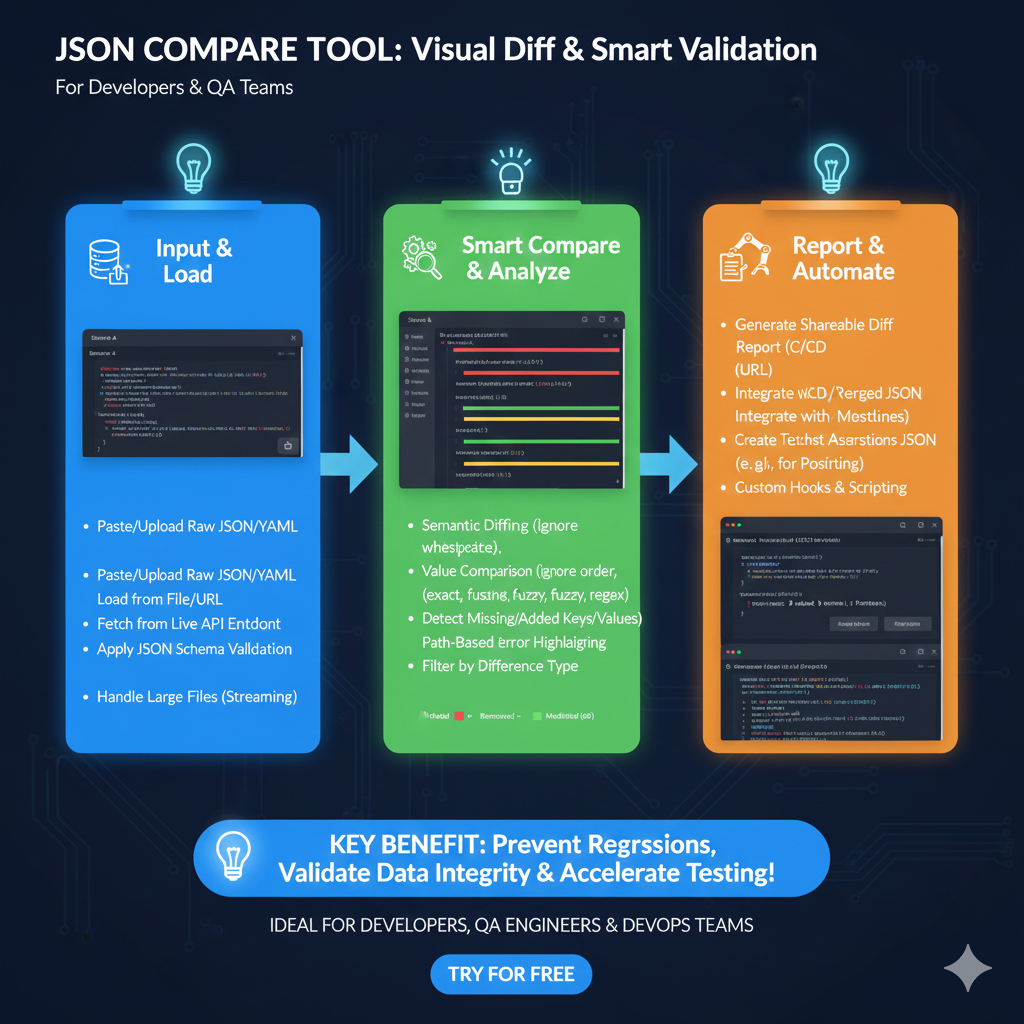
    Advanced JSON Comparison Workflow

    The tool streamlines the process of debugging API changes and validating data integrity through three main phases:

    1. Input & Load (Blue)

    This stage focuses on getting the data into the system for analysis:

    • Flexible Ingestion: Users can Paste/Upload Raw JSON/YAML or load directly from a File/URL.
    • Live Connectivity: Fetch data directly from a Live API Endpoint.
    • Validation: Apply JSON Schema Validation to ensure data structure correctness before comparison.
    • High Volume: Support for Streaming allows the tool to handle large files that would otherwise crash standard editors.

    2. Smart Compare & Analyze (Green)

    This section highlights the intelligent algorithms used to detect meaningful changes:

    • Semantic Intelligence: Features Semantic Diffing, which ignores non-critical changes like whitespace or reordered keys.
    • Granular Comparison: Offers multiple value comparison modes including Exact, Fuzzy, and Regex.
    • Structural Detection: Automatically detects Missing or Added Keys/Values.
    • Visual Debugging: Uses Path-Based Error Highlighting and filters to sort by difference type (Added, Removed, or Modified).

    3. Report & Automate (Orange)

    The final stage transforms analysis into actionable development steps:

    • Collaboration: Generate Shareable Diff Reports via URL or integrated C/CD workflows.
    • Version Control: Integrate with Merged JSON outputs and versioning systems.
    • Automation: Create Test Assertions (e.g., for Postman) directly from the comparison results.
    • Extensibility: Supports Custom Hooks & Scripting for specialized validation needs.
    json compare tool

    learn for more knowledge

    Mykeywordrank-> SEO Search Engine Optimization: Mastering the Search Engine for Traffic – keyword rank checker

    json web token->Understand JWT-The Complete Guide to JSON Web Token and Web Token Security – json web token

    Json parser->How to json data parse: A Comprehensive Guide for Developers – json parse

    Fake Json –>How to Utilize dummy json rest api for Rapid Front-End Development and fake rest api Testing – fake api

  • api response comparison tool – The Ultimate Guide to compare with a json compare tool and json diff tool

    Introduction: The Crucial Role of an api response comparison tool

    In the world of modern software development, APIs are the backbone of communication between systems. Whether you’re developing, testing, or integrating with an api, ensuring that api responses are accurate and consistent is paramount. This is where an api response comparison tool becomes an indispensable asset.

    Manual comparison of api responses, especially with large or complex json or xml payloads, is not only time-consuming but also highly prone to errors. This guide will walk you through comparing responses effectively and highlight what to look for in the best comparison tools.


    Why comparing api responses is Essential

    Before diving into the specific testing tools, let’s understand why this process is so critical for your data integrity:

    • Debugging and Troubleshooting: When an application behaves unexpectedly, you need to compare the current json response with a known good one to pinpoint where the data deviates.
    • Validating API Changes: After a code change, a json diff tool can highlight unintended side effects in the json structure.
    • Ensuring Consistency: Use a tool to compare json across development, staging, and production environments to prevent environment-specific bugs.
    • Automated Testing and Regression: Integrating a json compare tool into your CI/CD pipeline ensures that new deployments don’t break existing api contracts.

    testing tools and Features: What to Look for in a json compare tool

    To choose the best tool for comparing api responses, consider these key features:

    Support for Various Formats

    A robust api response comparison tool should handle common formats like json, xml, and even yaml. Whether you are looking at a simple query result or complex documentation examples, the tool must parse the data correctly.

    Intelligent json diff Capabilities

    Beyond simple line-by-line checks, a high-quality json compare utility understands the json structure. It should highlight json differences in nested objects or missing key values without being distracted by simple indentation changes.

    Ignoring Dynamic fields

    api responses often contain dynamic data like timestamps, request_id, or unique IDs. The best comparison tools allow you to configure specific fields to ignore during the test, ensuring you only see meaningful json differences.


    How to compare json and api responses: A Step-by-Step Guide

    While the specific query might change, the general process of json comparison follows these steps:

    1. Obtain Reference Response: This is your “expected” data from your documentation or a previous successful test.
    2. Get Actual Response: Make the api call and capture the current json response.
    3. Input into the Tool: Paste both into your chosen json diff tool.
    4. Analyze the Comparison: Use the visual json diff to find mismatches in the key or data values.
    5. Refine Filters: Set the tool to ignore volatile fields like createdAt or id.

    Example: In a json response, you might want to compare data while ignoring the requestId key, as it changes with every response.


    Popular comparison tools for json and api Testing

    • Online Tools: Quick platforms like JSON Diff or JSONCompare are great for a one-off json comparison.
    • IDE Extensions: Tools in VS Code allow you to compare json files directly in your workspace.
    • Dedicated API Platforms: In 2025, tools like Postman, Insomnia, and Bruno offer built-in scripts to compare responses automatically.
    • AI-Powered Tools: New services like Keploy or HyperTest can now compare data by recording traffic and automatically identifying json differences.

    Conclusion

    An effective api response comparison tool is a necessity for modern development. By using a dedicated json diff tool, you reduce debugging time and ensure the quality of every response. Choose a tool that fits your workflow—whether it’s a simple online json compare tool or a programmatic library—and start comparing with confidence.

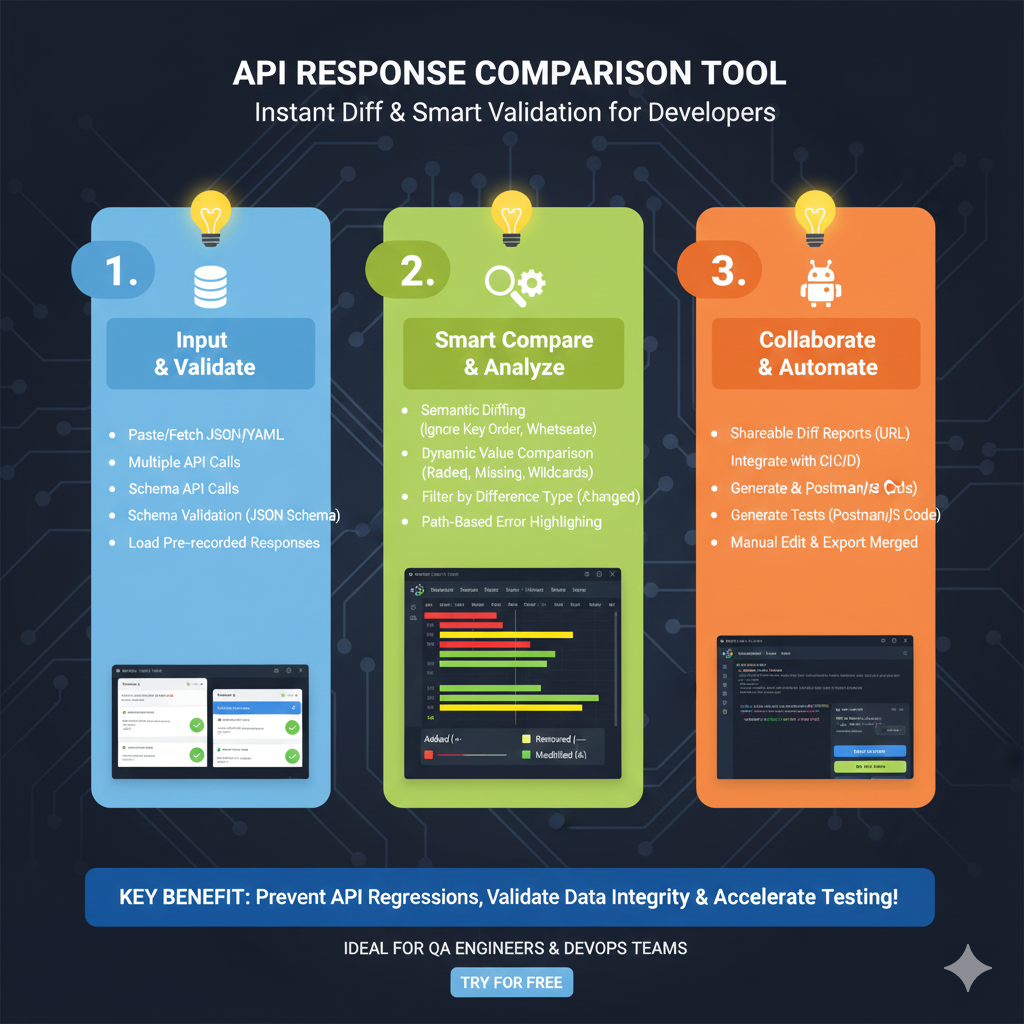
    The infographic titled “API RESPONSE COMPARISON TOOL: Instant Diff & Smart Validation for Developers” outlines a professional workflow for identifying regressions and maintaining data integrity across API versions.

    🛠️ The Three Stages of API Validation

    The graphic is organized into three functional pillars to help QA Engineers and DevOps teams automate their testing:

    1. Input & Validate (Blue)

    This initial stage focuses on gathering the data sets you wish to compare:

    • Multi-Source Ingestion: Users can Paste or Fetch JSON/YAML data directly.
    • Live Integration: The tool supports Multiple API Calls and Schema API Calls to pull real-time production or staging data.
    • Verification: Includes Schema Validation (JSON Schema) and the ability to Load Pre-recorded Responses to ensure the input format is correct before analysis.

    2. Smart Compare & Analyze (Green)

    This section details the advanced logic used to find meaningful differences:

    • Intelligent Diffing: Features Semantic Diffing, which ignores non-breaking changes like key order or whitespace.
    • Deep Analysis: Utilizes Dynamic Value Comparison to identify missing fields or wildcard mismatches.
    • Visualization: Provides Path-Based Error Highlighting and allows users to Filter by Difference Type (Changed, Added, or Removed) for faster debugging.

    3. Collaborate & Automate (Orange)

    The final stage covers how to turn findings into actionable development tasks:

    • Reporting: Generate Shareable Diff Reports (URL) to communicate issues with team members.
    • CI/CD Integration: The tool can be integrated into automated pipelines to catch regressions early.
    • Script Generation: Automatically Generate Postman/JS Code and tests based on the comparison results.
    • Finalization: Includes features for Manual Editing & Exporting Merged JSON files.

    learn for more knowledge

    Mykeywordrank-> SEO Search Optimization-Mastering Search Engine Optimization for Unbeatable Google Rankings – keyword rank checker

    json web token->jwt header-The Complete Guide to json web token Metadata – json web token

    json parser->How to json array parser- A Comprehensive Guide for Developers – json parse

    Fake Json –>dummy json online- Mastering fake api Testing with json, json dummy data, jsonplaceholder, and mockaroo – fake api

  • json online compare- The Ultimate Guide to json compare online, json diff, and compare online tools

    Introduction to json compare and online compare

    In the world of web development and json data exchange, JSON (JavaScript Object Notation) has become the de facto standard. Working with APIs, configurations, or data storage often means dealing with complex json files. But what happens when you have two seemingly similar json structure examples and need to identify the exact json differences?

    This is where an effective json online compare utility becomes invaluable. Whether you are using a json compare tool for a quick check or a deep json comparison of a large json file, understanding the structure is key to data integrity.


    Why Use a json compare online tool?

    Using a comparison tool online is crucial for several reasons:

    • Debugging APIs: Quickly identify changes in json data responses between different versions.
    • Configuration Management: Use a json diff to ensure consistency across application settings.
    • Data Validation: Verify that a schema transformation has occurred as expected by comparing the json structure.
    • Code Review: Spot subtle changes in a json file that might break your application.

    How to Effectively compare json files online

    The process of using a json compare tool typically involves these steps to get the best comparison results:

    1. Input Your Data: Most online compare utilities provide two fields where you paste your json data or upload your json files.
    2. Choose Comparison Options: Advanced tools allow you to ignore whitespace or sort keys, which simplifies the json comparison.
    3. Initiate the Process: Click the json diff or compare button to generate the diff view.
    4. Analyze results: The comparison tool will highlight additions, deletions, and modifications in the json structure.

    [Image: A side-by-side diff view showing json differences highlighted in red and green]


    Best json compare tool Options for json online

    There are numerous online tools available to compare json. When looking for a json diff solution, consider these popular choices:

    json diff (Visual Comparison)

    These tools offer a side-by-side diff view with color-coded highlighting, making it the best way to compare json files for visual learners.

    json online Comparison Tool

    Focuses on providing a clear structure representation, often with a tree view to navigate a complex json file.

    Online Formatter and Validator

    Before you compare, using a formatter is essential. A formatter ensures the json data is “pretty-printed,” so the comparison results aren’t cluttered by minified text or indentation errors.


    Understanding comparison results in a diff view

    Imagine you have two json files with a slightly different schema. A json compare online tool would typically show:

    • Modified: Values that changed (e.g., a “city” changing from “New York” to “London”).
    • Removed: Fields present in the first json file but missing in the second.
    • Added: New entries in the json data that weren’t there before.

    Tips for Efficient json online compare

    • Use a Formatter: Always format your json data before using a json diff tool.
    • Check the Schema: Ensure the json structure follows your expected schema to avoid false positives in json differences.
    • Normalize Your Data: If the order of keys doesn’t matter, choose a comparison tool that sorts them automatically before the online compare begins.

    Conclusion

    Mastering the art of json online compare is an essential skill for anyone working with data-driven applications. By leveraging a high-quality json compare tool and a clear diff view, you can save significant time and prevent errors. Integrate these online comparison tool techniques into your workflow for seamless json comparison and data management today!

    The infographic titled “JSON ONLINE COMPARE: Instantly Spot & Resolve Data Differences” provides a comprehensive guide for developers to visually diff, validate, and merge JSON files.

    🔍 Streamlined JSON Comparison Workflow

    The process is broken down into three logical phases designed to maintain data integrity across environments:

    1. Upload & Validate (Blue)

    This initial stage focuses on getting your data into the tool correctly:

    • Flexible Data Ingestion: Users can Upload Files, use Drag & Drop, Fetch from a URL, or simply Paste Text.
    • Pre-Analysis Checks: The system performs an Automatic Syntax Check to ensure the JSON is valid before comparison.
    • Schema Enforcement: Supports Schema Validation (Draft-07) to verify that the files adhere to specific structural rules.

    2. Diff & Analyze (Green)

    This section explains how the comparison engine identifies changes:

    • Semantic Intelligence: The tool uses Semantic Comparison, which ignores non-functional changes like key order or whitespace.
    • Visual Legend: Differences are highlighted for easy identification:
      • Added (+): New elements found in the target file.
      • Removed (Δ): Elements missing from the target file.
      • Modified: Values that have changed.
      • Moved (Δ →): Data that exists in both but at different locations.
    • Targeted Review: Developers can Filter by Difference Type to quickly isolate specific kinds of changes.

    3. Resolve & Export (Orange)

    The final phase covers how to handle the discovered differences:

    • Conflict Resolution: An Interactive Merged Editor and Manual Editing tools allow users to pick which version of the data to keep.
    • Data Export: Once reconciled, users can Download the Merged JSON file.
    • Team Collaboration: Provides a Shareable Diff Report URL so other developers can review the changes.
    json online compare

    learn for more knowledge

    Mykeywordrank-> small seo tool for keyword rank checking and local rank checker – keyword rank checker

    json web token-> Mastering OAuth2 JWT and OAuth Authentication Introduction to OAuth2 JWT and Identity Security – json web token

    json parser-> How to Parse JSON in C with jsmn parser: A Step-by-Step Guide for SEO – json parse

    Fake Json –>How to Easily Get dummy json data api Your API Testing and Development – fake api