Introduction: The Necessity of JSON Comparison
In the world of web development, json data exchange often relies heavily on json (JavaScript Object Notation). Whether you’re working with apis, cloud configuration files, or data logging, you frequently encounter scenarios where you need to compare two jsons online. Manually sifting through potentially thousands of lines of code to find json differences is not only time-consuming but also prone to errors. This is where an online json diff or json compare tool becomes indispensable for a thorough json comparison.
Why You Need a JSON Compare Online Solution
Monitoring json differences isn’t just about aesthetics; it’s a critical component of any data-driven workflow. Using a compare tool is essential for:
- Debugging API Responses: When an api behaves unexpectedly, using a json diff to compare the problematic response with an expected one can quickly pinpoint where the structure or data diverges.
- Validating Configuration Files: Use a json compare tool to ensure that new files align with a baseline or to test changes between different versions.
- Tracking Data Changes: Monitor how json data evolves over time, especially in cloud database backups or data migration scenarios.
- Ensuring Data Consistency: Perform a json comparison to verify that data retrieved from different sources or environments remains consistent.
How to Compare Two JSONs Online: A Step-by-Step Guide
Comparison tools simplify the process significantly by offering a side-by-side diff view. Here’s how to access the tool and get started:
1. Find a Reliable Online JSON Diff Tool
Search for “compare two jsons online” to find a reputable website. Modern comparison tools often offer features like syntax highlighting, a tree-based diff view, and options to ignore whitespace or key order.
2. Input Your JSON Files or Text
Most comparison tools provide two input fields. Paste your first json string into the left field and your second json content into the right field. If you have physical json files, many tools allow you to upload them directly.
3. Configure JSON Diff Options
Before you test the data, customize your json compare online experience. Common options in a compare tool include:
- Ignore Whitespace: Disregards differences in spacing or line breaks.
- Ignore Key Order: Treats two json objects with the same keys but different order as identical.
- Sort Arrays: Useful for json data where array order doesn’t affect the final comparison.
4. Analyze the JSON Differences
Initiate the comparison. The diff tool will then process the two json inputs. The diff view typically highlights the differences—additions, deletions, and modifications—using color-coding (red for removals, green for additions).
Benefits of Using an Online JSON Diff Tool
- Speed and Efficiency: Get instant json comparison results without manual inspection.
- Accuracy: Eliminate human error in identifying subtle differences in complex json data.
- Accessibility: Access the tool from any device with an internet connection; no local json compare software installation is required.
- Structure-Aware Comparison: Advanced comparison tools understand the json structure, so they won’t flag a difference just because two keys are in a different order.
Best Practices for JSON Comparison
- Pretty-Print Your JSON: Before you diff json, ensure your data is formatted (pretty-printed). This helps in understanding the context of json differences.
- Use a Secure Diff Tool: For sensitive cloud data, ensure the compare tool processes data locally in your browser so your json files are never uploaded to a server.
- Understand the Result: A json diff might show differences in data types (like a string
"1"vs a number1). Always check these details in the diff view.
Conclusion
Compare two jsons online is a straightforward yet powerful task that can save developers and data analysts countless hours. By leveraging the right online json diff and comparison tools, you can quickly identify discrepancies, test your api responses, and ensure the integrity of your json structure. Make json compare a regular part of your workflow to enhance debugging, validation, and overall data management efficiency.
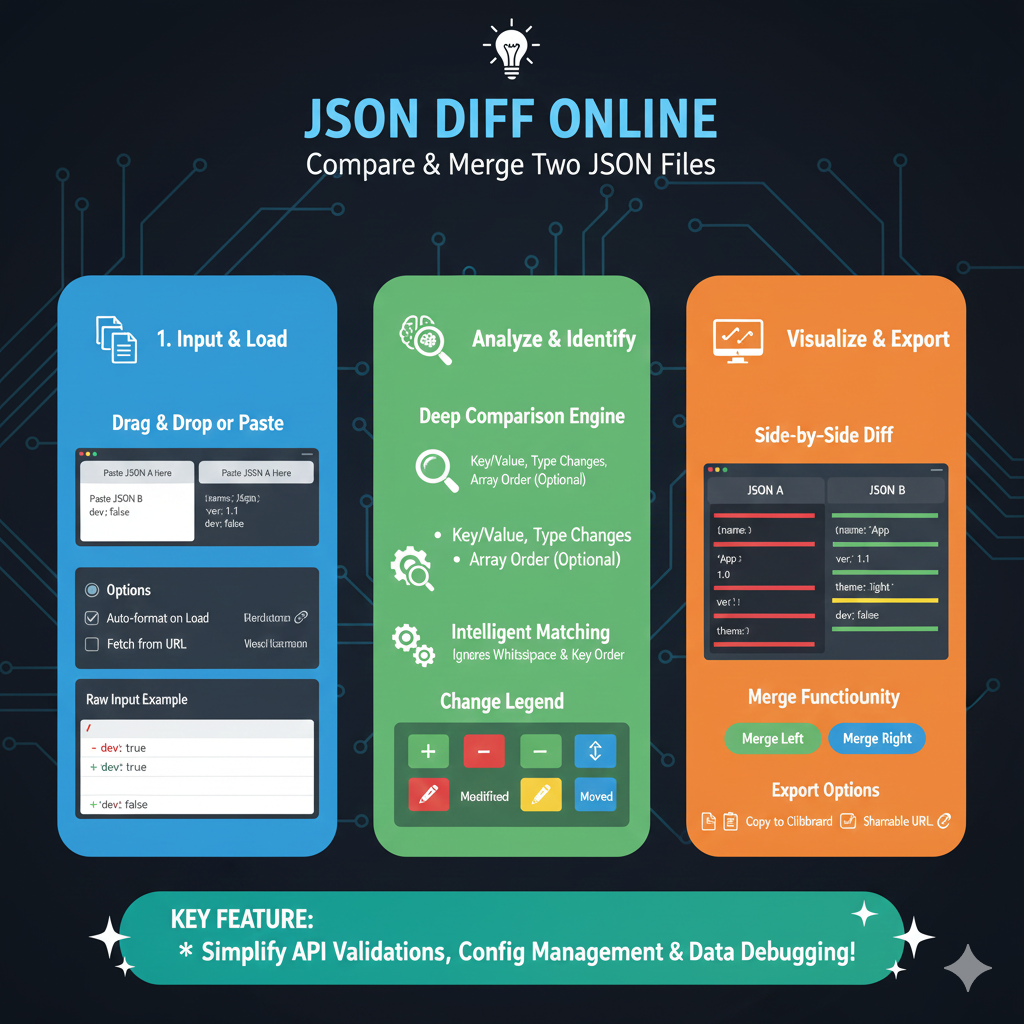
The infographic titled “JSON DIFF ONLINE: Compare & Merge Two JSON Files” provides a comprehensive guide to using specialized tools for analyzing differences between JSON datasets.
💻 Online JSON Diff & Merge Workflow
The process is divided into three key functional areas to help developers streamline their data validation tasks:
1. Input & Load (Blue)
This initial phase focuses on getting your data into the system efficiently:
- Drag & Drop or Paste: Users can quickly input their JSON data directly or upload files.
- Flexible Loading Options: Features like “Auto-format on Load” ensure the code is readable, while the “Fetch from URL” option allows for testing live API responses.
- Raw Input Preview: Shows a real-time snippet of the data being processed.
2. Analyze & Identify (Green)
This section details the “brain” of the tool, which performs deep data analysis:
- Deep Comparison Engine: The tool tracks changes in Key/Value pairs, data types, and can optionally account for array order.
- Intelligent Matching: To reduce noise, the engine can be set to ignore insignificant differences like whitespace or the order of keys.
- Change Legend: A clear visual key helps users identify specific types of changes:
- Added (+): New data points.
- Removed (-): Data missing from the new version.
- Modified (Pencil): Existing keys with changed values.
- Moved (Arrows): Data that exists in both files but in different positions.
3. Visualize & Export (Orange)
The final column focuses on resolving differences and sharing the results:
- Side-by-Side Diff: Displays “JSON A” and “JSON B” in a split-pane view with color-coded highlighting for instant recognition of discrepancies.
- Merge Functionality: Interactive buttons allow users to “Merge Left” or “Merge Right” to quickly reconcile the files into a single version.
- Export Options: Once the comparison or merge is complete, users can “Copy to Clipboard” or generate a “Shareable URL” for team collaboration.
KEY FEATURE: This tool is designed to “Simplify API Validations, Config Management & Data Debugging!”
learn for more knowledge
Json parser-> How to Parse JSON in Go (Golang JSON Parser Tutorial) – json parse
Json web token ->How to Securely Implement and Validate JWTs in AWS – json web token
Mykeywordrank-> Keyword SEO-Master Keyword Research and Discover the Best SEO Keywords with a Free Keyword Tool – keyword rank checker
Fake Json –>How to Create Dummy API Responses for Seamless Development and Testing – fake api
Leave a Reply