Understanding JSON Comparison and JSON Format
JSON (JavaScript Object Notation) has become the de facto standard for json data interchange across web applications. Its human-readable json format makes it easy to work with, but as applications grow, so does the complexity and size of your json files.
When dealing with different versions of configuration files, API responses, or database backups, accurately identifying changes between two json structures is crucial for debugging, validation, and maintaining data integrity. To do this efficiently, developers often turn to a json compare tool to compare json without the headache of manual inspection.
The Challenge of Manual JSON Files Comparison
Manually trying to compare json files is a daunting and error-prone task. You might spend hours painstakingly scrolling through a json file, trying to spot a missing comma, an extra field, or a subtle change in a value.
This not only wastes valuable development time but also increases the risk of overlooking critical json differences, leading to bugs or inconsistencies in your application. Without an online json compare tool, identifying a json diff in a 5,000-line json data set is nearly impossible.
Introducing the “JSON Comparator Online” Solution
Fortunately, you don’t have to rely on manual inspection anymore. A json comparator online tool offers an efficient and user-friendly way to compare json online. These online utilities provide immediate visual feedback, highlighting additions, deletions, and modifications through a clear diff view.
By using a json comparator, you eliminate the need for local software installations. These tools allow you to compare data from any device with an internet connection, often providing a built-in json validator to ensure your code is correct before you even begin the json comparison.
How to Use a JSON Comparator Online (Step-by-Step)
Using an online json comparison tool is straightforward. Here’s a typical workflow to compare text and structure effectively:
Step 1: Access the Tool
Navigate to your preferred json comparator online website or json compare tool.
Step 2: Paste and Format Your JSON Data
Paste your first json file into the left panel and your second json data into the right. If your code is messy, use the built-in json formatter or formatter to “pretty print” the text. This makes the json format much easier to read.
Step 3: Run a JSON Validator
Before hitting compare, ensure your json files are valid. Most comparison tools include a json validator that flags syntax errors immediately.
Step 4: Initiate JSON Diff
Click the “Compare” button. The compare tool will process the two inputs and highlight the json differences.
Step 5: Save and Share
Once you’ve identified the changes, many tools allow you to save the results or share a link with your teammates for collaborative debugging.
Key Features of a Great JSON Comparator and JSON Formatter
- Side-by-Side View: Presents both json files concurrently for easy visual tracking.
- Difference Highlighting: Clearly marks lines or values that have changed in the json diff.
- JSON Formatter & Pretty Print: Automatically fixes the json format into a readable structure.
- Ignore Order & Whitespace: Focusing only on semantic json comparison rather than formatting.
- Multi-format Support: Many tools now allow you to compare json against yaml or other data structures.
Why Choose an Online JSON Compare Tool?
The benefits of using a json compare online utility are compelling:
- Convenience: Access your json comparator from any web browser, anywhere, anytime.
- No Installation: No software to download; the formatter and validator are always ready.
- Speed: Quickly compare data even in massive json files within seconds.
- Accuracy: A json comparator eliminates human error in identifying subtle json differences.
- Versatility: Most tools can handle json, yaml, and plain text simultaneously.
Conclusion
Mastering json comparison is an essential skill for developers and data professionals. By leveraging a reliable json comparator online, you can significantly enhance your productivity, reduce debugging time, and ensure the integrity of your json data.
Stop wasting time with manual checks. Use these powerful online resources to format, compare, and validate your json files to streamline your workflow today!
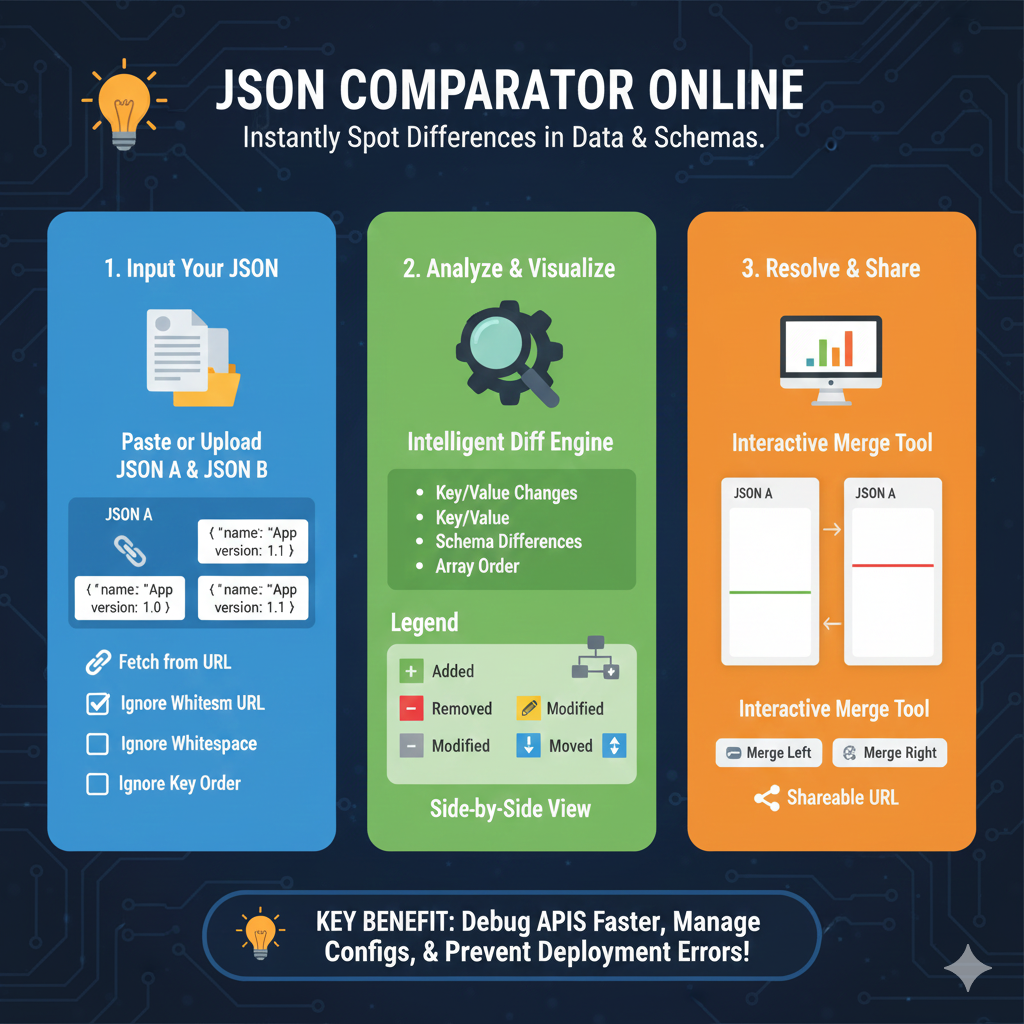
The infographic titled “JSON COMPARATOR ONLINE: Instantly Spot Differences in Data & Schemas” provides a detailed breakdown of how to use online tools to validate and reconcile JSON datasets.
🔍 JSON Comparison & Resolution Workflow
The tool follows a logical three-step progression to help developers manage complex data structures:
1. Input Your JSON (Blue)
This stage focuses on gathering the data for analysis:
- Data Entry: Users can either Paste or Upload two distinct files, designated as JSON A and JSON B.
- Loading Options: The tool supports fetching data directly from a URL.
- Smart Filters: To ensure an accurate comparison, users can choose to Ignore Whitespace or Ignore Key Order, preventing false positives caused by simple formatting differences.
2. Analyze & Visualize (Green)
This section explains the engine that processes the data and how it displays results:
- Intelligent Diff Engine: The system automatically detects Key/Value Changes, Schema Differences, and variations in Array Order.
- Visual Legend: A color-coded key identifies the nature of every change:
- Added (+): New elements found in the second file.
- Removed (-): Elements present in the first file but missing in the second.
- Modified (Pencil): Existing keys that have different values.
- Moved (Arrows): Data that exists in both files but has changed position.
- Side-by-Side View: Provides a clear, adjacent comparison of both files to highlight discrepancies.
3. Resolve & Share (Orange)
The final stage details the actions a user can take after identifying differences:
- Interactive Merge Tool: Users can reconcile data by selecting Merge Left or Merge Right, allowing them to build a corrected final version of the JSON.
- Collaboration: A Shareable URL can be generated to allow team members to view the same comparison results.
learn for more knowledge
Json Parser-> How to Parse JSON in Go (golang json parser Tutorial) – json parse
Json web token ->How to Securely Implement and Validate aws jwt and jwt – json web token
Mykeywordrank-> SEO Ranking Checker: Maximizing Your Website Ranking Checker and SEO Ranking with SEOptimer – keyword rank checker
Fake Json –>What Is Dummy API JSON? (Beginner-Friendly Explanation) – fake api
Leave a Reply