JSON Compare Online Tool: Your Go-To for Spotting Differences Quickly
In today’s data-driven world, working with JSON (JavaScript Object Notation) is commonplace for developers, data analysts, and anyone dealing with APIs or configuration files. But what happens when you have two seemingly similar JSON files and need to pinpoint the exact differences? Manually sifting through lines of code is not just tedious, it’s prone to errors. This is where a dedicated JSON compare online tool becomes an invaluable asset.
This guide will explore how an online JSON comparison tool can streamline your workflow, improve accuracy, and save you countless hours.
Why You Need a JSON Compare Online Tool
- Efficiency: Quickly identify discrepancies without manual review.
- Accuracy: Eliminate human error in comparing complex data structures.
- Debugging: Rapidly find changes in API responses or configuration files that might be causing issues.
- Validation: Ensure data consistency between different versions or sources.
- Collaboration: Easily share and discuss changes with team members.
How to Use an Online JSON Compare Tool
Using a JSON compare online tool is straightforward and intuitive. Here’s a typical workflow:
- Open the Tool: Navigate to your preferred JSON compare online tool in your web browser.
- Paste Your JSON Data: You’ll usually see two input fields or text areas. Paste your first JSON string into the “Left” or “Source” panel and your second JSON string into the “Right” or “Target” panel.
- Initiate Comparison: Click on a “Compare,” “Diff,” or “Analyze” button.
- Review Results: The tool will display the differences. Often, additions, deletions, and modifications are highlighted with distinct colors (e.g., green for added, red for deleted, yellow for modified).
- Analyze and Act: Examine the highlighted differences to understand what has changed. Some tools also offer options to merge or export the differences.
Example JSON for comparison:
// JSON 1
{
  "name": "Product A",
  "version": 1.0,
  "features": ["feature1", "feature2"],
  "details": {
    "id": "PA001",
    "price": 29.99
  }
}
// JSON 2 (with changes)
{
"name": "Product A",
"version": 1.1,
"features": ["feature1", "feature2", "feature3"],
"details": {
"id": "PA001",
"price": 34.99,
"inStock": true
}
}Key Features to Look For in a JSON Comparison Tool
- Syntax Highlighting: Makes JSON easier to read and understand.
- Side-by-Side View: The most common and effective way to visualize differences.
- Tree View: For deeply nested JSON, a collapsible tree view can be very helpful.
- Filtering Options: Some tools allow you to ignore certain keys or value types during comparison.
- Error Handling: Robust tools can identify and highlight invalid JSON.
- Performance: The ability to handle large JSON files without significant lag.
Boosting Your Workflow with JSON Comparison
Whether you’re debugging an API integration, verifying data migrations, or just ensuring consistency across different development environments, a reliable JSON compare online tool is indispensable. It transforms a potentially hours-long, error-prone task into a quick, accurate operation, freeing up your valuable time for more complex development challenges.
Conclusion
Don’t let manual JSON comparison slow you down. Embrace the efficiency and accuracy that an online JSON comparison tool offers. It’s a simple yet powerful addition to any developer’s toolkit, ensuring your JSON data is always precisely what you expect.
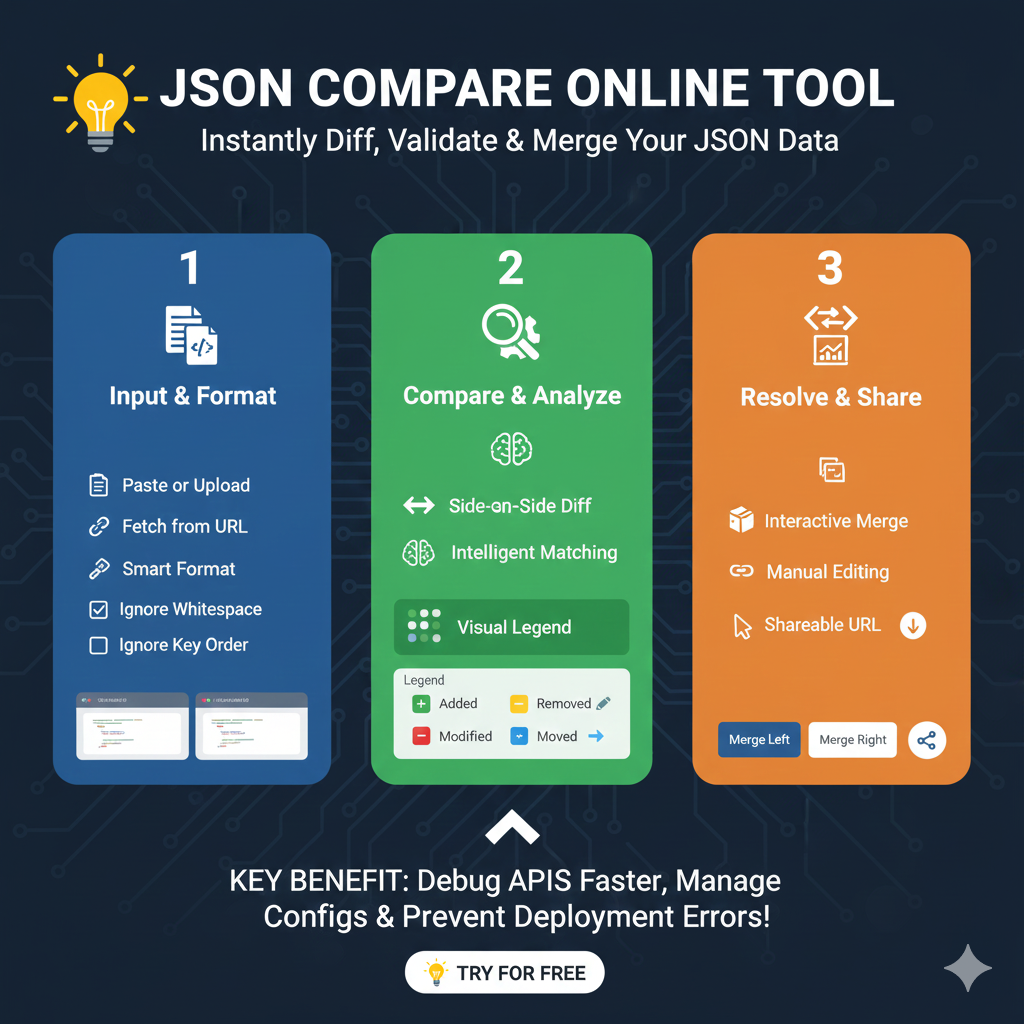
Streamlined Comparison Workflow
The process is designed to help developers and testers quickly identify inconsistencies without manual, error-prone checking.
1. Quick Data Input (Blue)
This initial stage focuses on loading your data into the tool:
- Flexible Loading: Users can Paste JSON strings directly into dual editor panels or Upload files from their local machine.
- Source Integration: Some tools allow you to fetch JSON directly from a URL or integrate with version control systems like Git.
- Formatting Tools: Use the “Prettify” or “Beautify” buttons to fix malformed or minified data before starting the comparison.
2. Advanced Diff Analysis (Green)
This section details how the tool processes and visualizes the results:
- Side-by-Side Visualization: The tool displays the two structures adjacent to each other, clearly highlighting all differences in real-time.
- Semantic Comparison: Intelligent engines ignore non-meaningful changes like Whitespace or Key Order, focusing only on actual data discrepancies.
- Change Categories:
- Added (+): New properties or array elements found only in the second version.
- Removed (-): Elements present in the original data but missing in the new one.
- Modified (Δ): Keys that exist in both versions but have different values.
- Deep Nested Support: The tool accurately navigates complex, deeply nested structures to ensure no hidden changes are missed.
3. Resolution & Integration (Orange)
The final stage focuses on using the findings to improve your workflow:
- Merge Capabilities: Some tools allow you to combine changes, building a corrected version of the JSON data.
- API & Configuration Debugging: Quickly validate that API responses match expected structures or that configuration settings were applied correctly after deployment.
- Shareable Reports: Generate visual diff reports to share with team members, enhancing collaboration and reducing communication gaps.
learn for more knowledge
Json Parser->Jackson JSON Parser: A Comprehensive Guide to Parse JSON for Java Developers – json parse
json web token-> python jwt: How to Securely Implement jwt in python – json web token
Mykeywordrank->small seo tool for keyword rank checking and local rank checker – keyword rank checker
Fake Json –>How to Generate and Use Dummy JSON Data for Development and Testing – fake api
Leave a Reply