Understanding the Need for a JSON Compare Tool
JSON (JavaScript Object Notation) has become the de facto standard for data interchange between clients and servers. As applications grow in complexity, so does the volume and intricacy of JSON data. Whether you’re debugging APIs, migrating data, or simply verifying configurations, identifying subtle differences between two JSON objects manually can be a daunting and error-prone task. This is where a reliable JSON compare tool becomes indispensable.
What is a JSON Compare Tool?
A JSON compare tool is an application or service designed to highlight the discrepancies between two JSON documents. It helps developers, QA engineers, and data analysts quickly pinpoint changes, additions, or deletions in JSON structures and values. This guide will walk you through how to compare JSON effectively using various methods.
How to Compare JSON Manually (Not Recommended for Large Data)
For very small JSON snippets, you might attempt to compare them visually. However, this method is highly inefficient and prone to errors. It involves:
- Side-by-side inspection: Opening both JSON files and scrolling through them simultaneously.
- Value-by-value checking: Manually verifying each key-value pair and array element.
While this approach might seem straightforward, it quickly becomes unmanageable with larger or more nested JSON structures. This is precisely why automated tools are preferred.
How to Compare JSON Using Online Tools (Quick and Easy)
Online JSON compare tools are a popular choice due to their accessibility and ease of use. They typically offer a user-friendly interface where you can paste your JSON data and get an instant comparison.
Steps to Use an Online JSON Compare Tool:
- Open your preferred online JSON compare tool (e.g., JSON Diff, Diffchecker, Online JSON Tools).
- Paste your first JSON data into the ‘Left’ or ‘Original’ input area.
- Paste your second JSON data into the ‘Right’ or ‘Modified’ input area.
- Click the ‘Compare’ or ‘Diff’ button.
- The tool will display the differences, often highlighting changes in different colors (e.g., green for additions, red for deletions, yellow for modifications).
These tools often provide options for ignoring whitespace, sorting keys, and pretty-printing JSON before comparison, which can significantly improve the accuracy of the json difference report.
How to Compare JSON Programmatically (For Automation and Integration)
For developers and those working with automated pipelines, comparing JSON programmatically is often the most efficient method. Most programming languages offer libraries that can parse JSON and provide diffing functionalities.
Example: Python JSON Comparison
In Python, you can use built-in modules like json and custom logic or third-party libraries for comparison.
import json

json_data1 = """
{
  "name": "Alice",
  "age": 30,
  "city": "New York",
  "hobbies": ["reading", "hiking"]
}
"""

json_data2 = """
{
  "name": "Alice",
  "age": 31,
  "city": "London",
  "hobbies": ["reading", "cycling"]
}
"""

dict1 = json.loads(json_data1)
dict2 = json.loads(json_data2)

# Simple comparison for equality (not diffing)
if dict1 == dict2:
    print("JSON objects are identical.")
else:
    print("JSON objects are different.")

# For actual diffing, you might need a library like `jsondiff`
# pip install jsondiff
# from jsondiff import diff
# print(diff(dict1, dict2))
Similar libraries exist for JavaScript, Java, C#, and other languages, enabling robust and automated JSON comparisons within your workflows.
Key Features to Look for in a JSON Compare Tool
When choosing a JSON compare tool, consider the following features:
- Syntax Highlighting: Makes JSON more readable.
- Diffing Algorithms: Accurate identification of changes (additions, deletions, modifications).
- Pretty Print/Minify: Ability to format JSON for better readability or compactness.
- Ignore Order/Whitespace: Flexibility to ignore non-semantic differences.
- Inline Editing: Some tools allow you to edit the JSON directly.
- Tree View: For complex JSON, a tree view can help navigate differences.
- Offline/Desktop Application: For sensitive data or when internet access is limited.
Conclusion
Mastering how to compare JSON is a fundamental skill for anyone working with data interchange formats. While manual comparison is feasible for minuscule snippets, a dedicated JSON compare tool is essential for efficiency, accuracy, and sanity when dealing with real-world JSON data. Whether you opt for a quick online solution or integrate programmatic comparisons into your development pipeline, leveraging these tools will significantly streamline your workflow and boost your productivity.
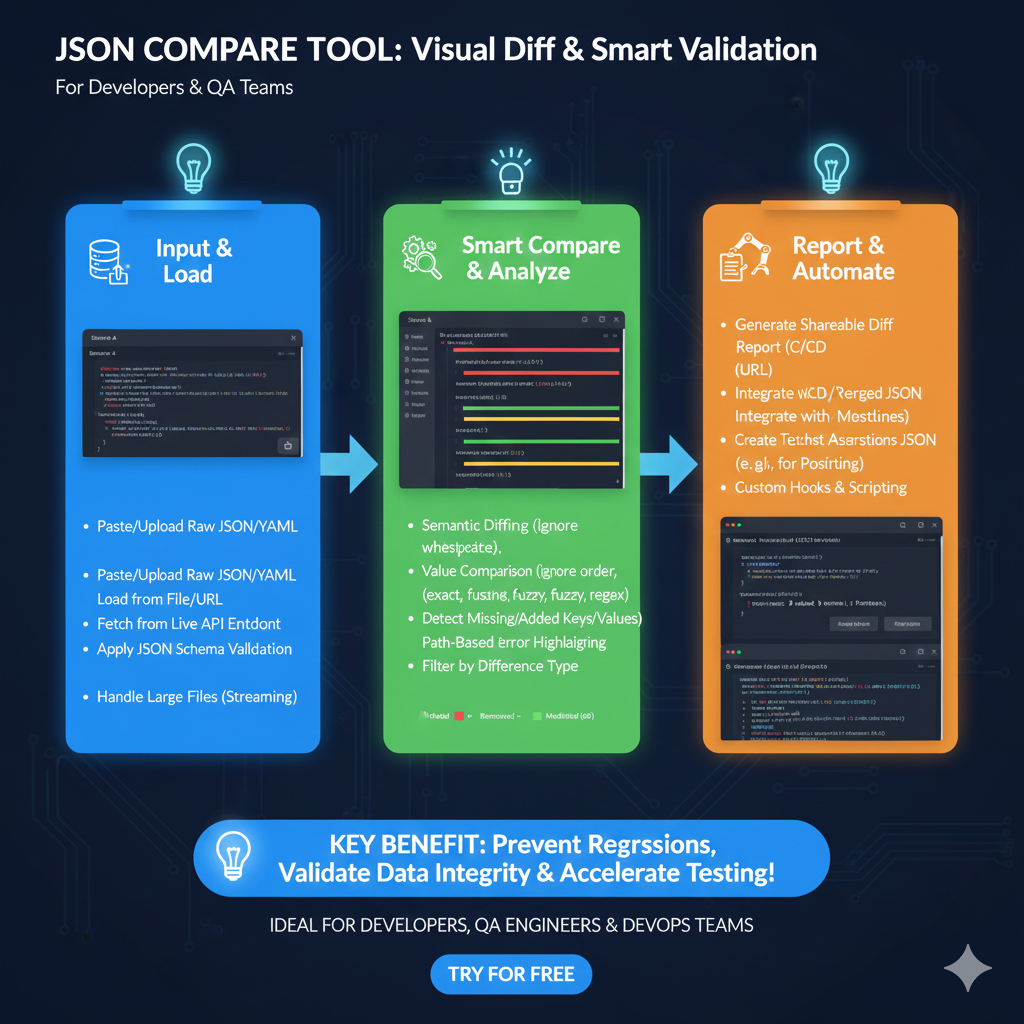
Advanced JSON Comparison Workflow
The tool streamlines the process of debugging API changes and validating data integrity through three main phases:
1. Input & Load (Blue)
This stage focuses on getting the data into the system for analysis:
- Flexible Ingestion: Users can Paste/Upload Raw JSON/YAML or load directly from a File/URL.
- Live Connectivity: Fetch data directly from a Live API Endpoint.
- Validation: Apply JSON Schema Validation to ensure data structure correctness before comparison.
- High Volume: Support for Streaming allows the tool to handle large files that would otherwise crash standard editors.
2. Smart Compare & Analyze (Green)
This section highlights the intelligent algorithms used to detect meaningful changes:
- Semantic Intelligence: Features Semantic Diffing, which ignores non-critical changes like whitespace or reordered keys.
- Granular Comparison: Offers multiple value comparison modes including Exact, Fuzzy, and Regex.
- Structural Detection: Automatically detects Missing or Added Keys/Values.
- Visual Debugging: Uses Path-Based Error Highlighting and filters to sort by difference type (Added, Removed, or Modified).
3. Report & Automate (Orange)
The final stage transforms analysis into actionable development steps:
- Collaboration: Generate Shareable Diff Reports via URL or integrated C/CD workflows.
- Version Control: Integrate with Merged JSON outputs and versioning systems.
- Automation: Create Test Assertions (e.g., for Postman) directly from the comparison results.
- Extensibility: Supports Custom Hooks & Scripting for specialized validation needs.
learn for more knowledge
Mykeywordrank-> SEO Search Engine Optimization: Mastering the Search Engine for Traffic – keyword rank checker
json web token->Understand JWT-The Complete Guide to JSON Web Token and Web Token Security – json web token
Json parser->How to json data parse: A Comprehensive Guide for Developers – json parse
Fake Json –>How to Utilize dummy json rest api for Rapid Front-End Development and fake rest api Testing – fake api
Leave a Reply