In modern web development, the ability to compare json javascript objects is an essential skill. Whether you are validating a response from an API, managing state in a react application, or comparing json in a post request, ensuring data integrity is paramount.
However, comparing json is notoriously tricky because JavaScript compares objects by reference, not by value. Two json objects can be identical in content but will return false if compared using standard operators. This comprehensive guide explores how to identify differences in json structures effectively.
Why Comparing JSON in json structures is Tricky
When you have two json variables, a simple == or === check only tells you if they point to the same memory location. To find the actual object diff, you need to look at the json structure. This involves:
- Checking if every key is present.
- Ensuring values in arrays are the same (array diff).
- Handling undefined or null values.
Method 1: The Quick (But Often Flawed) JSON.stringify() Approach
For a fast json compare, many developers use JSON.stringify(). This converts the json data into a string for a literal match.
JavaScript
const obj1 = { id: 1, name: "Data" };
const obj2 = { id: 1, name: "Data" };
console.log(JSON.stringify(obj1) === JSON.stringify(obj2)); // true
Limitations of this json diff style:
- Key Order: If the keys are swapped, the strings won’t match, even if the json data is the same.
- Undefined values:
JSON.stringify()often ignores undefined properties, leading to false positives.
Method 2: Crafting a Robust Deep Comparison Function
A deep comparison is the most reliable way to compare json and identify differences. This function recursively traverses the object and arrays to ensure every nested json structure is identical.
Core Logic for deep comparison:
- Type Check: Ensure both inputs are objects or arrays.
- Key Count: If the objects have a different number of keys, they aren’t equal.
- Recursive Step: For every key, run the function again to compare json values.
JavaScript
function deepCompare(obj1, obj2) {
  if (obj1 === obj2) return true; // Identical reference

  if (typeof obj1 !== 'object' || obj1 === null || typeof obj2 !== 'object' || obj2 === null) {
    return false; // Primitives or nulls that didn't match
  }

  const keys1 = Object.keys(obj1);
  const keys2 = Object.keys(obj2);

  if (keys1.length !== keys2.length) return false;

  for (const key of keys1) {
    if (!keys2.includes(key) || !deepCompare(obj1[key], obj2[key])) return false;
  }
  return true;
}
Method 3: Using Tools and the lodash isequal() method
If you don’t want to write a custom function, professional tools and libraries are available. The lodash isequal() method is the gold standard for comparing json in production environments. It handles array diff, object diff, and complex json structures out of the box.
json compare online and External Tools
Sometimes you need to compare json files or compare two json documents visually. Using a json compare online tool allows you to see a difference tree. This is helpful for:
- compare only specific sections of a large response.
- Using a keysonly” option to see if the structure matches without checking values.
- Generating a visual difference tree for debugging.
Summary of JSON Comparison Methods
| Method | Best For | Identify Differences? | Ignores Key Order? |
JSON.stringify() | Simple, flat objects | No | No |
| Deep Comparison | Complex json data | Yes | Yes |
| lodash isequal() | Production-ready apps | Yes | Yes |
| json compare online | compare json files | Visual Tree | Yes |
Conclusion
Mastering how to compare json javascript requires understanding when to use a simple string match and when to implement a deep comparison. By using the right tools—whether it’s a custom function, a library like Lodash, or a json compare online viewer—you can ensure your json structures are always accurate and your data remains consistent.
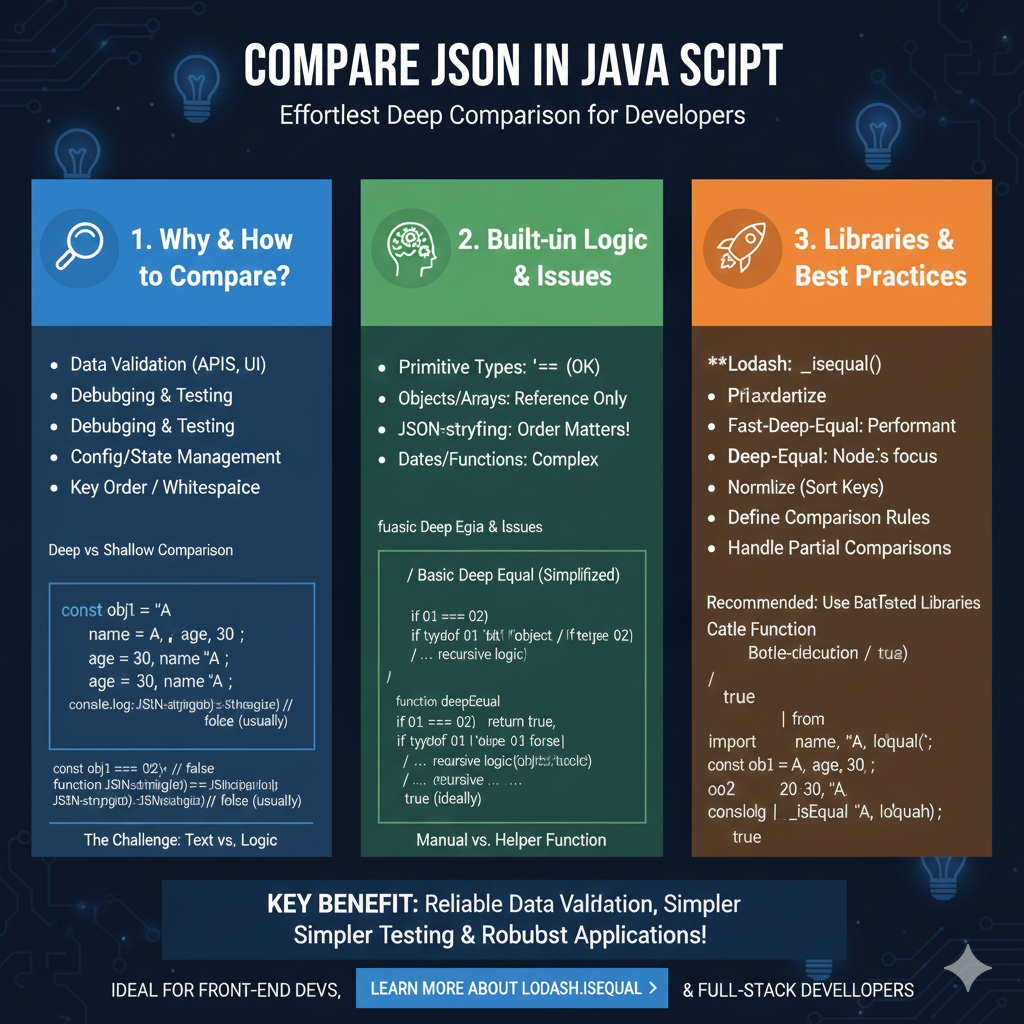
The infographic titled “COMPARE JSON IN JAVASCRIPT: Effortless Deep Comparison for Developers” provides a technical roadmap for accurately identifying differences between data objects in a JavaScript environment.
🛠️ The JavaScript JSON Comparison Framework
This guide breaks down the challenges of data comparison and offers industry-standard solutions for front-end and full-stack developers:
1. Why & How to Compare? (Blue)
This section establishes the necessity of robust comparison for application stability:
- Common Use Cases: Essential for Data Validation (APIs, UI), Debugging & Testing, and Config/State Management.
- The Structural Challenge: Highlights how non-semantic factors like Key Order and Whitespace can interfere with basic comparisons.
- Text vs. Logic: Illustrates the “The Challenge” where
JSON.stringify()often returnsfalsefor semantically identical objects due to differing key orders.
2. Built-in Logic & Issues (Green)
This module explores the limitations of native JavaScript operators when handling complex objects:
- Primitive Types: Standard operators like
===work reliably for simple strings or numbers. - Reference Pitfalls: Objects and Arrays are compared by Reference Only, meaning two identical-looking objects will not be equal unless they point to the same memory location.
- Complex Data Types: Notes that comparing Dates and Functions requires specialized logic.
- Manual Helper Functions: Introduces the concept of a
deepEqualrecursive function to manually traverse object trees for a “True” logical comparison.
3. Libraries & Best Practices (Orange)
The final pillar recommends battle-tested tools to handle deep comparisons efficiently:
- Top Libraries: Recommends Lodash (
_.isEqual()), Fast-Deep-Equal for high performance, and Deep-Equal for Node.js environments. - Professional Workflow: Encourages developers to Normalize (Sort Keys), Define Comparison Rules, and Handle Partial Comparisons.
- Practical Implementation: Provides a code example showing how Lodash accurately returns
truefor objects that native JavaScript might fail to match.
learn for more knowledge
Mykeywordrank-> Search for SEO: The Ultimate Guide to Keyword Research and SEO Site Checkup – keyword rank checker
json web token->React JWT: How to Build a Secure React Application with JSON Web Token – json web token
json parser-> How to Parse json format parser: A Comprehensive Guide – json parse
Fake Json –>dummy user data json- The Ultimate Guide to fake api, jsonplaceholder, and placeholder json data – fake api
Leave a Reply