In the world of web development, APIs, and data exchange, JSON (JavaScript Object Notation) has become the de facto standard for structuring data. As applications grow in complexity, so does the need to ensure data integrity and identify discrepancies. This is where a JSON comparator becomes an indispensable tool. But how exactly do you compare JSON objects effectively?
Why JSON Comparison is Crucial for Developers
Comparing JSON objects is more than just checking if two JSON files or strings are identical. It involves understanding their structure, values, and potential json differences, regardless of property order. JSON comparison is vital in these common scenarios:
- API Testing: Validating that API responses match expected outputs.
- Data Synchronization: Identifying changes between two versions of data.
- Debugging: Pinpointing subtle differences in JSON data structures causing issues.
- Configuration Management: Ensuring consistency across different environments.
- Database Migrations: Verifying data transformation accuracy when you compare data.
Understanding JSON Comparators: Diff Tool vs. Text Comparison
A JSON comparator is a tool or library designed to highlight the json differences between two JSON objects, often ignoring whitespace or key order, and sometimes even allowing you to ignore specific fields. Unlike a simple string compare text, a JSON comparator performs a structural and value-based analysis. This is the difference between a simple text diff and a powerful JSON diff capability.
How to Use a JSON Compare Online Tool
Using an online JSON compare or desktop comparison tool is the quickest way to compare JSON objects. These often include features of a robust JSON editor online:
- Input Your JSON: Paste your first JSON object into the “Original” or “Left” panel and your second into the “New” or “Right” panel. Many comparison tools can also load JSON files (CSV or YAML files need conversion).
- Configure Options: Advanced options often include ignoring key order, sorting arrays, and specifying key paths to exclude from the comparison.
- Initiate Comparison: Click the “Compare” button, “Diff”, or similar button.
- Analyze Results: The tool displays the json differences side-by-side in a diff view, highlighting additions, deletions, and modifications using different colors.
Programmatic JSON Diff for Automation
For automated tasks, developers use programming libraries (Python, JavaScript, Java, etc.) to perform the JSON comparison.
Conceptual Python Example (using a json diff library): This method converts the raw JSON format into an object, then uses a specialized library to report the specific json differences (e.g., modified value, added element).
Best Practices for Effective JSON Comparison
To ensure your JSON comparator provides meaningful results, follow these practices:
- Normalize Your JSON: Use a JSON editor or formatter to clean up the JSON format before you compare.
- Sort Arrays: If the order of items in an array doesn’t matter, ensure your compare tool can sort them to avoid false differences.
- Ignore Dynamic Fields: Fields like timestamps or unique IDs should be excluded from the comparison via the tool’s options.
- Understand the Diff View: Learn to interpret the visual cues in the diff view (colors, +/- signs) used by your online JSON compare tool to indicate changes between the original file and the modified file.
- Choose the Right Comparison Tools: Online JSON editor online tools are great for one-off checks; libraries are essential for automated testing and continuous integration.
Conclusion
Mastering JSON comparison is a critical skill for anyone working with data and APIs. By leveraging the power of dedicated JSON comparator tools and libraries, you can efficiently identify json differences, maintain data quality, and streamline your development and testing workflows. Whether you’re debugging an elusive bug or validating complex API responses, a reliable JSON compare online tool is your best ally.
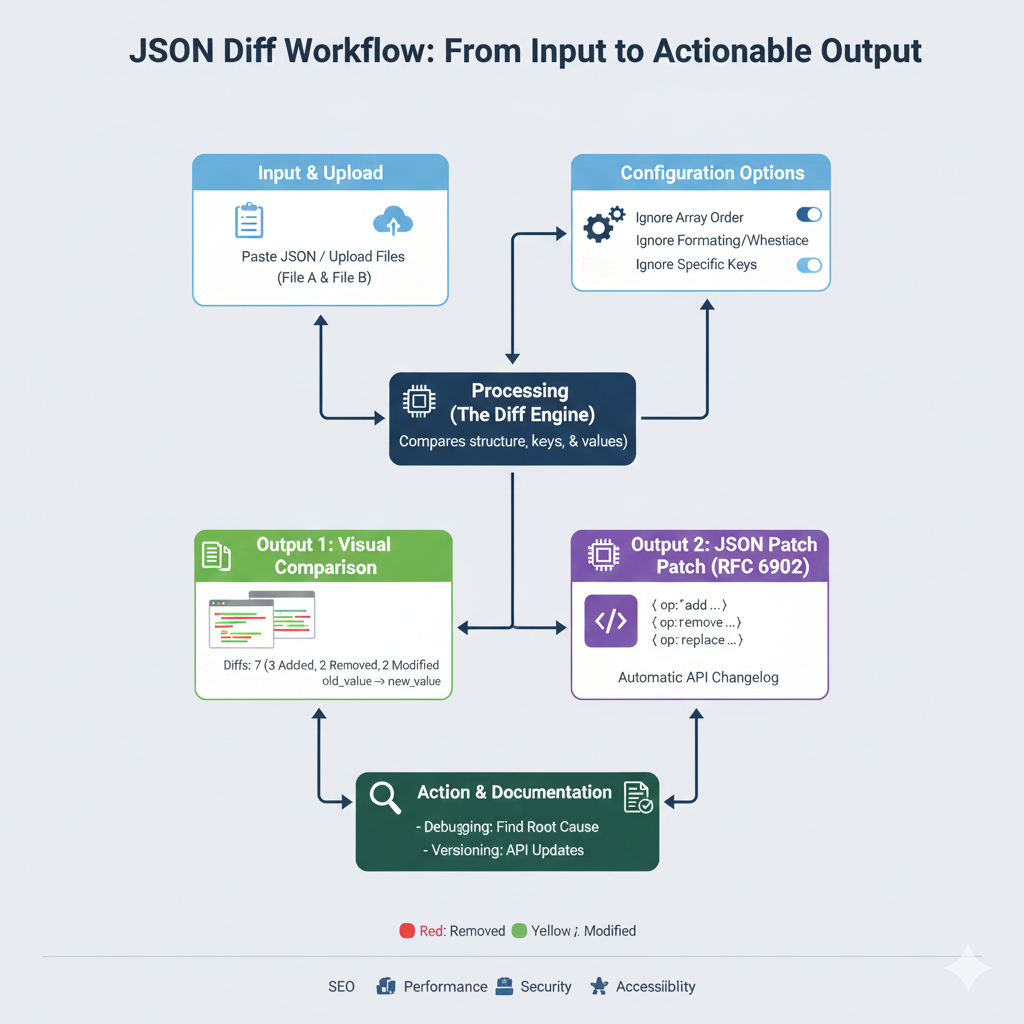
JSON Diff Workflow
This infographic details the process of comparing two JSON files to find differences, generate a patch, and use the output for debugging and documentation.
1. Input & Processing
| Step | Title | Action/Description |
| 1. | Input & Upload | User Paste[s] JSON / Upload[s] Files (File A & File B). |
| 2. | Configuration Options | User can refine the comparison by toggling options like Ignore Array Order, Ignore Formatting/Whitespace, and Ignore Specific Keys. |
| 3. | Processing (The Diff Engine) | The core function that Compares structure, keys, & values between the two files. |
2. Outputs Generated
The processing engine generates two distinct types of output for different uses:
| Output | Title | Details & Example |
| 4. | Output 1: Visual Comparison | Displays a side-by-side view with color-coding. The summary shows: “Diffs: 7 (3 Added, 2 Removed, 2 Modified)”. Visual cues show old_value -> new_value for modifications. |
| 5. | Output 2: JSON Patch (RFC 6902) | Generates an Automatic API Changelog in machine-readable format. Operations include: { op: "add" ... }, { op: "remove" ... }, and { op: "replace" ... }. |
3. Action & Documentation
| Step | Title | Key Uses |
| 6. | Action & Documentation | Debugging: Find Root Cause (e.g., when an API response schema changes unexpectedly). Versioning: API Updates (using the JSON Patch to document changes). |
learn for more knowledge
Json Parser ->What is JSON Parser Online? Complete Guide for Beginners – json parse
Json web token ->What Is JWT Token? (JSON Web Token Explained for Beginners) – json web token
MyKeyword rank ->Best Strategies to Rank on Google’s First Page in 2025 (Complete SEO Guide) – keyword rank checker
Fake Json ->Testing Software Tools: Best Tools & Software to Create Fake JSON Data for Testing – fake api
Leave a Reply