compare large json files, especially when they are a massive json file, can be a daunting task. Whether you’re debugging api responses, tracking configuration changes, or validating data migrations, finding json differences between two massive json structures requires the right software and workflow. This guide will walk you through various comparison tools to compare two json documents effectively, helping you pinpoint discrepancies in your json data quickly.
Why is json comparison of large json Challenging?
When you compare json files of significant size, you encounter several technical hurdles designed to slow you down:
- Memory Consumption: Loading a large json file into a standard editor can lead to out-of-memory errors.
- Performance: A naive json comparison is slow with deeply nested keys and extensive arrays.
- Semantic vs. Syntactic: The json structure might have the same data but in a different order, making a basic diff tool unreliable.
Method 1: CLI comparison tools for Quick json diff
For quick checks, command-line utilities are the most efficient workflow to compare large json files.
Using jq and diff for json comparison
You can use jq to normalize the json format (sort keys) before passing it to a diff tool. This ensures that the comparison results focus on actual data changes rather than just modified text.
- Normalize the json files:jq -S . file1.json > file1_normalized.json
- Compare the results:diff file1_normalized.json file2_normalized.json
Method 2: custom code steps for Deep json comparison
When you need to compare two json documents with complex json objects, a programmatic approach is often best.
Python json compare Example
Using libraries like DeepDiff, you can compare json data while ignoring array order or specific json structure segments.
Python
import json
from deepdiff import DeepDiff

# Load the json file
with open('data1.json') as f1, open('data2.json') as f2:
    data1 = json.load(f1)
    data2 = json.load(f2)

# Find json differences
diff = DeepDiff(data1, data2, ignore_order=True)
print(diff)
Method 3: Using an online json compare tool or json editor online
If your json file isn’t too large (under 10MB), an online json compare tool is a convenient way to get a visual diff view.
| Tool Type | Best Use Case | Pros |
| json compare online | Small snippets/Quick checks | Visual diff view, no setup. |
| json editor online | Formatting and editing | Integrated formatter and validator. |
| diff tool (Desktop) | large json files | Handles massive data without crashing. |
Security Note: Avoid using an online json compare tool for sensitive api keys or private user data. Use local software instead.
Best Practices to compare large json files
- Normalize First: Always sort keys and handle indentation to avoid seeing modified text that isn’t a real json difference.
- Stream Large Data: If the file is too big for memory, use a streaming json parser to compare chunks.
- Hash Check: To quickly see if a json comparison is even necessary, compare the MD5 hash of the normalized files.
- Filter Keys: Use jq to strip out timestamps or IDs before running your diff tool to focus on the core json structure.
Conclusion
Whether you choose a json compare online method for small tasks or custom code steps for a large json file, the goal is to identify json differences accurately. By choosing the right comparison tools and following a structured workflow, you can manage your json data and api responses with confidence.
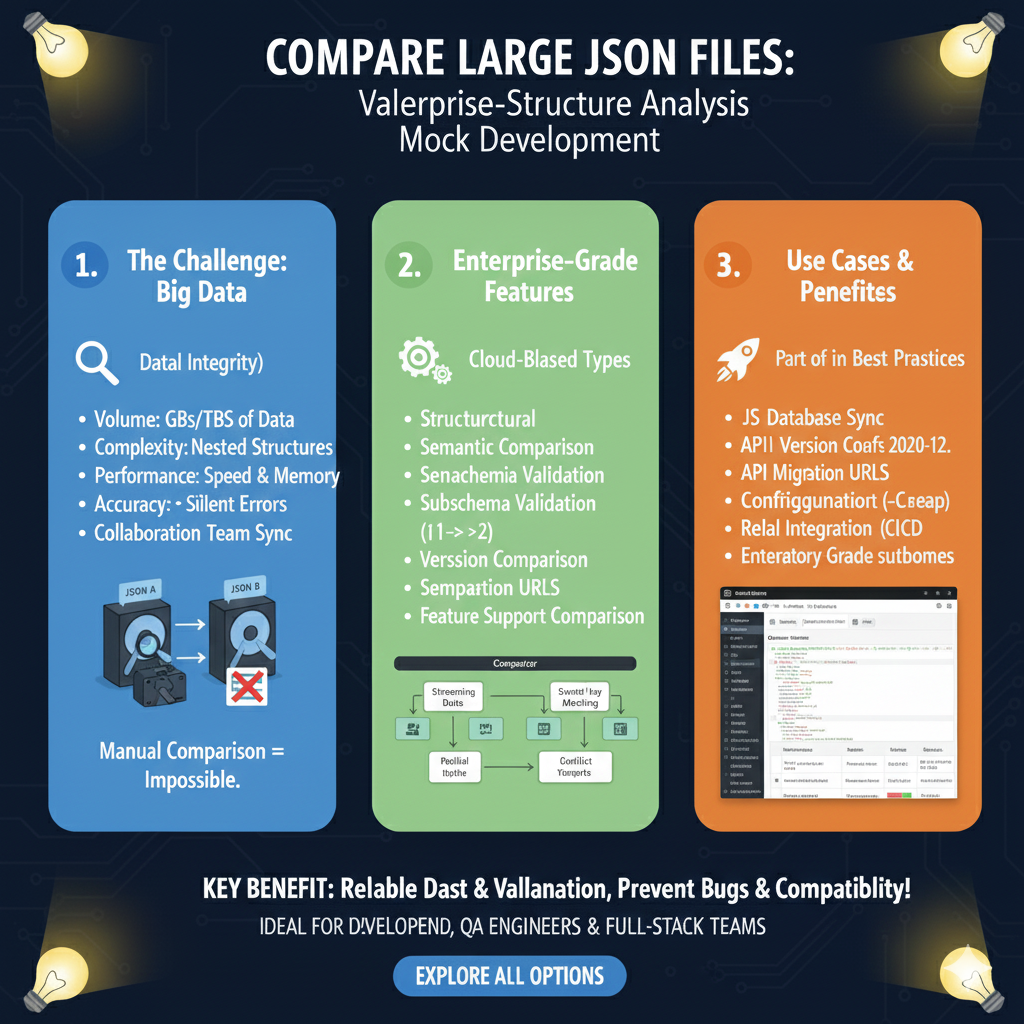
Handling Big Data at Scale
The workflow is categorized into three critical areas: the challenges of high-volume data, enterprise-specific features, and practical use cases for professional teams.
1. The Challenge: Big Data (Blue)
This section highlights why standard comparison tools often fail with large-scale datasets:
- High Volume: Built to handle GBs or even TBs of data that would crash standard editors.
- Complexity: Manages highly nested structures that are difficult to track manually.
- Performance: Optimized for high speed and low memory usage to maintain system stability.
- Data Integrity: Designed to catch silent errors and facilitate collaboration team sync across complex projects.
- Visual Aid: Includes a diagram illustrating that while comparing two massive JSON files (JSON A and JSON B) is “Manual Comparison = Impossible,” automated tools make it seamless.
2. Enterprise-Grade Features (Green)
This pillar details the advanced technical logic used to identify differences in enterprise environments:
- Advanced Logic: Supports structural and semantic comparisons to look beyond simple text differences.
- Schema Support: Includes subschema validation and full schema validation to ensure data conforms to established rules.
- Version Tracking: Features version comparison and specialized comparison URLs for sharing specific diff results.
- Cloud-Based Processing: Utilizes cloud-based types and streaming data to process files without exhaustive local resources.
3. Use Cases & Benefits (Orange)
The final section outlines how these tools integrate into modern developer best practices:
- System Synchronization: Ideal for database sync tasks and managing API version changes.
- Migration Support: Facilitates API migration and configuration checks to prevent deployment failures.
- DevOps Integration: Designed for CI/CD integration, ensuring that large data changes are automatically validated during the build process.
- Professional Standards: Provides enterprise-grade subhomes for organized, team-wide data management.
learn for more knowledge
Mykeywordrank-> Search for SEO: The Ultimate Guide to Keyword Research and SEO Site Checkup – keyword rank checker
json web token->jwt react Authentication: How to Secure Your react app with jwt authentication – json web token
Json Parser ->How to Effectively Use a JSON Parser API: A Comprehensive Guide – json parse
Fake Json –>fake api jwt json server: Create a free fake rest api with jwt authentication – fake api
Leave a Reply