JSON (JavaScript Object Notation) has become the ubiquitous format for data interchange across web services, APIs, and configuration files. As a developer, you’ll frequently encounter scenarios where you need to compare two JSON files – whether it’s debugging API responses, verifying configuration changes, or ensuring data consistency. While it might seem straightforward, efficiently identifying differences, especially in large or complex JSON structures, requires the right approach.
Why Compare JSON Files?
- Debugging: Pinpointing changes in API responses that might be causing issues.
- Configuration Management: Verifying updates to application configurations.
- Data Migration: Ensuring data integrity between source and target systems.
- Testing: Validating expected vs. actual outputs in automated tests.
Methods to Compare Two JSON Files
1. Manual Inspection (For Small Files)
For very small JSON files with minimal data, a visual, line-by-line comparison can be feasible. However, this method is highly prone to human error, especially as the file size or complexity increases. It’s generally not recommended for professional or critical tasks.
2. Online JSON Comparison Tools
Many web-based tools offer user-friendly interfaces to paste or upload two JSON files and visualize their differences. These tools often highlight additions, deletions, and modifications, making it easy to spot changes at a glance.
Advantages:
- Quick and easy to use.
- Visual representation of differences.
- No software installation required.
Disadvantages:
- Security concerns for sensitive data (be cautious about what you paste).
- Limited functionality for complex comparisons or automation.
Examples of popular online tools include jsondiff.com, jsoncompare.com, and various others available with a quick search.
3. Programmatic Comparison (For Automation and Large Files)
For larger files, sensitive data, or when integration into workflows is needed, programmatic comparison is the most robust solution. You can leverage scripting languages like Python or JavaScript to build custom comparison logic.
Python Example (Using json and deepdiff libraries)
Python’s built-in json module can parse JSON, and external libraries like deepdiff provide powerful comparison capabilities, identifying granular changes.
import json
from deepdiff import DeepDiff

json_data1 = """
{
  "name": "Alice",
  "age": 30,
  "city": "New York",
  "hobbies": ["reading", "hiking"],
  "address": {
    "street": "123 Main St",
    "zip": "10001"
  }
}
"""

json_data2 = """
{
  "name": "Alice Smith",
  "age": 30,
  "city": "London",
  "hobbies": ["reading", "cycling"],
  "address": {
    "street": "123 Main St",
    "zip": "W1A 0AX"
  }
}
"""

data1 = json.loads(json_data1)
data2 = json.loads(json_data2)

diff = DeepDiff(data1, data2, ignore_order=True)

if diff:
    print("Differences found:")
    print(json.dumps(diff, indent=2))
else:
    print("No differences found.")
This code snippet demonstrates how DeepDiff can identify changes in values, new items, and removed items, providing a structured output of discrepancies.
JavaScript Example (Node.js with fast-json-patch or similar)
In JavaScript environments like Node.js, you can use libraries designed for JSON diffing and patching. While a direct diff like DeepDiff isn’t built-in, libraries can achieve this.
const jsonpatch = require('fast-json-patch'); // npm install fast-json-patch

const jsonObject1 = {
  name: "Bob",
  age: 25,
  interests: ["coding", "gaming"]
};

const jsonObject2 = {
  name: "Robert",
  age: 25,
  interests: ["coding", "reading", "gaming"]
};

const diff = jsonpatch.compare(jsonObject1, jsonObject2);

if (diff.length > 0) {
  console.log("Differences found:");
  console.log(JSON.stringify(diff, null, 2));
} else {
  console.log("No differences found.");
}
The fast-json-patch library generates an RFC 6902 JSON Patch document detailing the changes required to transform jsonObject1 into jsonObject2.
Best Practices for JSON Comparison
- Normalize Data: Before comparing, ensure both JSONs are consistently formatted (e.g., sort array elements if order doesn’t matter, handle missing keys with defaults).
- Ignore Order: If the order of elements in arrays or keys in objects doesn’t semantically matter, use tools/libraries that can ignore order during comparison.
- Handle Data Types: Be aware of potential type coercions (e.g., number vs. string representations of the same value).
- Choose the Right Tool: Select a comparison method based on the size of files, sensitivity of data, and need for automation.
Conclusion
Comparing two JSON files is a fundamental task for developers. While manual inspection suffices for trivial cases, online tools offer a quick visual aid, and programmatic solutions provide the power and flexibility needed for complex, automated, or large-scale comparisons. By choosing the appropriate method and following best practices, you can efficiently identify discrepancies and maintain the integrity of your data.
Mastering these techniques will significantly boost your productivity and ensure data consistency in your development workflows.
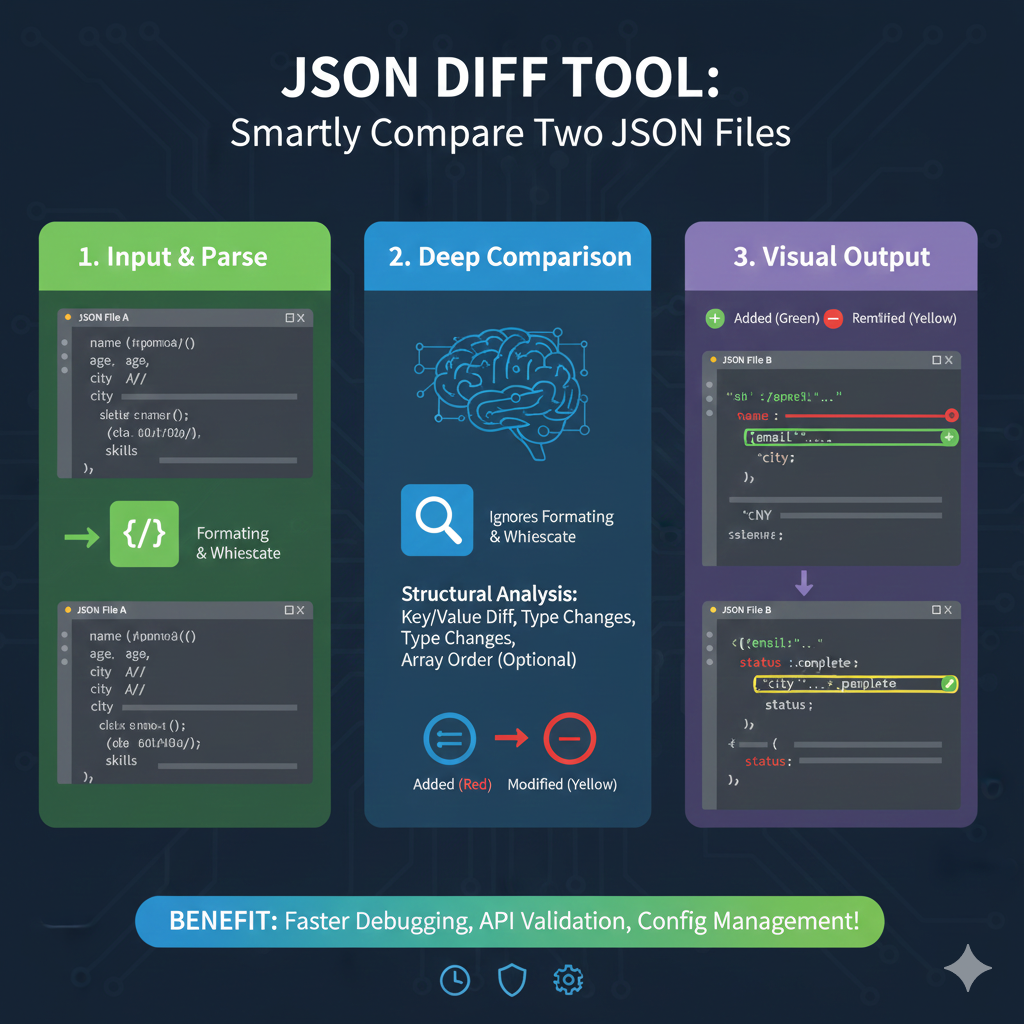
JSON Diff Tool Workflow
The process is divided into three sequential steps:
1. Input & Parse (Green)
- Action: JSON File A (the original) is loaded.
- Preprocessing: The tool performs Formatting & Whitespace removal to standardize the input before comparison, ensuring only data differences are found, not formatting ones.
2. Deep Comparison (Blue)
- Core Logic: The tool ignores formatting and whitespace, focusing on structural and content differences.
- Structural Analysis: It analyzes the key-value differences, type changes (e.g., number to string), and can optionally check Array Order.
- Internal Labeling: Differences are internally labeled as Added (Red) or Modified (Yellow).
3. Visual Output (Purple)
- Presentation: The final comparison results (JSON File B against File A) are presented using visual markers.
- Visual Key:
- Added (Green): Indicates a key/property exists in File B that was not in File A.
- Modified (Yellow): Indicates a key exists in both, but the value is different.
BENEFIT: The overarching benefit of using a JSON Diff Tool is Faster Debugging, API Validation, and Config Management!
learn for more knowledge
Json parser-> How to Find the Fastest JSON Parser for Peak Performance – json parse
Json web token ->Spring Security JWT: Your Comprehensive Guide to JSON Web Tokens – json web token
Mykeywordrank-> Search Page Optimization: Maximizing Visibility and Clicks on the SERP (A Key to Your Site’s Success) – keyword rank checker
Fake Json –>Dummy API for JSON Data: Unlocking Efficient Development – fake api
Leave a Reply