How to Compare Two JSON Files Effectively for Developers
In the world of modern web development and data exchange, JSON (JavaScript Object Notation) files are ubiquitous. From API$ responses and configuration files to database backups, you’ll encounter JSON everywhere. But what happens when you have two JSON files that look similar, and you need to identify their exact differences? Whether you’re debugging an API, validating data, or managing configuration versions, knowing how to compare two JSON files efficiently is a crucial skill.
Why Compare JSON Files?
Performing a JSON comparison can save you countless hours of manual inspection. Here are some common scenarios where a json compare tool is essential:
- Debugging API responses where slight changes might lead to unexpected behavior.
- Validating configuration files after an update to ensure no critical settings were accidentally altered.
- Monitoring data changes between different versions of an application or database.
- Ensuring consistency across multiple environments.
Methods to Compare JSON Files
There are several approaches to performing a JSON comparison, ranging from quick online tools to powerful command-line utilities and programmatic solutions. All methods aim to highlight the json differences in the json structure and json data.
1. Online JSON Comparison Tools (JSON Compare Online)
For quick, visual comparisons, online tools are often the most straightforward. They typically provide a side-by-side view, highlighting differences in json structure and values.
- JSON Diff: Many websites offer this functionality. You simply paste your two JSON inputs, and they show you a visual json diff.
- JSON Compare: Similar to JSON Diff, these comparison tools are user-friendly for a quick sanity check.
Pros: Easy to use, visual representation, no installation required. You can often save and share the results.
Cons: Privacy concerns for sensitive data, limited customization.
2. Command-Line Tools for JSON Diff
For developers who prefer the terminal or need to automate comparisons, command-line comparison tools are invaluable.
Using diff with jq
Combining the standard Unix diff utility with jq, a command-line JSON processor, helps normalize the JSON files before comparison.
Bash
# First, pretty-print and sort keys for consistent diff
jq -S . file1.json > file1_sorted.json
jq -S . file2.json > file2_sorted.json

# Then, use diff to compare two json files
diff file1_sorted.json file2_sorted.json
The -S option in jq sorts the keys of json objects, which helps in getting a more meaningful json diff when the order of keys doesn’t matter.
3. Programmatic JSON Comparison (Using a JSON Compare Tool Library)
When you need fine-grained control, integration into a larger application, or complex logic for comparing JSON, programming languages offer the most flexibility. This is the most robust form of testing for json data.
Python Example: DeepDiff
The deepdiff library provides a powerful way to compare 2 json files intelligently, even when dealing with complex nested json objects.
Python
import json
from deepdiff import DeepDiff # A dedicated json compare tool library

# ... (loading files) ...

# For a detailed, semantic diff, use a library like DeepDiff
diff = DeepDiff(json1, json2, ignore_order=True) # ignore_order for arrays/sets
print(json.dumps(diff, indent=2))
The ignore_order option is particularly useful because it allows the json compare tool to treat arrays as sets if element order is not relevant to your comparison.
Key Considerations When Comparing JSON
When using a json compare tool to check for json differences, keep these critical aspects in mind:
- Order of Keys: In JSON objects, the order of keys is not semantically significant. A good comparison tool will ignore key order.
- Order of Array Elements: For arrays, the order usually is significant. Look for tools with an
ignore_orderoption for arrays if order does not matter in your json file. - Data Types: Ensure your json comparison handles different data types correctly (e.g.,
"123"vs.123). - Nested Structures: The ability to recursively compare two json files with deeply nested json objects is crucial.
Conclusion
Knowing how to compare two json files is an essential skill for anyone working with data and APIs. Whether you opt for a quick json compare online utility, the power of command-line tools like jq and diff, or the flexibility of programmatic solutions with libraries like Python’s deepdiff, choosing the right json compare tool depends on your specific needs, the sensitivity of the data, and the complexity of the json structure. Embrace these tools to streamline your development workflow and ensure data integrity.
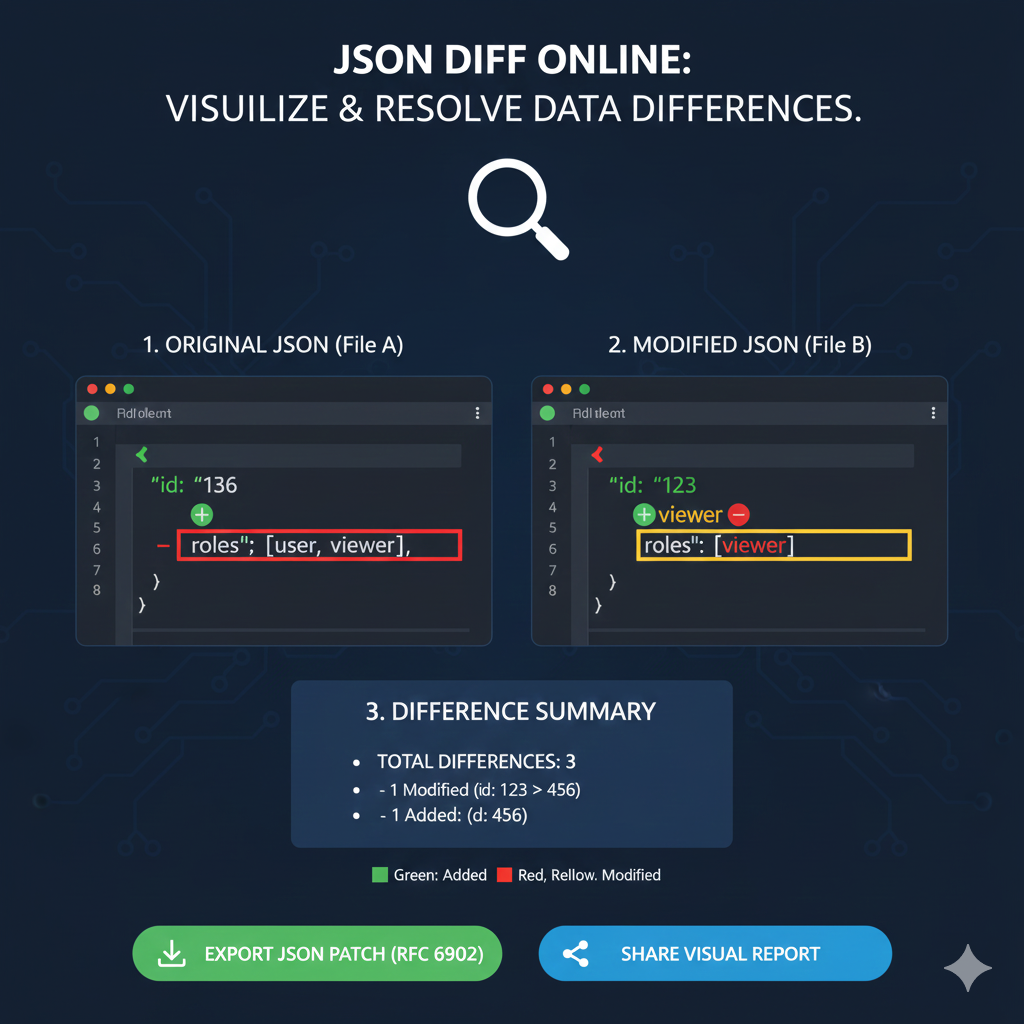
JSON Diff Online: Visual Diff Report
This infographic illustrates how an online tool compares two JSON documents (File A and File B) using color-coding to identify and summarize changes quickly.
1. Original JSON (File A) vs. 2. Modified JSON (File B)
The side-by-side view is the central feature, immediately highlighting differences between the baseline (File A) and the new version (File B).
| Feature | Original JSON (File A) | Modified JSON (File B) | Status Color |
id Value | Shows id: "136" (implied original value). | Shows id: "456" (the new value). | Yellow (Modified) |
id Key (Example) | Shows id: "123" and is marked as Removed (Red). | The key id: "456" is marked as Added (Green). | Red/Green (Removed/Added) |
roles Array | Shows roles: [user, viewer]. | Shows roles: [id: "viewer"], indicating the structure or contents were modified. | Yellow (Modified) |
3. Difference Summary
The tool provides an immediate, aggregated count of the changes found in the comparison.
- TOTAL DIFFERENCES: 3
- 1 Modified: (e.g., the change from
id: 123toid: 456). - 1 Removed: (e.g., the previous
id: 123or an element within therolesarray). - 1 Added: (e.g., the new
id: 456).
- 1 Modified: (e.g., the change from
Actionable Outputs
The tool offers key outputs for integrating the differences into a development workflow:
- Export JSON Patch (RFC 6902): Allows the user to download a standard document containing only the instructions to transform File A into File B.
- Share Visual Report: Provides an option to easily share the comparison with others.
learn for more knowledge
Json Parser ->WHAT IS API JSON Parser – JSON Parser API – JSON.parse – json parse
Json web token ->WHAT IS JWT Security, Web Security,-JSON Web Tokens – json web token
Mykeywordrank ->SEO Ranking Checker -Keyword Rank Checker – keyword rank checker
Fake Json –>What is Dummy JSON Data- Free Fake Rest Api JSON Data – fake api
Leave a Reply