JSON (JavaScript Object Notation) is an indispensable data format for developers, APIs, and configuration files. But what happens when you have two JSON files and need to pinpoint the exact json differences? Manually comparing them can be a tedious, error-prone, and time-consuming task. Fortunately, a multitude of online tools are available to streamline this process, making it incredibly easy to compare two json files online and identify discrepancies.
Why Compare Two JSON Files Online?
Comparing JSON files isn’t just a developer’s chore; it’s a critical step in many workflows:
- API Development: Identifying changes in API responses between different versions.
- Configuration Management: Ensuring consistency and tracking modifications in application configurations.
- Data Validation: Verifying data integrity after migration or transformation processes.
The Challenge of Manual JSON Comparison
JSON files, especially large ones, can be complex with nested json structures and arrays. Trying to manually compare JSON side-by-side in a text editor often leads to missed differences due to non-semantic changes like whitespace or key order. This makes having a reliable json compare tool essential.
How Online JSON Comparison Tools Help
Online JSON comparison tools are designed to highlight json differences efficiently. They typically parse the JSON, normalize it, and then apply a diff algorithm to show additions, deletions, and modifications in a user-friendly interface. This provides a visual json diff or diff view that accurately tracks changes.
Features to Look for in an Online JSON Diff Tool
To ensure an accurate json comparison, look for comparison tools that handle the complexity of JSON structures:
- Semantic Comparison: The json compare tool should understand JSON as a structure of objects and arrays, ignoring non-semantic differences like white space or the order of keys within an object.
- Side-by-Side/Diff View: Easily see both json files simultaneously with color-coded differences for added, deleted, or modified elements.
- Tree View: Navigate complex JSON structures more easily. Tools like JSON Editor Online excel at visualizing deeply nested data hierarchically.
- Import Files: The ability to import files directly, rather than just pasting the JSON string, speeds up the workflow.
- Security: Tools that perform all processing client-side (in your browser) are preferred for sensitive json data.
Recommended Online JSON Compare Tools
Several top-tier tools offer advanced features for accurate JSON comparison:
- JSONToolBox is noted for being a comprehensive, developer-centric solution that offers Semantic Diff and JSONPath tracking for precise referencing. It also includes an integrated JSON formatter and editor.
- JSONDiff focuses heavily on a pure Semantic Comparison, making it ideal when accuracy and ignoring formatting noise are the top priorities.
- HyperTest JSON Comparison Tool provides detailed difference analysis, categorizing changes as structural, value, or array modifications, and offers path-based identification.
- JSON Editor Online is excellent for QA and analyzing large or deeply nested payloads using its expandable Tree View.
[Visual comparison of two JSON structures showing color-coded additions, deletions, and modifications in a side-by-side view, potentially with a Tree View option](Image of a side-by-side online JSON diff tool showing color-coded changes in a tree view)
Step-by-Step Guide: Comparing JSON Files Online
The general process for most online JSON diff tools is straightforward:
- Open Your Chosen Tool: Navigate to your preferred json compare online website.
- Input JSON Files: Paste your first JSON string or use the Import Files function into the first input area, and your second JSON file into the second. Many tools include a built-in formatter to clean up the syntax.
- Initiate Comparison: Click a “Compare” or “Diff” button.
- Review Differences: The json compare tool will display the json differences, often highlighted, in a diff view or hierarchical structure. Many tools allow you to save or export the comparison results.
Conclusion
Comparing two JSON files online is no longer a daunting task. With the right json compare tool, you can quickly identify changes, prevent errors, and maintain json data integrity across your projects. Leveraging tools with Semantic Diff and Tree View capabilities is key to accurately understanding how your json structures have evolved.
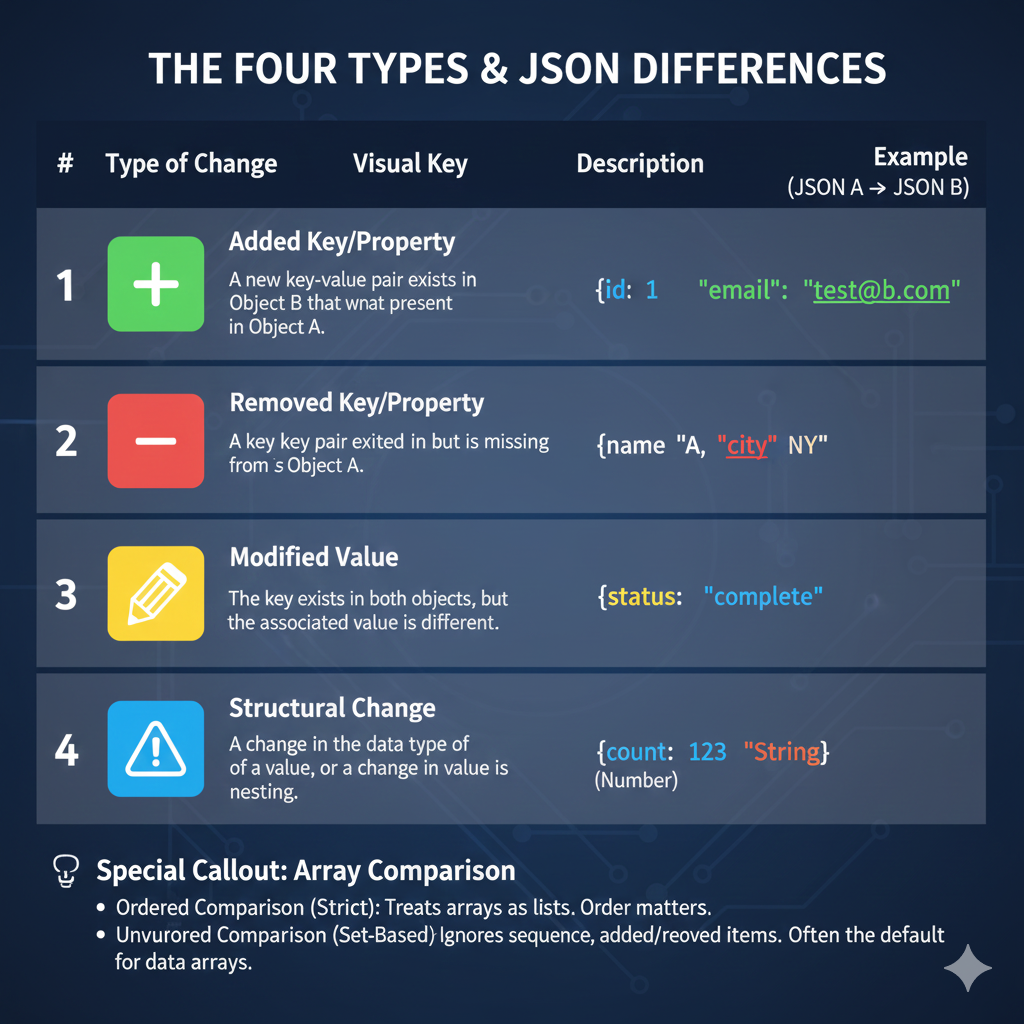
The image is an infographic titled “THE FOUR TYPES & JSON DIFFERENCES”. It clearly outlines and provides examples for the four primary ways two JSON objects (Object A and Object B) can differ during a comparison.
🚦 The Four Types of JSON Differences
The main body of the graphic is a table format describing the differences:
| # | Type of Change | Visual Key | Description | Example (JSON A → JSON B) |
| 1 | Added Key/Property | ➕ Green | A new key-value pair exists in Object B that was not present in Object A. | {"id": 1} $\rightarrow$ {"id": 1, "email": "test@b.com"} |
| 2 | Removed Key/Property | ➖ Red | A key-value pair existed in Object A but is missing from Object B. | {"name": "A", "city": "NY"} (Missing “city” in B) |
| 3 | Modified Value | 📝 Yellow | The key exists in both objects, but the associated value is different. | {"status": "complete"} (The value has changed) |
| 4 | Structural Change | ⚠️ Blue | A change in the data type of a value, or a change in nesting. | {"count": 123} (Number) $\rightarrow$ {"count": 123** [String]}** |
💡 Special Callout: Array Comparison
The graphic includes a note regarding array comparisons, which have two common modes:
- Ordered Comparison (Strict): Treats arrays as lists, meaning the order of items matters.
- Unordered Comparison (Set-Based): Ignores the sequence and focuses only on added or removed items. This is often the default for data arrays
learn for more knowledge
Json parser-> Express JSON Parser: A Comprehensive Guide to express.json – json parse
Json web token ->How to Effectively Manage Auth0 Tokens for Secure Applications – json web token
Mykeywordrank-> Search Engine Optimization What It Is and How to Do It Effectively – keyword rank checker
Fake Json –>How to Create Fake JSON API Online: Boost Your Development Workflow – fake api
Leave a Reply