How to Compare Two JSON Files Online Effectively
In the world of web development, APIs, and data exchange, JSON (JavaScript Object Notation) has become the de facto standard. Developers frequently deal with JSON data, whether it’s configuring applications, debugging API responses, or managing data migrations. A common challenge arises when you need to understand the differences between two JSON objects or JSON files. Manually comparing complex JSON data can be tedious and error-prone. This is where online JSON comparison tools come to the rescue, offering a quick and efficient way to compare 2 json online and visualize json differences.
Why is Comparing JSON Data Essential?
Understanding the discrepancies between JSON structures is crucial for several reasons. Using a dedicated json compare tool provides a semantic, structural comparison rather than a simple text diff.
- Debugging API Issues: Comparing the API’s response JSON before and after a code change quickly pinpoints modified values.
- Configuration Management: Ensuring consistency between data sets (development, staging, production) often involves comparing configuration files.
- Data Validation and Testing: Verifying if a data update or transformation has introduced unintended changes to your JSON data. This is essential for robust API testing.
- Version Control: Getting a meaningful structural diff view of changes to large JSON files.
How to Compare Two JSON Online: A Step-by-Step Guide
Using an online JSON comparison tool is straightforward. Here’s a general guide on how to compare two JSON online:
- Choose a Reliable Tool: Search for “compare two json online” or “json compare tool” to find a reputable online service. Examples include SemanticDiff and Playcode.
- Input Your JSON Data: Copy and paste your first JSON string into the designated Input A or “Left Panel” area. Then, paste your second JSON string into the “Right Panel.” Many tools also allow you to access the tool and upload files.
- Prettify and Format: If your JSON is unformatted, click the “prettify” button. Prettify ensures clean alignment for the diff view, ignoring simple whitespace differences.
- Initiate Comparison: Click the “Compare” or “Diff” button.
- Review the Results: The tool will display the two JSON inputs side-by-side, highlighting the differences with distinct colors (visual diff).
Key Features of a Premium Online JSON Diff Tool
When selecting an online tool to compare JSON, look for the following features that go beyond simple text comparison:
| Feature | Importance for JSON Comparison |
| Intelligent Structural Diff | Identifies changes in key-value pairs, array elements, and nested objects, not just line changes. |
| Ignore Order/Whitespace | Crucial, as JSON key order and formatting often don’t matter semantically. |
| Clear Visual Indicators | Distinct colors for additions, deletions, and modified values in the diff view. |
| Client-Side Processing | Ensures privacy—your sensitive json data never leaves your browser/client. |
| Three-Way Merge | Advanced feature for developers managing versions (compares Left, Right, and a common Base file). |
| Handling Large Data Sets | Performance to efficiently handle voluminous json files without crashing. |
Benefits of Using an Online JSON Comparator
Leveraging online JSON comparison tools brings numerous advantages to your development workflow:
- Time-Saving: Automates a task that would be incredibly time-consuming and error-prone manually, especially with large data sets.
- Accuracy: Provides an accurate, semantic breakdown of json differences and the resulting modified JSON.
- Accessibility: Access the tool instantly from any device with an internet connection—no software installation is needed.
- Efficiency: Quickly identifies differences for debugging or $\text{API}$ auditing purposes, improving overall development efficiency.
Conclusion
For anyone working with JSON data, the ability to efficiently compare two JSON online is invaluable. These tools streamline debugging, configuration management, and data validation processes, saving significant time and reducing errors. By understanding how to compare two JSON online and what features to look for in a json compare tool, you can significantly enhance your workflow and ensure data integrity. Next time you face a JSON comparison task, turn to a reliable online json diff tool for a fast and accurate solution!
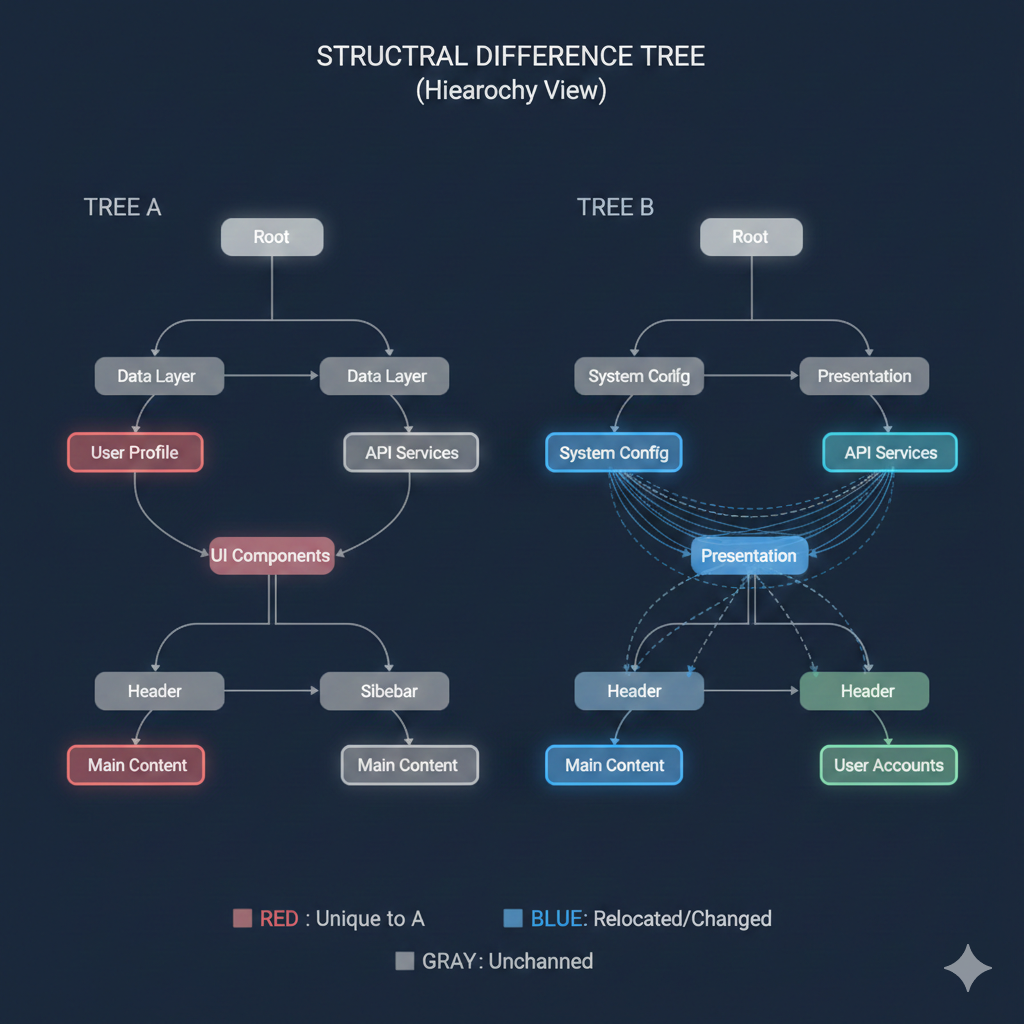
Key to Structural Changes
| Color | Label | Description of Change |
| 🟥 Red | Unique to A | Elements that were present in Tree A but have been removed in Tree B. |
| 🟦 Blue | Relocated/Changed | Elements that have either moved within the hierarchy, or whose parent/child relationship has been modified. |
| 🟨 Green | Unique to B | Elements that are new in Tree B (The legend implies this, as Red is Unique to A, so a new element should be uniquely in B). |
| ⬜ Gray | Unchanged | Elements that remain in the same position with the same relationship as in Tree A. |
🔍 Structural Differences Analysis
Based on the comparison of Tree A and Tree B:
1. Deleted/Removed Elements (Unique to A – Red)
- The “User Profile” node under “Data Layer” was removed.
- The “UI Components” node has been removed.
- The “Main Content” node under “Header” was removed.
2. Relocated and Modified Elements (Blue)
- “System Config” (originally under “Data Layer” in A, implied by its relation to “API Services”) has been relocated and is now a child of the “Root” in Tree B.
- “Presentation” has been introduced as a parent/intermediate node.
- “API Services” is now a child of “Presentation” in B, changing its hierarchy.
- The sub-tree under the old “UI Components” (specifically “Header” and “Main Content”) has been restructured.
- One “Header” and “Main Content” are now children of “Presentation”.
- The other “Header” is also a child of “Presentation”.
3. New Elements (Unique to B – Green)
- A new node, “User Accounts”, has been added under one of the “Header” nodes.
- The node “Presentation” is also a new element, serving as a key new branch point for many components.
learn for more knowledge
Json Parser ->WHAT IS API JSON Parser – JSON Parser API – JSON.parse – json parse
Json web token ->What Is OneSpan Token – json web token
Mykeywordrank->Google Website Rank Checker- Track Your Keyword Rank and SEO Performance – keyword rank checker
Fake Json –>Fake JSON API: Using JSONPlaceholder, DummyJSON, and Mock API – fake api
Leave a Reply