Introduction to JSON Comparison
JSON (JavaScript Object Notation) has become the de facto standard for data interchange on the web, used extensively in APIs, configuration files, and data storage. As you work with JSON data, a common task you’ll encounter is the need to compare two JSON objects. Whether you’re validating API responses, debugging data transformations, or synchronizing configurations, understanding how to effectively compare JSON is crucial.
Why Compare JSON Objects?
- Debugging and Troubleshooting: Identify discrepancies between expected and actual data structures or values.
- API Testing and Validation: Ensure that API responses match predefined schemas or expected outputs during automated tests.
- Configuration Management: Verify if two application configurations are identical or to pinpoint differences.
- Data Synchronization: Determine if two data sources holding JSON have diverged and require merging or updating.
Methods for Comparing JSON
Depending on the complexity and size of your JSON data, you can choose from several comparison methods.
1. Manual Comparison (for Small JSONs)
For very small and simple JSON structures, a visual side-by-side comparison might suffice. You can paste your JSONs into a text editor and manually scan for differences. This method is quick but highly prone to errors and impractical for anything beyond trivial cases.
2. Programmatic Comparison
For larger or more complex JSON structures, programmatic approaches are essential. Most modern programming languages offer built-in support or libraries for parsing and manipulating JSON, which can be leveraged for comparison.
Python Example: Using json.loads and Deep Comparison
Python’s `json` module can parse JSON strings into native Python dictionaries and lists, which can then be compared. Python’s default `==` operator for dictionaries performs a deep comparison of key-value pairs, ignoring the order of keys, which is often desirable for JSON.
import json

def compare_json_strings(json1_str, json2_str):
    try:
        obj1 = json.loads(json1_str)
        obj2 = json.loads(json2_str)
        return obj1 == obj2
    except json.JSONDecodeError as e:
        print(f"Error decoding JSON: {e}")
        return False

json_a = '{"name": "Alice", "age": 30, "details": {"city": "New York"}}'
json_b = '{"age": 30, "name": "Alice", "details": {"city": "New York"}}' # Same content, different key order
json_c = '{"name": "Bob", "age": 25}'
json_d = '{"name": "Alice", "age": 30, "details": {"city": "London"}}' # Different nested value

print(f"JSON A vs B (order-independent): {compare_json_strings(json_a, json_b)}")
print(f"JSON A vs C: {compare_json_strings(json_a, json_c)}")
print(f"JSON A vs D: {compare_json_strings(json_a, json_d)}")
This Python example shows a simple, order-independent comparison for the structural equality of JSON. For more advanced comparisons (e.g., ignoring specific keys, handling float precision), you might need libraries like `deepdiff`.
JavaScript Example: Deep Comparison
In JavaScript, comparing two objects (including parsed JSON) directly with `==` or `===` only checks for reference equality. To perform a deep comparison, you need a custom function or a utility library.
function deepCompareJson(obj1, obj2) {
    if (obj1 === obj2) return true;

    if (typeof obj1 !== 'object' || obj1 === null || typeof obj2 !== 'object' || obj2 === null) {
        return false;
    }

    const keys1 = Object.keys(obj1);
    const keys2 = Object.keys(obj2);

    if (keys1.length !== keys2.length) {
        return false;
    }

    for (const key of keys1) {
        if (!keys2.includes(key) || !deepCompareJson(obj1[key], obj2[key])) {
            return false;
        }
    }

    return true;
}

const jsonA = {"name": "Alice", "age": 30, "details": {"city": "New York"}};
const jsonB = {"age": 30, "name": "Alice", "details": {"city": "New York"}}; // Same content, different key order
const jsonC = {"name": "Bob", "age": 25};
const jsonD = {"name": "Alice", "age": 30, "details": {"city": "London"}}; // Different nested value

console.log("JSON A vs B (order-independent):", deepCompareJson(jsonA, jsonB));
console.log("JSON A vs C:", deepCompareJson(jsonA, jsonC));
console.log("JSON A vs D:", deepCompareJson(jsonA, jsonD));
While this JavaScript example provides a basic deep comparison, robust solutions often come from libraries like Lodash’s isEqual, which handle complex scenarios such as circular references, different types of arrays, and more.
3. Using Online JSON Comparison Tools
For quick ad-hoc comparisons without writing code, several web-based tools provide visual JSON comparison. You paste your two JSON strings, and the tool highlights the differences, often in a color-coded, side-by-side view. Popular options include JSONDiff, JSONCompare, and others.
Key Considerations for JSON Comparison
- Order of Keys: JSON objects are inherently unordered. Most practical comparisons should treat
{"a": 1, "b": 2}as equal to{"b": 2, "a": 1}. Arrays, however, are ordered, and their element order typically matters. - Data Types: Be mindful of strict type comparisons. Is
1the same as"1"? Usually not, but context might dictate otherwise. - Nested Structures: A true comparison requires deep inspection, traversing all nested objects and arrays.
- Ignoring Specific Keys: In some scenarios, certain keys (e.g., timestamps, dynamically generated IDs like
"createdAt","id") might be irrelevant for comparison. Advanced programmatic solutions can allow you to exclude these keys. - Value Transformation: Sometimes, values might need to be transformed (e.g., converting dates to a standard format) before comparison.
Conclusion
Comparing two JSON objects is a common task in modern development, crucial for maintaining data integrity and ensuring system reliability. Whether you opt for a quick manual check, a robust programmatic solution, or a convenient online tool, choosing the right method depends on the scale, complexity, and specific requirements of your comparison. By understanding the nuances of JSON structure and leveraging appropriate tools, you can efficiently identify and manage differences in your data.
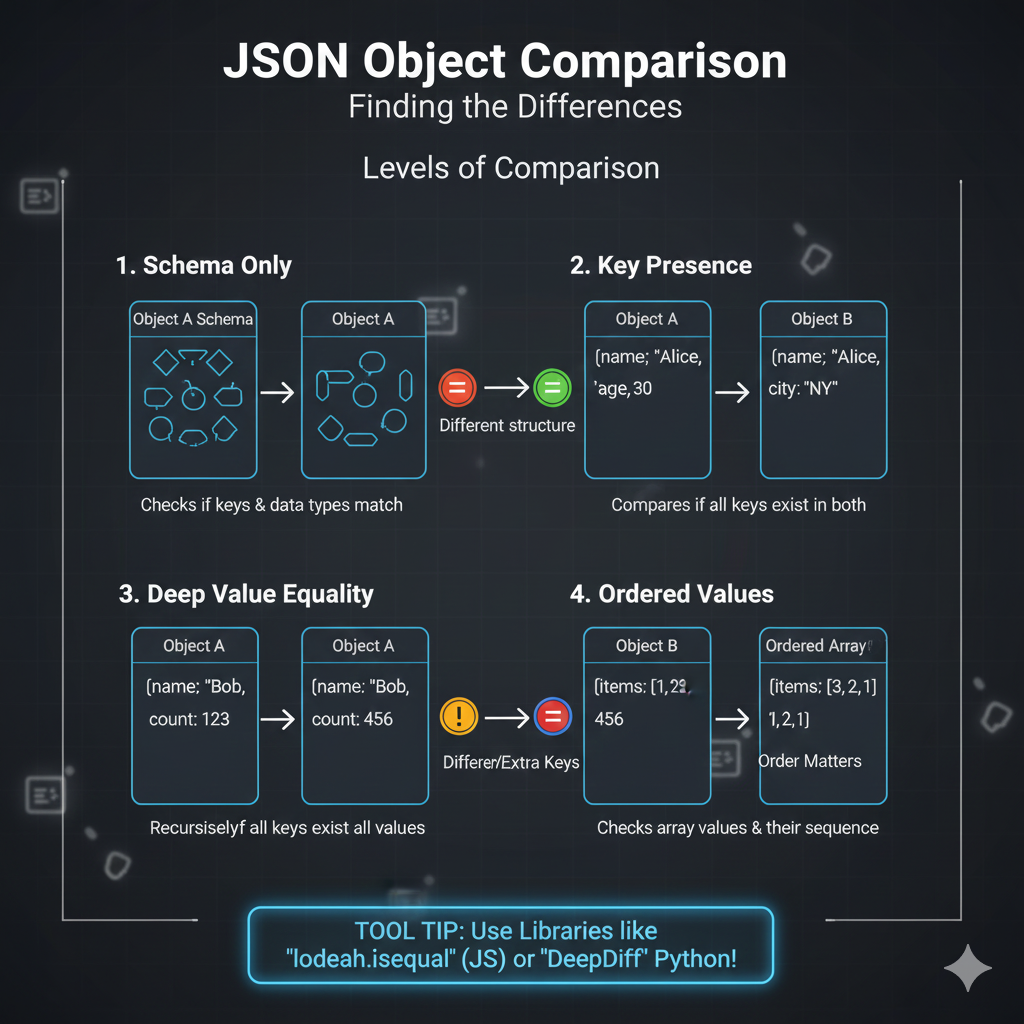
The image is an infographic titled “JSON Object Comparison: Finding the Differences – Levels of Comparison”. It illustrates four distinct methods or levels used when comparing two JSON objects (Object A and Object B).
⚖️ JSON Object Comparison: Levels of Comparison
The graphic breaks down comparison into four scenarios, showing the criteria for determining if two objects are equivalent:
1. Schema Only
- Goal: Checks if the object structures and data types match, regardless of the values.
- Visualization: Two blank objects (Object A and Object B) are shown, both having a similar shape but different color indicators inside, leading to a “Different structure” result.
- Rule: Checks if keys & data types match.
2. Key Presence
- Goal: Compares if all necessary keys exist in both objects.
- Example:
- Object A:
{"name": "Alice", "age": 30} - Object B:
{"name": "Alice", "city": "NY"} - Result: The objects are considered different because Object A has “age” and Object B has “city”.
- Object A:
- Rule: Compares if all keys exist in both.
3. Deep Value Equality
- Goal: Recursively checks if all keys exist and all values are equal across both objects.
- Example:
- Object A:
{"name": "Bob", "count": 123} - Object B:
{"name": "Bob", "count": 456} - Result: The objects are considered different due to a “Differer/Extra Keys” result, specifically because the
countvalues are different (123 vs. 456).
- Object A:
- Rule: Recursively if all keys exist all values.
4. Ordered Values
- Goal: Checks the order/sequence of values within an array, treating order as critical.
- Example:
- Object A (Ordered Array):
{"items": [1, 2, 456]} - Object B (Ordered Array):
{"items": [3, 2, 1, 2, 1]} - Result: The objects are different because the arrays have different contents and sequencing.
- Object A (Ordered Array):
- Rule: Checks array values & their sequence.
learn for more knowledge
Json parser-> How to express json body parser- A Complete Guide – json parse
Json web token ->How to Use token jwt (JSON Web Tokens) for Secure Authentication – json web token
Mykeywordrank-> Search Optimization SEO: Master Search Engine Optimization for Top Rankings – keyword rank checker
Fake Json –>How to Create Fake JSON API for Faster Development and Testing – fake api
Leave a Reply