How to Compare Two JSON Objects and Get Their Differences Effectively
In the world of web development and data exchange, JSON (JavaScript Object Notation) has become an indispensable format. Whether you’re working with APIs, configuring applications, or managing databases, you often encounter situations where you need to compare two JSON objects. The challenge isn’t just knowing if they are different, but precisely understanding what those differences are. This guide will walk you through various methods to compare two JSON objects and pinpoint their discrepancies.
Why Compare JSON Objects and Identify Differences?
Understanding the ‘why’ helps in choosing the right ‘how’. Here are common scenarios where comparing JSON objects and getting their differences is crucial:
- Data Validation: Ensuring that expected data matches actual data, especially after API calls or database operations.
- Debugging: Pinpointing changes between an ‘expected’ state and an ‘actual’ state of an object.
- Configuration Management: Tracking modifications in application configurations stored as JSON.
- API Testing: Verifying that API responses remain consistent or have expected changes.
- Auditing and Version Control: Keeping a record of changes in complex data structures.
General Approaches to JSON Comparison
Comparing JSON objects can range from simple equality checks to deep, recursive comparisons that account for object structure, key order, and data types.
- Shallow Comparison: Often just checks if the references are the same or if stringified versions are identical (which can be misleading).
- Deep Comparison: Recursively checks every property and nested object, often ignoring key order if specified. This is usually what people mean when they say “compare JSON objects.”
- Diffing: Beyond just identifying if they are different, diffing aims to produce a list of specific changes (additions, deletions, modifications).
How to Compare Two JSON Objects Programmatically
Let’s dive into practical examples using popular programming languages like JavaScript and Python to compare JSON objects and extract their differences.
JavaScript Example: Using a Custom Deep Diff Function
JavaScript doesn’t have a built-in deep comparison or diffing function for objects. You often need to implement one or use a library. For a custom solution, we can write a recursive function.
function getJsonDiff(obj1, obj2) {
    const diff = {};

    // Compare properties of obj1 with obj2
    for (const key in obj1) {
        if (!Object.prototype.hasOwnProperty.call(obj1, key)) continue;

        if (!Object.prototype.hasOwnProperty.call(obj2, key)) {
            diff[key] = { type: 'deleted', oldValue: obj1[key] };
        } else if (typeof obj1[key] === 'object' && obj1[key] !== null && typeof obj2[key] === 'object' && obj2[key] !== null) {
            const nestedDiff = getJsonDiff(obj1[key], obj2[key]);
            if (Object.keys(nestedDiff).length > 0) {
                diff[key] = { type: 'modified', changes: nestedDiff };
            }
        } else if (obj1[key] !== obj2[key]) {
            diff[key] = { type: 'modified', oldValue: obj1[key], newValue: obj2[key] };
        }
    }

    // Compare properties of obj2 with obj1 (for additions)
    for (const key in obj2) {
        if (!Object.prototype.hasOwnProperty.call(obj2, key)) continue;

        if (!Object.prototype.hasOwnProperty.call(obj1, key)) {
            diff[key] = { type: 'added', newValue: obj2[key] };
        }
    }
    return diff;
}

// Example Usage
const json1 = {
    name: "Alice",
    age: 30,
    address: {
        street: "123 Main St",
        city: "New York"
    },
    hobbies: ["reading", "coding"],
    status: "active"
};

const json2 = {
    name: "Bob",
    age: 31,
    address: {
        street: "456 Oak Ave",
        city: "New York",
        zip: "10001"
    },
    hobbies: ["reading", "gaming"],
    status: null,
    occupation: "engineer"
};

const differences = getJsonDiff(json1, json2);
console.log(JSON.stringify(differences, null, 2));

/* Expected Output:
{
  "name": {
    "type": "modified",
    "oldValue": "Alice",
    "newValue": "Bob"
  },
  "age": {
    "type": "modified",
    "oldValue": 30,
    "newValue": 31
  },
  "address": {
    "type": "modified",
    "changes": {
      "street": {
        "type": "modified",
        "oldValue": "123 Main St",
        "newValue": "456 Oak Ave"
      },
      "zip": {
        "type": "added",
        "newValue": "10001"
      }
    }
  },
  "hobbies": {
    "type": "modified",
    "oldValue": [
      "reading",
      "coding"
    ],
    "newValue": [
      "reading",
      "gaming"
    ]
  },
  "status": {
    "type": "modified",
    "oldValue": "active",
    "newValue": null
  },
  "occupation": {
    "type": "added",
    "newValue": "engineer"
  }
}
*/
This JavaScript function provides a basic deep diffing mechanism, identifying additions, deletions, and modifications. It handles nested objects recursively. Note that comparing arrays deeply requires additional logic, which is simplified here for brevity (arrays are compared by value directly if they differ).
Python Example: Using the json_delta Library
Python offers excellent libraries for this. While you can write a custom recursive function similar to JavaScript, a dedicated library often provides more robust and flexible solutions. The json_delta library is a great choice.
# First, install the library if you haven't:
# pip install json-delta

import json
from json_delta import diff

json1_str = """
{
    "name": "Alice",
    "age": 30,
    "address": {
        "street": "123 Main St",
        "city": "New York"
    },
    "hobbies": ["reading", "coding"],
    "status": "active"
}
"""

json2_str = """
{
    "name": "Bob",
    "age": 31,
    "address": {
        "street": "456 Oak Ave",
        "city": "New York",
        "zip": "10001"
    },
    "hobbies": ["reading", "gaming"],
    "status": null,
    "occupation": "engineer"
}
"""

obj1 = json.loads(json1_str)
obj2 = json.loads(json2_str)

# Get the difference
# The 'diff' function returns a list of "patch" operations
# that transform obj1 into obj2.
differences = diff(obj1, obj2)

print(json.dumps(differences, indent=2))

/* Expected Output (simplified representation, actual output is more detailed JSON Patch format):
[
  ["replace", "/name", "Bob"],
  ["replace", "/age", 31],
  ["replace", "/address/street", "456 Oak Ave"],
  ["add", "/address/zip", "10001"],
  ["replace", "/hobbies/1", "gaming"],
  ["replace", "/status", null],
  ["add", "/occupation", "engineer"]
]
*/
The json_delta library outputs differences in a JSON Patch format (RFC 6902), which is incredibly useful for applying changes programmatically. It clearly indicates additions (“add”), deletions (“remove”), and modifications (“replace”) along with their paths.
Important Considerations When Comparing JSON
- Order of Keys: Standard JSON objects do not guarantee key order. A strict string comparison might fail if keys are reordered but values are identical. Deep comparison typically ignores key order.
- Data Types: Be mindful of type coercions (e.g.,
"123"vs.123). A robust diff function should treat these as differences. - Null vs. Undefined: In JavaScript,
nullandundefinedare distinct. JSON itself only supportsnull. Ensure your comparison handles these as intended. - Array Comparison: Comparing arrays can be tricky. Do you care about element order? If not, you might need to sort arrays before comparison. If elements are objects, you’ll need a deep comparison for each element.
- Performance: For very large JSON objects, recursive deep comparisons can be computationally intensive. Consider optimized libraries or strategies for large-scale data.
Conclusion
Knowing how to compare two JSON objects and efficiently extract their differences is a fundamental skill for developers working with data-driven applications. Whether you opt for a custom recursive function or leverage powerful libraries like Python’s json_delta, the ability to precisely identify changes will significantly aid in debugging, validation, and maintaining data integrity. Choose the method that best fits your project’s complexity and performance requirements.
Mastering JSON Comparison and Data Consistency
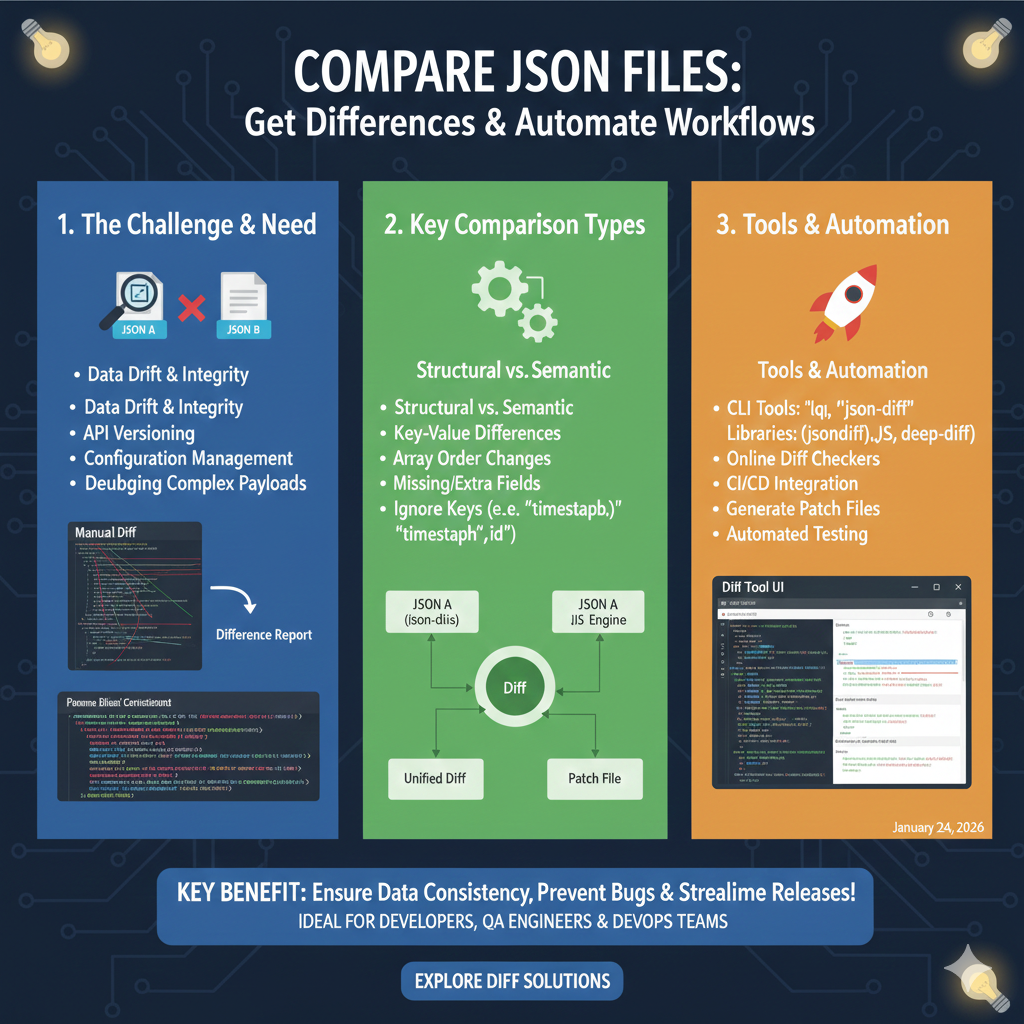
This technical roadmap is divided into three sections: identifying the need for automated diffing, understanding comparison types, and exploring the automation ecosystem.
1. The Challenge & Need (Blue)
This module highlights the risks of manual data management in modern development:
- Integrity Risks: Directly addresses concerns regarding Data Drift & Integrity.
- System Maintenance: Vital for managing API Versioning and Configuration Management.
- Complexity: Provides a solution for Debugging Complex Payloads where human error is likely.
- Visual Comparison: Contrasts a traditional Manual Diff with a modern, structured Difference Report.
2. Key Comparison Types (Green)
This section details the analytical logic used to compare two JSON objects:
- Analysis Depth: Distinguishes between Structural vs. Semantic changes.
- Granular Detection: Identifies specific Key-Value Differences, Array Order Changes, and Missing/Extra Fields.
- Smart Filtering: Includes the ability to Ignore Keys that are expected to change, such as “timestamps” or “id”.
- Process Flow: Shows a central Diff Engine processing JSON A (json-diis) and a JIS Engine to output a Unified Diff or a Patch File.
3. Tools & Automation (Orange)
The final pillar outlines the technical stack available for automating the comparison process:
- CLI & Libraries: Suggests tools like “lqi” and “json-diff”, alongside libraries such as (jsondiff).JS and deep-diff.
- Platform Integration: Promotes the use of Online Diff Checkers and full CI/CD Integration.
- Actionable Workflows: Enables teams to Generate Patch Files and conduct Automated Testing based on diff results.
- Interface: Displays a Diff Tool UI that provides a side-by-side visual representation of changes.
learn for more knowledge
Mykeywordrank-> Search for SEO: The Ultimate Guide to Keyword Research and SEO Site Checkup – keyword rank checker
json web token->jwt react Authentication: How to Secure Your react app with jwt authentication – json web token
Json Parser ->How to Effectively Use a JSON Parser API: A Comprehensive Guide – json parse
Fake Json –>fake api jwt json server: Create a free fake rest api with jwt authentication – fake api
Leave a Reply