Introduction: The Crucial Role of an api response comparison tool
In the world of modern software development, APIs are the backbone of communication between systems. Whether you’re developing, testing, or integrating with an api, ensuring that api responses are accurate and consistent is paramount. This is where an api response comparison tool becomes an indispensable asset.
Manual comparison of api responses, especially with large or complex json or xml payloads, is not only time-consuming but also highly prone to errors. This guide will walk you through comparing responses effectively and highlight what to look for in the best comparison tools.
Why comparing api responses is Essential
Before diving into the specific testing tools, let’s understand why this process is so critical for your data integrity:
- Debugging and Troubleshooting: When an application behaves unexpectedly, you need to compare the current json response with a known good one to pinpoint where the data deviates.
- Validating API Changes: After a code change, a json diff tool can highlight unintended side effects in the json structure.
- Ensuring Consistency: Use a tool to compare json across development, staging, and production environments to prevent environment-specific bugs.
- Automated Testing and Regression: Integrating a json compare tool into your CI/CD pipeline ensures that new deployments don’t break existing api contracts.
testing tools and Features: What to Look for in a json compare tool
To choose the best tool for comparing api responses, consider these key features:
Support for Various Formats
A robust api response comparison tool should handle common formats like json, xml, and even yaml. Whether you are looking at a simple query result or complex documentation examples, the tool must parse the data correctly.
Intelligent json diff Capabilities
Beyond simple line-by-line checks, a high-quality json compare utility understands the json structure. It should highlight json differences in nested objects or missing key values without being distracted by simple indentation changes.
Ignoring Dynamic fields
api responses often contain dynamic data like timestamps, request_id, or unique IDs. The best comparison tools allow you to configure specific fields to ignore during the test, ensuring you only see meaningful json differences.
How to compare json and api responses: A Step-by-Step Guide
While the specific query might change, the general process of json comparison follows these steps:
- Obtain Reference Response: This is your “expected” data from your documentation or a previous successful test.
- Get Actual Response: Make the api call and capture the current json response.
- Input into the Tool: Paste both into your chosen json diff tool.
- Analyze the Comparison: Use the visual json diff to find mismatches in the key or data values.
- Refine Filters: Set the tool to ignore volatile fields like
createdAtorid.
Example: In a json response, you might want to compare data while ignoring the
requestIdkey, as it changes with every response.
Popular comparison tools for json and api Testing
- Online Tools: Quick platforms like JSON Diff or JSONCompare are great for a one-off json comparison.
- IDE Extensions: Tools in VS Code allow you to compare json files directly in your workspace.
- Dedicated API Platforms: In 2025, tools like Postman, Insomnia, and Bruno offer built-in scripts to compare responses automatically.
- AI-Powered Tools: New services like Keploy or HyperTest can now compare data by recording traffic and automatically identifying json differences.
Conclusion
An effective api response comparison tool is a necessity for modern development. By using a dedicated json diff tool, you reduce debugging time and ensure the quality of every response. Choose a tool that fits your workflow—whether it’s a simple online json compare tool or a programmatic library—and start comparing with confidence.
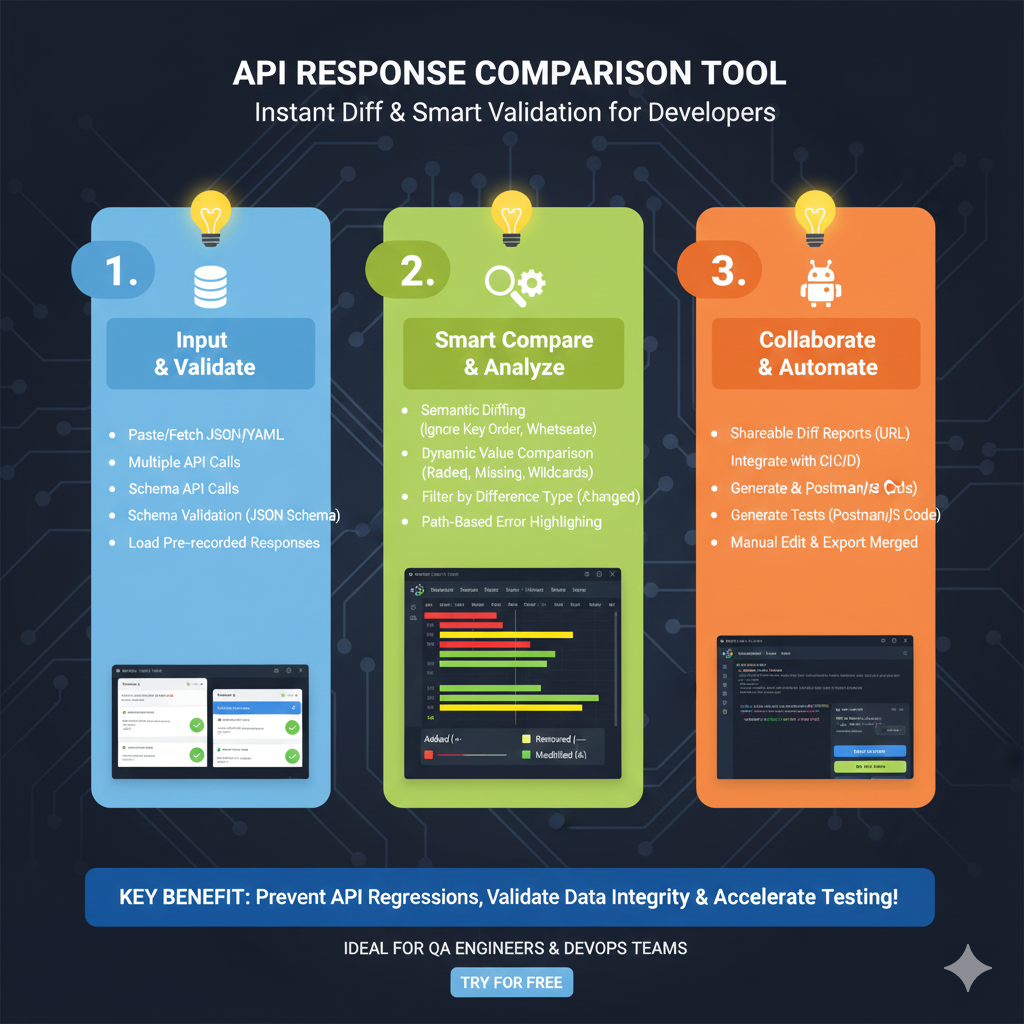
The infographic titled “API RESPONSE COMPARISON TOOL: Instant Diff & Smart Validation for Developers” outlines a professional workflow for identifying regressions and maintaining data integrity across API versions.
🛠️ The Three Stages of API Validation
The graphic is organized into three functional pillars to help QA Engineers and DevOps teams automate their testing:
1. Input & Validate (Blue)
This initial stage focuses on gathering the data sets you wish to compare:
- Multi-Source Ingestion: Users can Paste or Fetch JSON/YAML data directly.
- Live Integration: The tool supports Multiple API Calls and Schema API Calls to pull real-time production or staging data.
- Verification: Includes Schema Validation (JSON Schema) and the ability to Load Pre-recorded Responses to ensure the input format is correct before analysis.
2. Smart Compare & Analyze (Green)
This section details the advanced logic used to find meaningful differences:
- Intelligent Diffing: Features Semantic Diffing, which ignores non-breaking changes like key order or whitespace.
- Deep Analysis: Utilizes Dynamic Value Comparison to identify missing fields or wildcard mismatches.
- Visualization: Provides Path-Based Error Highlighting and allows users to Filter by Difference Type (Changed, Added, or Removed) for faster debugging.
3. Collaborate & Automate (Orange)
The final stage covers how to turn findings into actionable development tasks:
- Reporting: Generate Shareable Diff Reports (URL) to communicate issues with team members.
- CI/CD Integration: The tool can be integrated into automated pipelines to catch regressions early.
- Script Generation: Automatically Generate Postman/JS Code and tests based on the comparison results.
- Finalization: Includes features for Manual Editing & Exporting Merged JSON files.
learn for more knowledge
Mykeywordrank-> SEO Search Optimization-Mastering Search Engine Optimization for Unbeatable Google Rankings – keyword rank checker
json web token->jwt header-The Complete Guide to json web token Metadata – json web token
json parser->How to json array parser- A Comprehensive Guide for Developers – json parse
Fake Json –>dummy json online- Mastering fake api Testing with json, json dummy data, jsonplaceholder, and mockaroo – fake api
Leave a Reply