How to Effectively Compare JSON Files: A Comprehensive Guide
In the world of web development, data is often exchanged and stored in JSON (JavaScript Object Notation) format. Whether you’re debugging APIs, tracking configuration changes, or validating data integrity, the need to compare two JSON files accurately is a common task. This guide will walk you through various methods and tools to efficiently compare JSON files, from simple manual checks to advanced programmatic solutions.
Why Compare JSON Files?
Comparing JSON files is crucial for several reasons:
- Debugging: Identify discrepancies in API responses or data payloads.
- Configuration Management: Track changes between different versions of configuration files.
- Data Validation: Ensure data consistency and integrity across systems.
- Code Review: Understand modifications in data structures within your codebase.
Methods for Comparing JSON Files
1. Manual Comparison (For Small Files)
For very small JSON files, a quick visual inspection might suffice. However, this method is highly prone to errors and impractical for larger, more complex files due to the hierarchical nature and potential reordering of keys.
2. Using Text Editors with Diff Capabilities
Many modern text editors and IDEs come with built-in or plugin-based diff tools that can highlight differences between two text files. While not JSON-specific, they can be useful if the JSON is well-formatted.
- Visual Studio Code: Open both files, right-click one, and select “Select for Compare”. Then right-click the second and select “Compare with Selected”.
- Sublime Text: Requires a “Sublime Merge” or similar diff plugin.
- Notepad++: Install the “Compare” plugin.
3. Command-Line Tools
For developers who prefer the terminal, several command-line tools can help compare JSON files.
diff Utility
The standard Unix diff utility can compare two files line by line. For JSON, it’s best to first pretty-print the JSON to ensure consistent formatting, otherwise, differences in whitespace or key order can lead to false positives.
# Pretty-print JSON files before comparing
jq . file1.json > file1_pretty.json
jq . file2.json > file2_pretty.json

diff file1_pretty.json file2_pretty.json
The jq tool is indispensable for processing JSON from the command line. Using jq . pretty-prints the JSON, ensuring a consistent format for comparison.
jd (JSON Diff)
jd is a dedicated command-line tool designed specifically for JSON comparison. It handles key reordering and array element reordering gracefully.
jd file1.json file2.json
Install jd using pip: pip install jd
4. Online JSON Comparison Tools
Numerous web-based tools offer intuitive interfaces for comparing JSON files. These are great for quick comparisons without installing any software.
- JSON Compare: (e.g., jsoncompare.com, diffchecker.com) These tools typically allow you to paste or upload two JSON strings/files and visually highlight the differences. Many offer options to ignore key order, whitespace, etc.
5. Programmatic Comparison (Using Libraries)
For automated workflows, integrating JSON comparison into your code is often the best approach. Most programming languages have libraries that can parse and compare JSON objects.
Python Example
Using Python’s built-in json module to load data and then comparing dictionaries.
import json

def compare_json_files(file1_path, file2_path):
    with open(file1_path, 'r') as f1, open(file2_path, 'r') as f2:
        json1 = json.load(f1)
        json2 = json.load(f2)

    # For simple equality check (order matters for lists, keys for dicts do not)
    # This might not ignore key order within objects unless they are converted to canonical form.
    # A more robust comparison might involve sorting keys or using a diff library.
    if json1 == json2:
        return "Files are identical."
    else:
        # A more detailed diff would require a dedicated library like 'jsondiff' or 'deepdiff'
        return "Files are different. More detailed diff needed for specifics."

# Example usage:
# print(compare_json_files('file1.json', 'file2.json'))
JavaScript/Node.js Example
Using JSON.parse() and a library like deep-object-diff or json-diff.
const fs = require('fs');
const diff = require('deep-object-diff').diff; // npm install deep-object-diff

function compareJsonFiles(file1Path, file2Path) {
    const json1 = JSON.parse(fs.readFileSync(file1Path, 'utf8'));
    const json2 = JSON.parse(fs.readFileSync(file2Path, 'utf8'));

    const differences = diff(json1, json2);

    if (Object.keys(differences).length === 0) {
        return "Files are identical.";
    } else {
        return "Files are different. Differences found:\n" + JSON.stringify(differences, null, 2);
    }
}

// Example usage:
// console.log(compareJsonFiles('file1.json', 'file2.json'));
Note: For Node.js, you’d typically install deep-object-diff via npm install deep-object-diff.
Best Practices for JSON Comparison
- Normalize First: Always pretty-print or sort keys before comparing, especially with text-based diff tools, to avoid superficial differences.
- Choose the Right Tool: Select a tool based on file size, frequency of comparison, and whether you need to ignore specific differences (e.g., whitespace, key order).
- Understand Output: Familiarize yourself with how your chosen tool indicates differences.
Conclusion
Comparing JSON files is a fundamental task for developers and data professionals. By leveraging the right tools—whether it’s a simple command-line utility, a feature-rich online service, or a robust programming library—you can efficiently identify and manage discrepancies in your JSON data, ultimately streamlining your development and debugging processes.
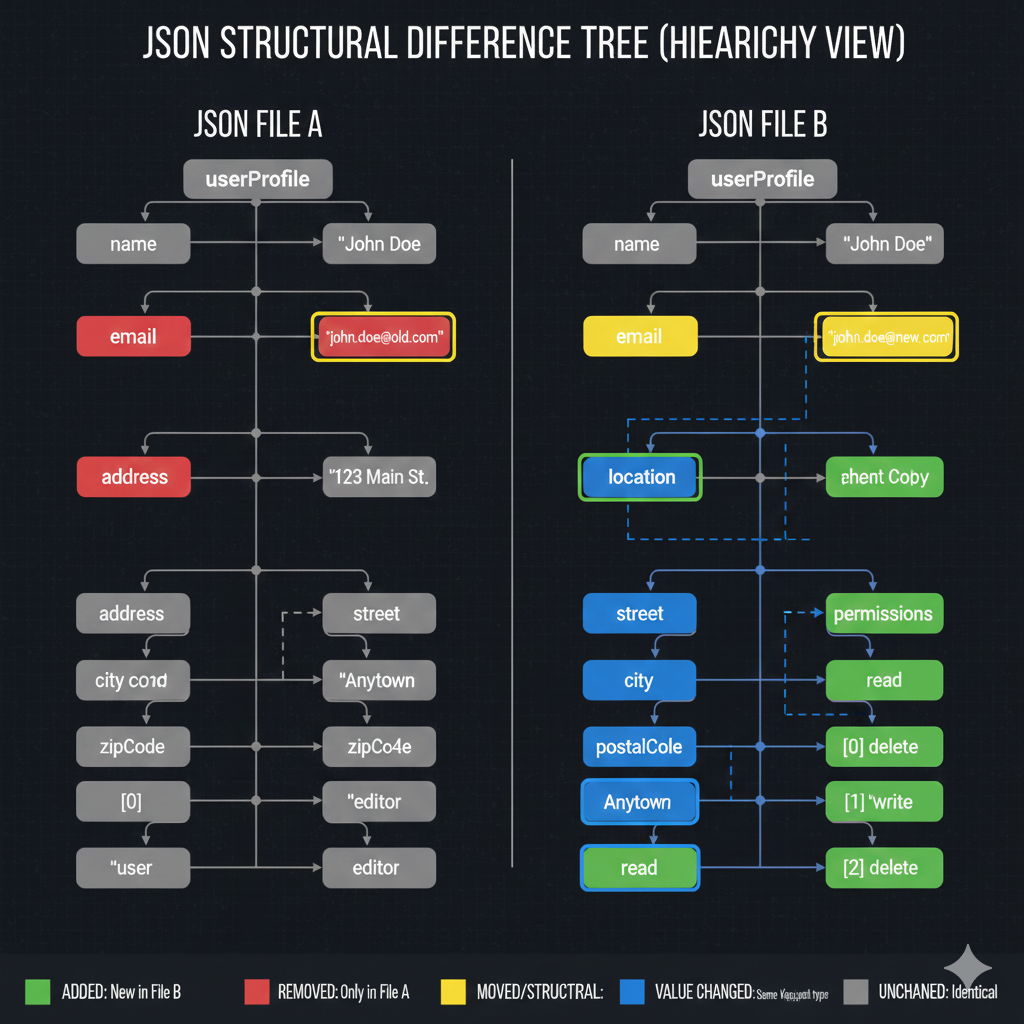
Key to Differences
- 🟥 REMOVED: Only in File A: Elements that were deleted in File B.
- 🟩 ADDED: New in File B: Elements that were created in File B.
- 🟨 MOVED/STRUCTURAL: Keys that exist in both files but have a different hierarchy or structure.
- 🟦 VALUE CHANGED: Keys that have the same structure and key name, but the associated data value is different.
- ⬜ UNCHANGED: Identical: Elements that are exactly the same in both files.
🔍 Analysis of Changes
The comparison reveals significant restructuring and data updates within the userProfile object:
1. Unchanged Elements (Identical)
- The top-level object
userProfileremains the root. - The key
nameretains the value"John Doe".
2. Value Changes (Blue)
- The key
emailhas the same structure but a different value:- File A Value:
"john.doe@old.com" - File B Value:
"john.doe@new.com"
- File A Value:
3. Removed Elements (Red)
- The top-level key
addresswith the value"123 Main St."has been removed. - The nested key
city(which had the value"Anytown") has been removed from its original location. - The key
zipCode(with the valuezipCo4e) has been removed. - The nested key
[0] "user"(with the valueeditor) has been removed.
4. Added Elements (Green)
- A new array element
[0] deleteis added underpermissions. - A new array element
[1] "write"is added underpermissions. - A new array element
[2] deleteis added underpermissions. - A new key
permissionsis added.
5. Moved/Structural Changes (Yellow/Structural Blue)
- The key
emailis marked as MOVED/STRUCTURAL (yellow) even though only its value changed, suggesting the visualization prioritizes any difference over an identical structure. - The key
locationis a new element (not strictly green/added) that seems to replace the oldaddresskey, demonstrating a structural change. - The key
address(which was the parent ofstreetandcityin File A) has been structurally replaced and reorganized in File B. - The key
streetis now a child oflocationand is also linked to the oldaddresskey. - The key
readis now linked to the newpermissionselement.
learn for more knowledge
Json Parser ->BeautifulSoup JSON Parser-Combining BeautifulSoup and JSON for Web Scraping – json parse
Json web token ->What Is Okta JWT? (Beginner-Friendly Explanation) – json web token
Mykeywordrank ->Search for SEO: The Ultimate Guide to Keyword Research and SEO Site Checkup – keyword rank checker
Fake Json –>What Is JSON Fake API? (Beginner-Friendly Explanation) – fake api
Leave a Reply