How to Effectively Compare JSON Online: A Comprehensive Guide
In the world of web development and data exchange, JSON (JavaScript Object Notation) has become the de-facto standard. Whether you’re working with APIs, configuration files, or data serialization, dealing with JSON is an everyday task. But what happens when you need to identify subtle differences between two JSON structures? Manually comparing them can be a tedious and error-prone process. This is where an online JSON diff tool becomes indispensable.
What is an Online JSON Diff Tool?
An online JSON diff tool is a web-based utility designed to visually compare two JSON inputs (JSON files, strings, or $\text{URLs}$) and highlight their differences. It helps developers, testers, and data analysts quickly pinpoint additions, deletions, and modifications, making the process of debugging, merging, and verifying data much more efficient. This is the ultimate json compare online tool.
Why Use an Online JSON Diff and JSON Compare Tool?
For effective data management, leveraging an online JSON diff or json compare tool is crucial for streamlining your workflow.
- Efficiency: Save significant time compared to manual comparison.
- Accuracy: Eliminate human error in identifying differences.
- Visibility: Clearly visualize changes with color-coded highlighting in a diff view.
- Collaboration: Easily share comparison results with team members.
- Debugging: Quickly identify discrepancies in API responses.
How to Compare JSON Online: A Step-by-Step Guide for Diff
Using most online json diff tools to compare json is straightforward:
- Open the Tool: Navigate to your preferred online JSON diff website. Many tools are free online.
- Input JSON 1: Paste your first JSON string into the left input area.
- Input JSON 2: Paste your second JSON string into the right input area.
- Click “Compare”: Press the comparison button (often labeled “Diff”, “Compare”, or “Analyze”).
- Review Results: The tool will display the two JSON inputs side-by-side, highlighting differences (the diff).
Key Features to Look For in a Diff Tool
When selecting an online JSON diff tool to compare json, look for these features:
- Side-by-Side Comparison: Clear visual distinction between inputs in the diff view.
- Color-Coded Differences: Easily identify additions, deletions, and modifications.
- JSON Formatting/Beautification: Automatically pretty-print unformatted JSON data.
- Ignore Order of Keys/Arrays: Advanced options to handle non-strict comparisons.
- Privacy: Ensure the tool doesn’t store your sensitive data.
Example of JSON Diff (Compare Data)
Consider two JSON objects (a common json example):
JSON 1:
JSON
{
  "id": "user123",
  "name": "Alice Smith",
  "email": "alice.s@example.com",
  "roles": ["admin", "editor"]
}
JSON 2:
JSON
{
  "id": "user123",
  "name": "Alice Johnson",
  "email": "alice.j@example.com",
  "roles": ["admin", "viewer"],
  "status": "active"
}
An online diff tool would highlight all the changes, allowing you to easily compare data and see the diff in the JSON files.
Conclusion
Leveraging an online JSON diff tool is a smart move for anyone frequently working with JSON data. It streamlines the comparison process, enhances accuracy, and significantly boosts productivity. Integrate a reliable json compare tool into your daily workflow to make managing JSON differences effortless and error-free.
JSON Diff Online
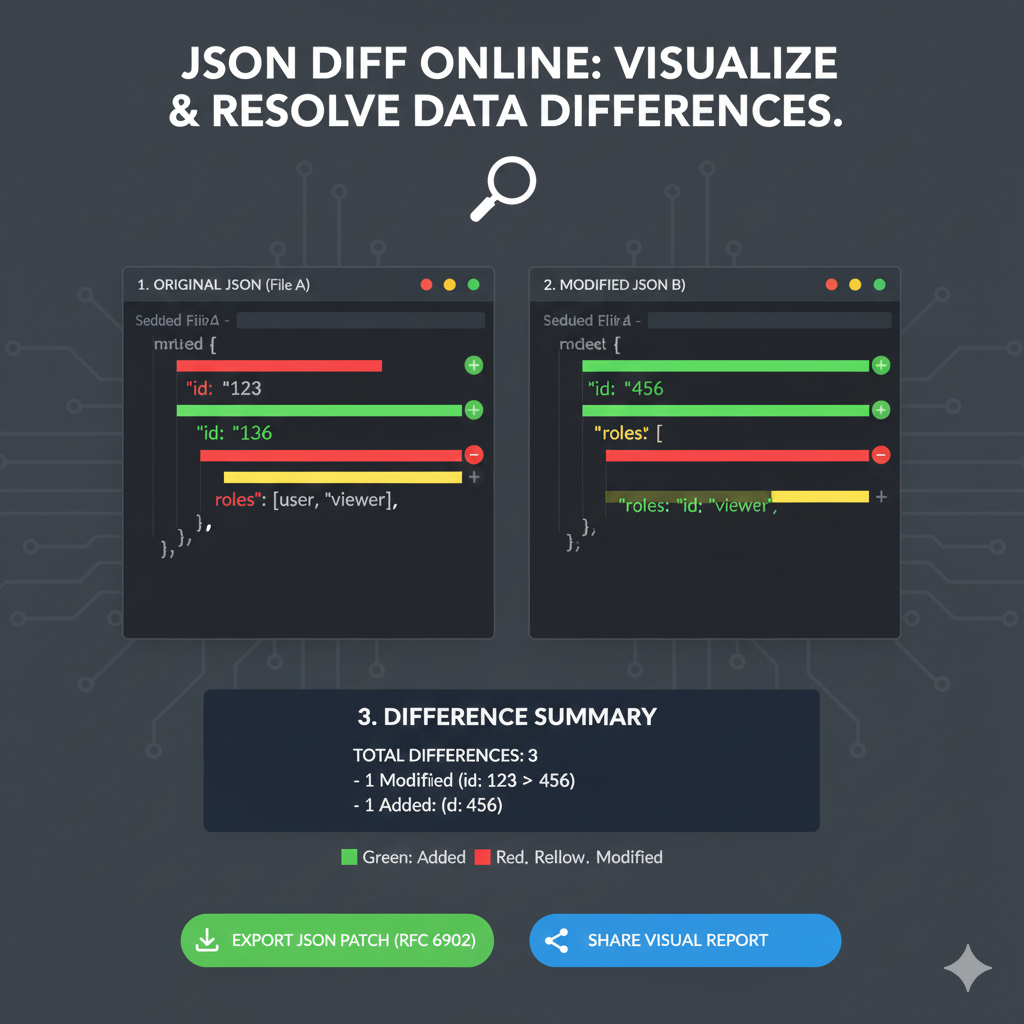
This infographic illustrates how an online tool compares two JSON documents (File A and File B) to quickly identify and report changes, a crucial process for debugging and API version control.
1. Side-by-Side Comparison
The core of the infographic shows the original data versus the modified data, with color-coding to highlight the precise changes.
| Status | 1. ORIGINAL JSON (File A) | 2. MODIFIED JSON (File B) |
| Modified | The id value is 123. | The id value is changed to 456 (highlighted in Yellow). |
| Removed | The roles array contains the value viewer. | The value viewer is missing from the roles array (highlighted in Red). |
| Added | The id key/value pair is missing. | A new id key/value of 456 is added (highlighted in Green). |
| Unchanged | Keys like name, email, preferences, and last_login are identical in both files. | These values remain the same and are unhighlighted. |
2. Difference Summary
The tool provides an immediate, concrete count and description of the changes found.
- TOTAL DIFFERENCES: 3
- 1 Modified: (id: 123 to 456)
- 1 Removed: (role:
"viewer") - 1 Added: (id: 456)
3. Actionable Output & Key
- Actionable Outputs: The tool offers options to Export JSON Patch (RFC 6902) and Share Visual Report.
- Color Key:
- Green: Added
- Red: Removed
- Yellow: Modified
learn for more knowledge
Json Parser ->What Is jQuery JSON Parser, jQuery. Parse.Json, JSON.parse, jQuery.getJSON, ParseJSON Explanation) – json parse
Json web token ->What is protegrity tokenization, data protection, tokenization, vaultless tokenization – json web token
MyKeywordrank ->SEO Optimization Checker: Mastering Website SEO Optimization and Rankings – keyword rank checker
Leave a Reply