How to Effectively Compare Two JSON Objects
In the world of web development, data validation, and API testing, encountering and needing to compare JSON (JavaScript Object Notation) objects is a common task. Whether you’re debugging an API response, ensuring data integrity, or migrating data, understanding the differences (diff) between two JSON structures is crucial. This guide will walk you through various methods to effectively compare 2 json structures.
Why Compare JSON Objects?
JSON is the de facto standard for data interchange on the web. As such, comparing two JSON payloads can help you:
- Debug API Responses: Quickly spot discrepancies between expected and actual API outputs.
- Validate Data Integrity: Ensure that data transformations or database updates maintain the correct structure and values.
- Track Configuration Changes: Monitor alterations in configuration files stored as JSON.
Methods for Comparing JSON (JSON Compare Tool)
The best way to compare json depends on whether you need quick visual diff or robust programmatic control.
1. Manual Comparison (Not Recommended)
For very small JSON snippets, you might be able to visually scan and identify differences. However, this method is highly prone to errors and incredibly inefficient for anything beyond a few key-value pairs. It’s almost always better to automate this process using a dedicated compare tool.
2. Programmatic Comparison (The JSON Compare Tool Approach)
The most robust and repeatable way to compare 2 json objects is programmatically. This allows for deep comparison, ignoring irrelevant keys, or focusing on specific data points.
Python Example: Using Deepdiff
Python’s DeepDiff library treats JSON objects like nested Python dictionaries and lists, allowing for precise identification of changes between the two data json structures.
Python
# ... (Example Code Snippet) ...

# Compare the two JSON objects
diff = DeepDiff(data1, data2, ignore_order=True)
# ... (Output) ...
JavaScript Example: Deep Comparison
For deep comparison in JavaScript, a recursive function or a library like Lodash’s _.isEqual is needed to correctly compare all nested objects and data in the JSON documents.
3. Online JSON Comparison Tools (JSON Compare Online)
For quick, ad-hoc comparisons without writing code, online JSON comparison tools are incredibly useful. Websites like jsondiff.com or jsoncompare.com allow you to paste two JSON strings and visually highlight their differences. This method offers a visual diff view, making it easy to compare data instantly. You can usually save or share the results.
- Pros: Quick, no setup, visual diff.
- Cons: Security concerns for sensitive data, limited customization for comparison rules.
Key Aspects to Consider When You Compare JSON
When using a json compare tool or writing your own script, always consider these factors:
- Order of Keys: Typically, the order of keys in a JSON object does not matter. Most comparisons handle this.
- Order of Array Elements: This often matters. If the list order is irrelevant, ensure your compare tool or library supports ignoring array order.
- Data Types: A number
123is different from a string"123". A robust comparison will flag this. - Nested Structures: Ensure your method performs a deep comparison, traversing all nested json objects and arrays.
- Ignoring Specific Keys: Advanced tools allow you to ignore certain keys (e.g., timestamps) that are expected to diff when you compare 2 json inputs.
Conclusion: Make the Right Diff Choice
Comparing two JSON objects is an essential skill for anyone working with JSON data formats. While manual inspection is suitable only for the smallest cases, programmatic solutions using libraries provide robust, automated, and customizable comparisons of the JSON documents. For quick checks, the json compare online method and its visual diff view offer a convenient alternative, effectively serving as a text compare tool tailored for the json format. Choose the compare tool or method that best suits your needs for accuracy, speed, and security.
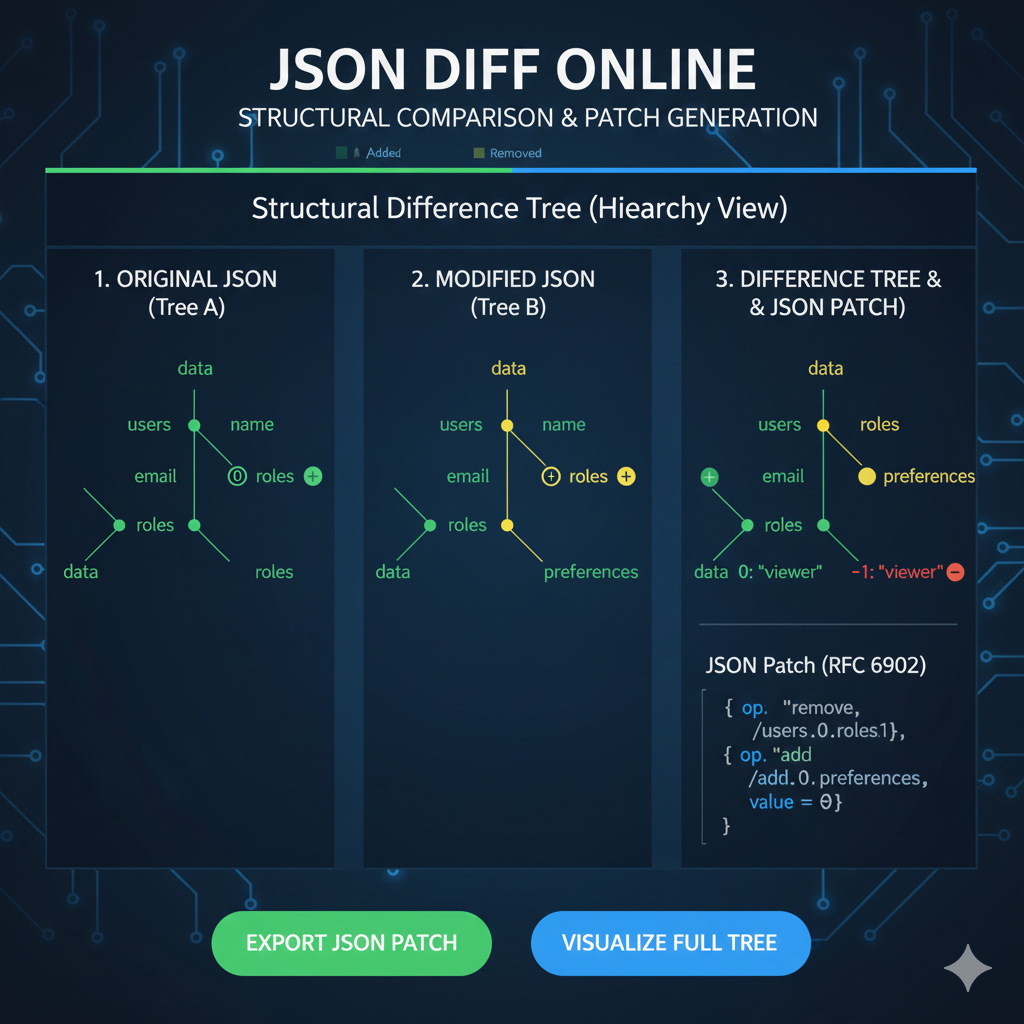
The image provided is an infographic titled “JSON DIFF ONLINE: STRUCTURAL COMPARISON & PATCH GENERATION”. It illustrates the concept of the Structural Difference Tree for comparing two JSON documents and generating a standard JSON Patch.
Here is the structured content for this infographic:
Structural Difference Tree (JSON Diff)
This infographic details the process of comparing two JSON files (Tree A and Tree B) using a structural, hierarchical view, which is essential for generating precise change instructions (JSON Patches).
1. Original JSON (Tree A)
This column represents the baseline or original JSON file, visualized as a hierarchical tree.
- Structure: Shows the key hierarchy, starting from the
dataroot, branching tousers, and then to keys likename,email, androles. - Status: All elements are initially marked as present (implied baseline status).
2. Modified JSON (Tree B)
This column represents the new or updated JSON file, showing the resulting structure after modifications.
- Changes:
- A new element,
preferences, is introduced underusers. - The
roleskey underusersis marked with a plus and minus sign, indicating that its content has been altered.
- A new element,
3. Difference Tree & JSON Patch
This final column displays the comparison result and the resulting actionable output.
- Difference Tree Visualization:
- The
emailkey has a Green plus sign, indicating it was Added or modified to a new state. - The
roleskey is Yellow, indicating it was Modified. The child nodevieweris marked with a Red minus sign, showing it was Removed from the array. - The
preferenceskey is Yellow, indicating a modification or addition to this branch.
- The
- JSON Patch (RFC 6902): The most important output is the JSON Patch, a standard format detailing only the required operations to transform Tree A into Tree B.
- The patch includes operations like:
{"op": "remove", "/users/0/roles/1"}{"op": "add", "/add/0/preferences", "value = 0"}
- The patch includes operations like:
learn for more knowledge
Json Parser ->What Is Node.js Body Parser? express body-parser (Explanation) – json parse
Json web token ->What Is Auth0 JWT, JSON Web Token – json web token
Mykeywordrank ->What Is Seo Rank and seo analyzer – keyword rank checker
Fake Json –>What is FakeStore API: Beginner-Friendly Guide to Using Fake E-Commerce Data – fake api
Leave a Reply