Instantly find differences between two JSON files with the best online JSON Diff tool. Understand why developers, QA and DevOps teams rely on JSON comparison for validation. This guide focuses on helping you compare JSON accurately.
Introduction: Why You Need an Online JSON Diff Tool
Imagine debugging an API where the response suddenly changes, or managing a complex application configuration that someone just updated. Manually scanning hundreds of lines of code to spot a single missing comma or a changed value is a recipe for errors and lost time.
This is where an Online JSON Diff Tool (or JSON Compare Tool) becomes your best friend. A JSON Diff tool is a web-based utility that compares two pieces of JSON data (usually labeled as “Original” and “Modified”) and highlights the precise differences in a clean, side-by-side, color-coded diff view. For any developer, QA engineer, or DevOps professional, mastering this comparison tool is crucial for data validation, version control, and rapid debugging when working with JSON data.
In this ultimate guide, we will explain exactly what a JSON Diff tool does, the key features you must look for, and why a semantic comparison is superior to a simple line-by-line text diff.
What Is an Online JSON Diff Tool and How Does It Work
At its core, “diffing” is the process of finding differences between two sets of data. When applied to JSON (JavaScript Object Notation)—the universal data-interchange format—it requires a specialized approach. The goal is to successfully diff JSON online.
Understanding JSON Structure
Unlike a simple text file, JSON has a rigid, hierarchical structure built on:
- Key-Value Pairs: E.g.,
"name": "Alice" - Objects: Denoted by curly braces
{} - Arrays: Denoted by square brackets
[]
A basic text-diff utility might flag an entire block as changed if a single piece of indentation or a key’s order is different. A sophisticated Online JSON Diff Tool uses a three-step process to provide meaningful results:
- Parsing: It first reads both JSON documents and converts them into a structured data tree. The compare tool relies on a robust JSON format formatter to handle both prettified and minified JSON.
- Semantic Comparison (JSON Comparison): It compares the data trees, ignoring non-data-related changes like whitespace, key order (in objects), and line breaks. It focuses purely on structural and value differences when you compare JSON files.
- Visualization: It maps the differences back to your original text, highlighting them clearly: Added data (unique to the ‘Modified’ version), Deleted data (unique to the ‘Original’ version), Modified/Changed values.
Top 5 Use Cases for JSON Comparison
Using an online JSON diff tool can dramatically speed up your workflow in several critical areas of software development. It makes it easy to compare data accurately.
- API Response Validation: Compare the current API response with the expected, known-good response to ensure the API is working correctly. This is the ultimate json compare online use case.
- Configuration Management: Check for unintended changes between different environment configuration files (often stored in JSON format).
- Data Migration & Synchronization: Verify that all data was transferred accurately during a database migration.
- Version Control and Code Review: Quickly review changes made to JSON files in Git/SVN using a diff view.
- Debugging: Compare a failing JSON output with a working one to pinpoint the exact line or value causing a bug.
Must-Have Features of the Best JSON Compare Tools
Not all online json diff tools are created equal. To boost your productivity and ensure accuracy when you compare json files, look for these advanced features:
Semantic Diffing Versus Text Diffing
This is the single most important feature for a good online json comparison tool. A semantic diff is structure-aware. It knows that reordering keys in an object does not constitute a structural difference and will show NO difference. A basic text diff would flag the whole file as changed.
Handling Unordered Arrays
Arrays are a common headache in JSON comparison. The best tools offer options to treat arrays as:
- Ordered: Position matters (standard array comparison).
- Unordered/Keyed: Tries to match items by a common ID field even if items are re-arranged.
Ignore Options
Advanced options should allow you to:
- Ignore Whitespace/Formatting: Essential for comparing minified JSON against prettified JSON.
- Ignore Key Paths: Specify fields (like timestamps or unique IDs to exclude from the comparison when you compare data.
Visualization and Navigation
- Side-by-Side View: Clear, indexed, and color-coded diff view.
- Tree View: Offers an interactive, collapsable tree view for deeply nested JSON objects.
- Diff Navigation: Buttons or shortcuts to jump directly to the Next Previous difference.
Conclusion: Choose the Right Tool for Reliability
An Online JSON Diff Tool is an indispensable part of the modern developer toolskit. By choosing a tool that offers semantic comparison and smart features, you ensure that you are focusing on genuine data changes, not just formatting noise. This leads to faster debugging, more accurate validation, and more robust software deployments. Mastering how to diff JSON online is key to professional development.
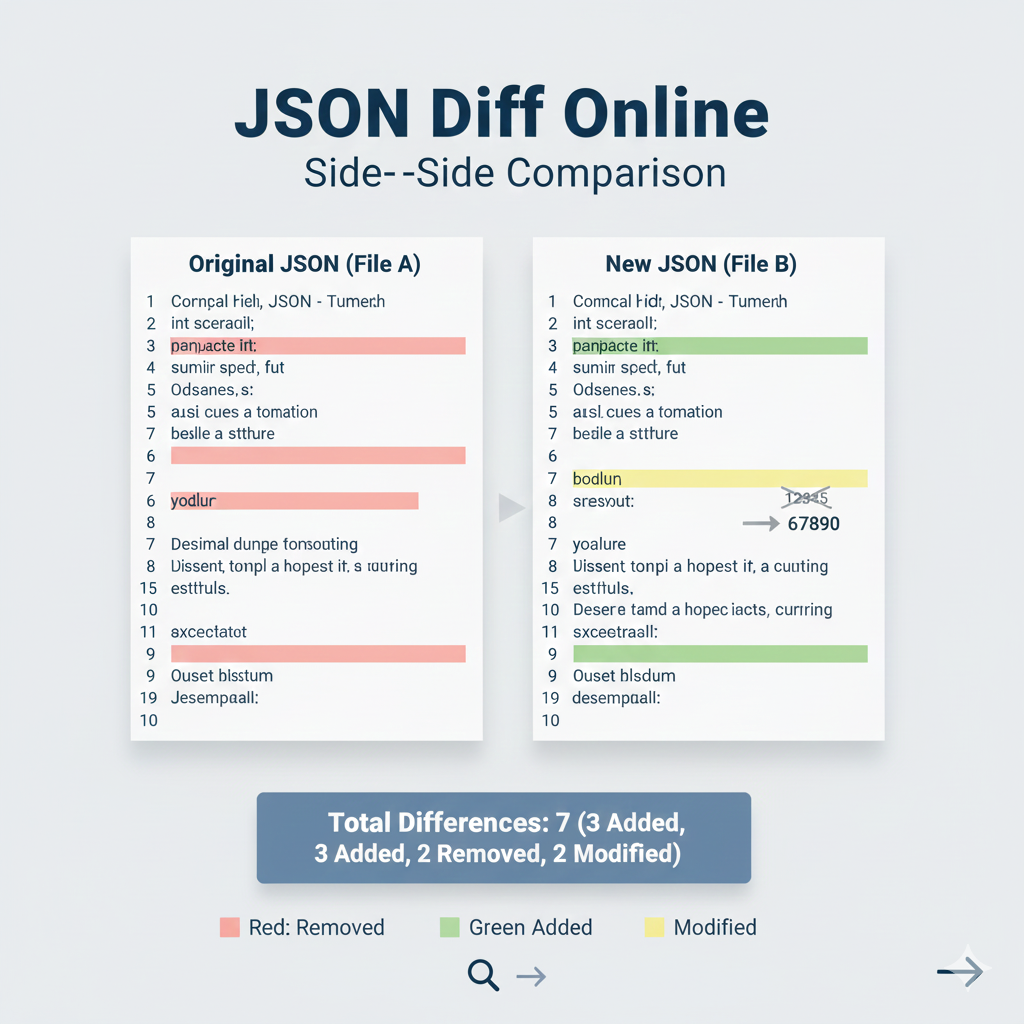
JSON Diff Online: Side-by-Side Comparison”
This infographic visually demonstrates the core utility of an online JSON Diff tool: quickly identifying structural and value differences between two JSON documents.
Title: JSON Diff Online: Side-by-Side Comparison
| Feature | Original JSON (File A) | New JSON (File B) |
| Input | Represents the base or Original JSON file. | Represents the modified or New JSON file. |
| Removed | Line 6, key yodlur is present. | The key yodlur is absent. |
| Added | Line 9, key Ouset blsstum is absent. | Line 9, key Ouset blsstum is present (highlighted in Green). |
| Modified | Line 7, key sresout has an old value. | Line 7, key sresout has a new value: 67890 (highlighted in Yellow). A visual cue shows old_value -> new_value. |
Summary & Color Key
- Total Differences:7
- 3 Added
- 2 Removed
- 2 Modified
- Color Key:
- Red: Removed
- Green: Added
- Yellow: Modified
learn for more knowledge
Json Parser ->APIDevTools JSON Schema Ref Parser: Resolving JSON Schema References – json parse
Json web token ->What Is JWT? (JSON Web Token Explained) – json web token
mykeywordrank->Google Search Engine Optimization (SEO)-The Key to Higher Rankings – keyword rank checker
Fake Json ->Fake API: Why Fake JSON APIs Are Useful for Developers – fake api
Leave a Reply