JSON Diff Online is a web-based tool that helps you compare two JSON files or JSON data. It highlights all the differences so you can easily see what has changed — such as added keys, removed keys, updated values, or structural changes.
It is commonly used by developers, testers, and API engineers who work with JSON data on a daily basis.
✨ Why JSON Diff Online Is Used
JSON Diff tools make it easy to:
- Find mistakes in JSON
- Compare API responses
- Detect changes in configurations
- Debug faster
- Save time during development
🔍 What JSON Diff Tools Highlight
Most JSON diff tools show:
🟩 Added Fields
New keys or values that were not present before.
🟥 Removed Fields
Keys or values that existed earlier but are now missing.
🟨 Modified Fields
Values that have been changed between the two JSON inputs.
⚙️ Popular Features in JSON Diff Tools
- Side-by-side view
- Color-coded differences
- JSON formatter / beautifier
- Copy–paste support
- Upload JSON file option
- Collapsible JSON structure
👨💻 Who Uses JSON Diff Online?
- Front-end developers
- Back-end developers
- QA testers
- Students learning APIs
- Anyone working with JSON data
🎯 Final Summary
JSON Diff Online is a simple but powerful comparison tool that helps you understand differences between two JSON inputs quickly. It improves debugging, accuracy, and productivity — especially when dealing with large JSON files.
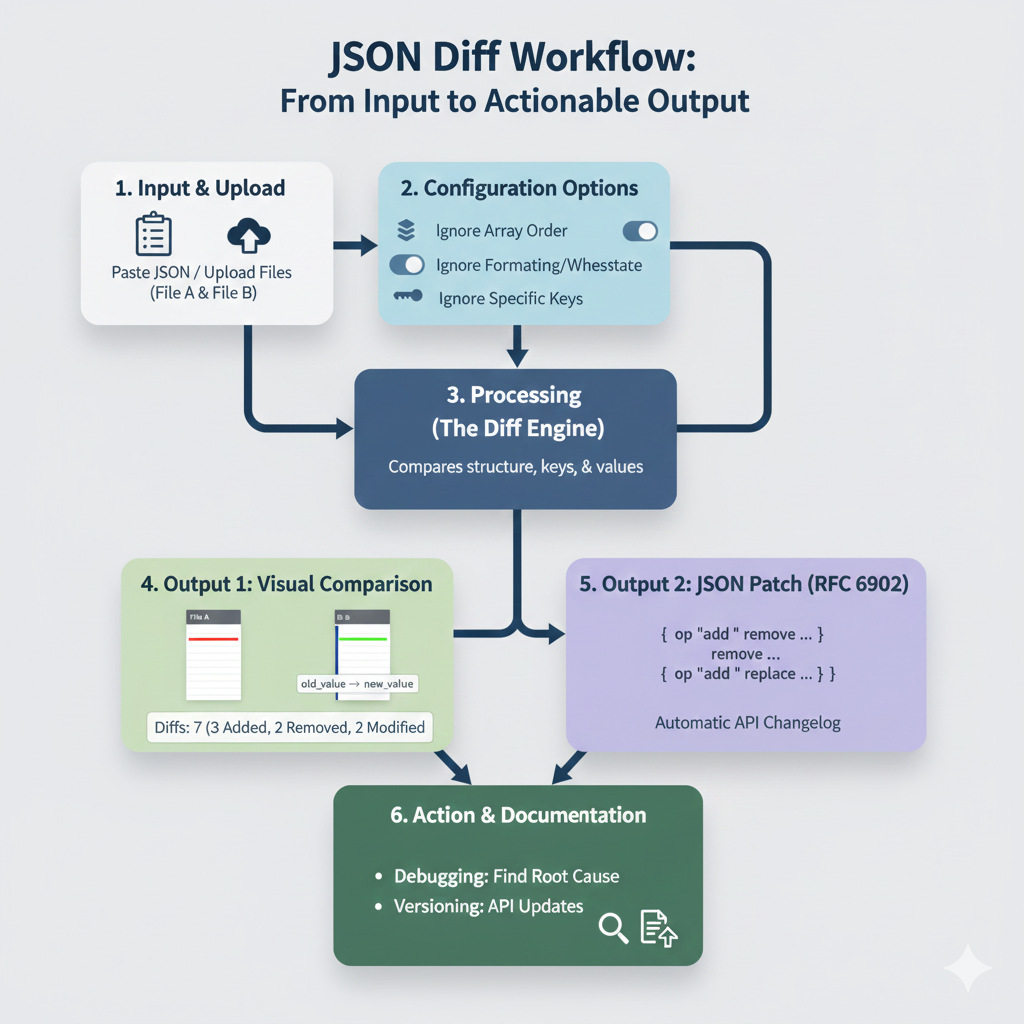
“JSON Diff Workflow” Infographic
This content breaks down the process of using an online tool to compare two JSON documents and generate useful, actionable outputs.
Title: JSON Diff Workflow: From Input to Actionable Output
| Step | Section | Description & Details |
| 1 | Input & Upload | The user pastes JSON or uploads File A (Original) and File B (New/Modified) to the tool. |
| 2 | Configuration Options | Users can enable settings to refine the comparison: * Ignore Array Order * Ignore Formatting/Whitespace * Ignore Specific Keys |
| 3 | Processing (The Diff Engine) | The engine compares the structure, keys, and values of the two files. |
| 4 | Output 1: Visual Comparison | Displays a side-by-side view highlighting differences. * Example shown: “Diffs: 7 (3 Added, 2 Removed, 2 Modified)” * Visual cue: old_value -> new_value is shown for modifications. |
| 5 | Output 2: JSON Patch (RFC 6902) | Generates an array of operations (op: "add", op: "remove", op: "replace") to serve as an Automatic API Changelog. |
| 6 | Action & Documentation | The final output is used for: * Debugging: Find Root Cause of issues. * Versioning: Document API Updates. |
Leave a Reply