Online Compare JSON tools are essential for developers, testers, and API engineers who work with structured data. These tools allow you to quickly compare JSON files, view differences, and ensure data consistency across environments. Using a JSON compare tool or JSON diff viewer simplifies debugging and helps maintain accuracy in your JSON documents. Whether you need a JSON comparator, formatter, or validator, these online JSON tools make your workflow faster and more efficient.
What Is Online Compare JSON?
Online Compare JSON refers to web-based tools that enable you to compare two or more JSON files. They instantly identify differences, such as missing keys, modified values, or newly added data fields. These tools are widely used for validating API responses, detecting structural issues, and formatting JSON for easier readability. With a reliable JSON compare tool, you can maintain consistency across your development, staging, and production environments.
Why Online JSON Comparison Tools Are Used
Online JSON comparison tools are designed to help you:
- Find differences quickly between two JSON objects
- Identify missing keys, values, or structure changes
- Validate API responses during development or testing
- Format and beautify JSON for better readability
- Ensure data integrity across multiple environments
By providing a clear diff view and highlighting modified, deleted, or added data, these tools make working with JSON files easier and more efficient.
How Online Compare JSON Tools Work
Most online JSON comparison tools work as follows:
- Paste two JSON texts (JSON A and JSON B) or upload JSON files
- The tool automatically parses and analyzes both JSON objects
- It highlights differences: deleted or missing values, modified keys or data, and new or added fields
These tools use JSON parsers internally to validate structure and ensure accurate comparison. Many also provide a diff tool, JSON validator, and formatter to help you clean and structure your data.
Common Features of Online JSON Compare Tools
Popular JSON compare tools include the following features:
- JSON diff checker
- JSON formatter and beautifier
- JSON minifier
- Syntax validation
- Tree view and side-by-side comparison
- Highlighting added, removed, or changed elements
- JSON upload and URL-based comparison
- Support for comparing JSON documents and files
Who Uses JSON Comparison Tools?
Online JSON tools are widely used by:
- Frontend developers
- Backend and API developers
- QA testers
- Automation engineers
- DevOps teams
- Students working on JSON-based projects
These tools are ideal for anyone needing to compare JSON files, validate data, or maintain consistency across environments.
Benefits of Using Online Compare JSON Tools
Using a reliable online compare JSON tool offers several advantages:
- Saves time and simplifies debugging
- Prevents errors in JSON data
- Makes complex JSON easier to read
- Helps maintain consistency between API versions
- Works directly in the browser — no installation required
Conclusion
Online Compare JSON tools are a must-have for developers, testers, and anyone working with JSON files or APIs. By providing features like JSON compare, JSON diff, JSON comparator, formatter, and validator, these tools ensure your JSON documents are accurate, structured, and error-free. Using an online JSON tool helps streamline your workflow, detect differences quickly, and maintain consistent data across all environments.
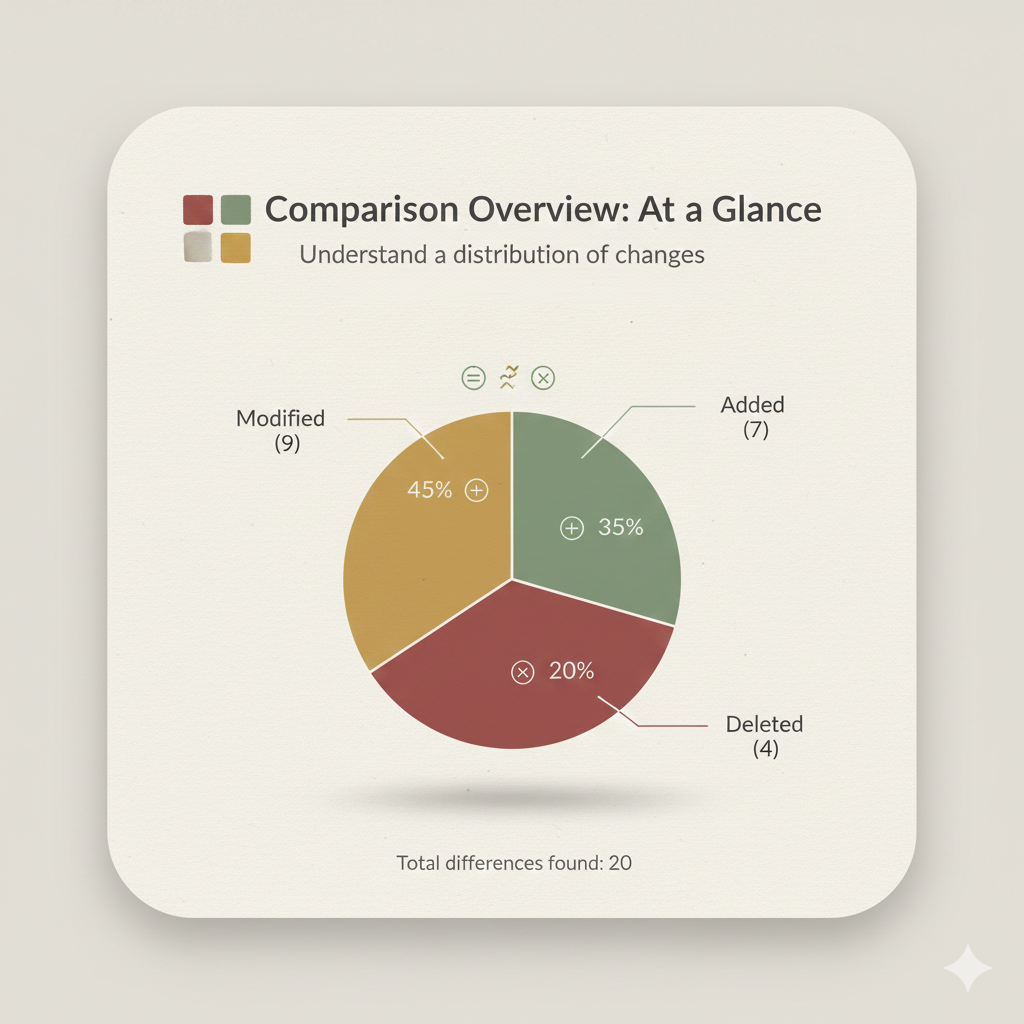
Side-by-Side Visual Diff Infographic:
Example Comparison
Left JSON:
{
  "id": 1001,
  "status": "active",
  "config": {
    "timeout": 30,
    "max_retries": 5,
    "features": [
      "logging",
      "caching",
      "monitoring"
    ]
  },
  "user": {
    "name": "Alice",
    "age": 30,
    "email": "alice@example.com",
    "settings": {
      "theme": "light",
      "notifications": true
    },
    "isAdmin": true
  },
  "version": 1.0,
  "deprecated_field": "remove_me"
}
Right JSON:
{
  "id": 1001,
  "status": "inactive",                           // MODIFIED (1/9)
  "config": {
    "timeout": 60,                               // MODIFIED (2/9)
    "max_retries": 5,
    "features": [
      "logging",
      "caching_new",                              // MODIFIED (3/9)
      "telemetry"                                // MODIFIED (4/9) (Note: "monitoring" was deleted, "telemetry" is a new value/modification)
    ],
    "region": "US-EAST"                          // ADDED (1/7)
  },
  "user": {
    "name": "Bob",                               // MODIFIED (5/9)
    "age": 31,                                   // MODIFIED (6/9)
    "settings": {
      "theme": "dark",                           // MODIFIED (7/9)
      "notifications": false                     // MODIFIED (8/9)
    },
    "lastLogin": "2025-01-01T00:00:00Z"          // ADDED (2/7)
    // "isAdmin": true is DELETED (4/4)
  },
  "version": 2.0,                                // MODIFIED (9/9)
  "new_api_key": "xyz123",                       // ADDED (3/7)
  "last_updated": "2025-11-27",                  // ADDED (4/7)
  "metadata": {
    "source": "manual",                          // ADDED (5/7)
    "checksum": "abcde"                          // ADDED (6/7)
  },
  "audit_flags": [
    "reviewed"                                   // ADDED (7/7)
  ]
  // "email": "alice@example.com" is DELETED (2/4)
  // "deprecated_field": "remove_me" is DELETED (3/4)
}
Comparison Output:
- 9 Modified: Keys that exist in JSON A but have a different value in JSON B.
- 7 Added: New keys/values not present in JSON A.
- 4 Deleted: Keys/values present in JSON A but removed in JSON B.
Leave a Reply