Blog

  • Compare Two JSON Online: Master the JSON Compare Tool Easily and Effectively

    How to Compare Two JSON Files Online Effectively

    In the world of web development, APIs, and data exchange, JSON (JavaScript Object Notation) has become the de facto standard. Developers frequently deal with JSON data, whether it’s configuring applications, debugging API responses, or managing data migrations. A common challenge arises when you need to understand the differences between two JSON objects or JSON files. Manually comparing complex JSON data can be tedious and error-prone. This is where online JSON comparison tools come to the rescue, offering a quick and efficient way to compare 2 json online and visualize json differences.


    Why is Comparing JSON Data Essential?

    Understanding the discrepancies between JSON structures is crucial for several reasons. Using a dedicated json compare tool provides a semantic, structural comparison rather than a simple text diff.

    • Debugging API Issues: Comparing the API’s response JSON before and after a code change quickly pinpoints modified values.
    • Configuration Management: Ensuring consistency between data sets (development, staging, production) often involves comparing configuration files.
    • Data Validation and Testing: Verifying if a data update or transformation has introduced unintended changes to your JSON data. This is essential for robust API testing.
    • Version Control: Getting a meaningful structural diff view of changes to large JSON files.

    How to Compare Two JSON Online: A Step-by-Step Guide

    Using an online JSON comparison tool is straightforward. Here’s a general guide on how to compare two JSON online:

    1. Choose a Reliable Tool: Search for “compare two json online” or “json compare tool” to find a reputable online service. Examples include SemanticDiff and Playcode.
    2. Input Your JSON Data: Copy and paste your first JSON string into the designated Input A or “Left Panel” area. Then, paste your second JSON string into the “Right Panel.” Many tools also allow you to access the tool and upload files.
    3. Prettify and Format: If your JSON is unformatted, click the “prettify” button. Prettify ensures clean alignment for the diff view, ignoring simple whitespace differences.
    4. Initiate Comparison: Click the “Compare” or “Diff” button.
    5. Review the Results: The tool will display the two JSON inputs side-by-side, highlighting the differences with distinct colors (visual diff).

    Key Features of a Premium Online JSON Diff Tool

    When selecting an online tool to compare JSON, look for the following features that go beyond simple text comparison:

    FeatureImportance for JSON Comparison
    Intelligent Structural DiffIdentifies changes in key-value pairs, array elements, and nested objects, not just line changes.
    Ignore Order/WhitespaceCrucial, as JSON key order and formatting often don’t matter semantically.
    Clear Visual IndicatorsDistinct colors for additions, deletions, and modified values in the diff view.
    Client-Side ProcessingEnsures privacy—your sensitive json data never leaves your browser/client.
    Three-Way MergeAdvanced feature for developers managing versions (compares Left, Right, and a common Base file).
    Handling Large Data SetsPerformance to efficiently handle voluminous json files without crashing.

    Benefits of Using an Online JSON Comparator

    Leveraging online JSON comparison tools brings numerous advantages to your development workflow:

    • Time-Saving: Automates a task that would be incredibly time-consuming and error-prone manually, especially with large data sets.
    • Accuracy: Provides an accurate, semantic breakdown of json differences and the resulting modified JSON.
    • Accessibility: Access the tool instantly from any device with an internet connection—no software installation is needed.
    • Efficiency: Quickly identifies differences for debugging or $\text{API}$ auditing purposes, improving overall development efficiency.

    Conclusion

    For anyone working with JSON data, the ability to efficiently compare two JSON online is invaluable. These tools streamline debugging, configuration management, and data validation processes, saving significant time and reducing errors. By understanding how to compare two JSON online and what features to look for in a json compare tool, you can significantly enhance your workflow and ensure data integrity. Next time you face a JSON comparison task, turn to a reliable online json diff tool for a fast and accurate solution!

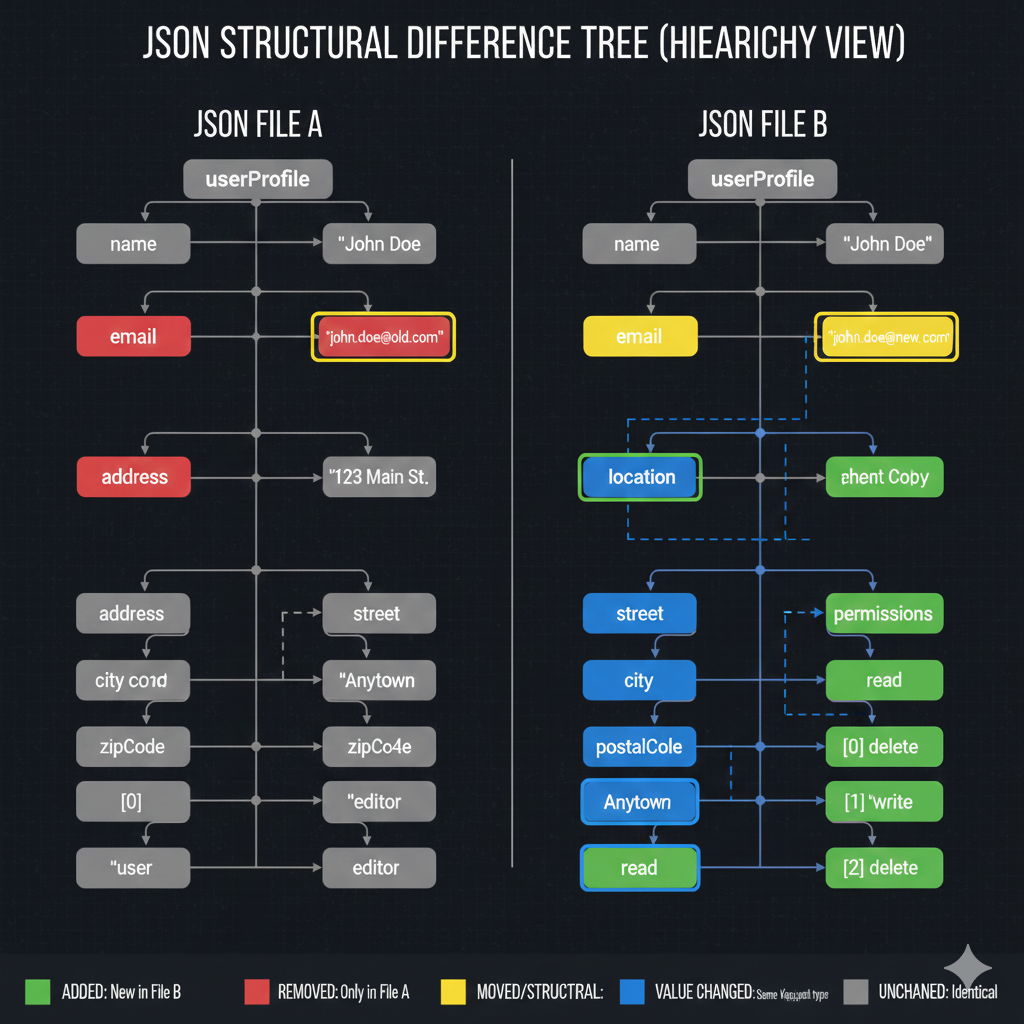
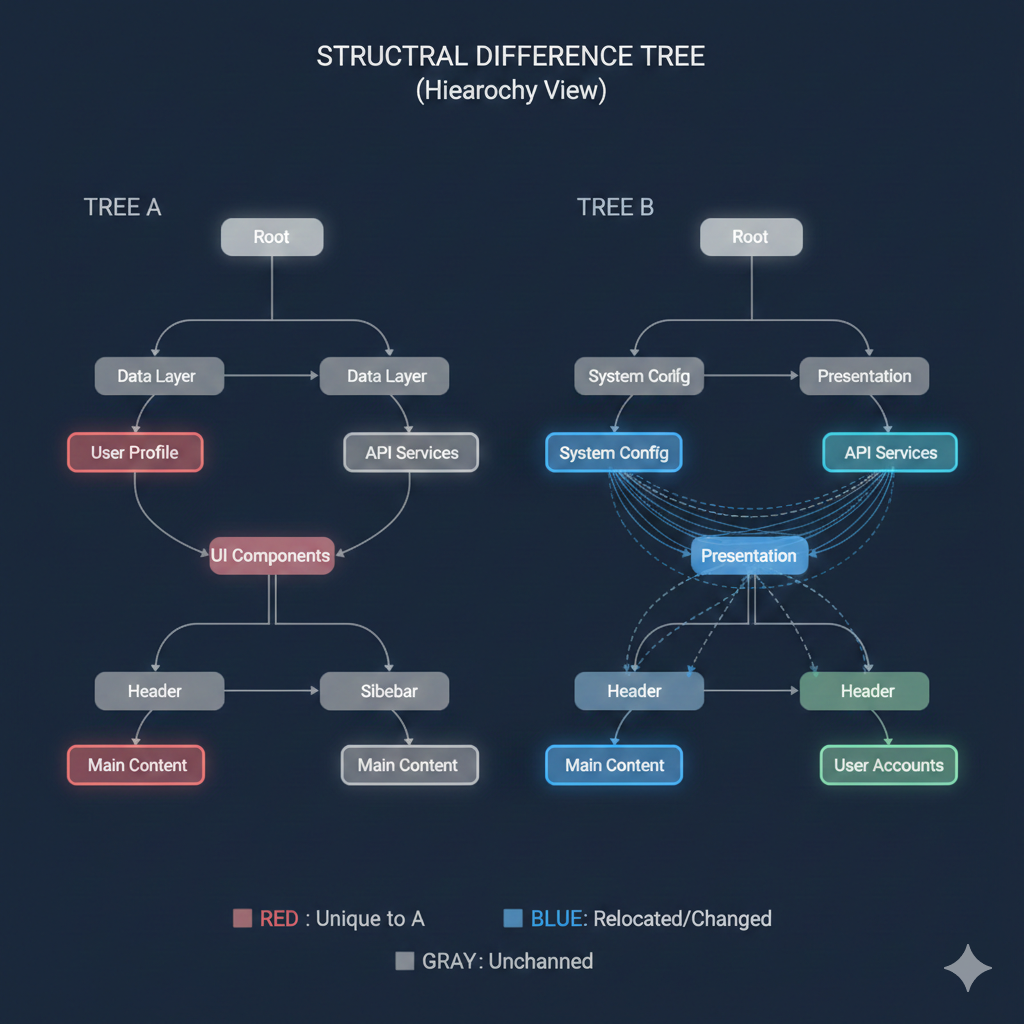
    Key to Structural Changes

    ColorLabelDescription of Change
    🟥 RedUnique to AElements that were present in Tree A but have been removed in Tree B.
    🟦 BlueRelocated/ChangedElements that have either moved within the hierarchy, or whose parent/child relationship has been modified.
    🟨 GreenUnique to BElements that are new in Tree B (The legend implies this, as Red is Unique to A, so a new element should be uniquely in B).
    ⬜ GrayUnchangedElements that remain in the same position with the same relationship as in Tree A.

    🔍 Structural Differences Analysis

    Based on the comparison of Tree A and Tree B:

    1. Deleted/Removed Elements (Unique to A – Red)

    • The “User Profile” node under “Data Layer” was removed.
    • The “UI Components” node has been removed.
    • The “Main Content” node under “Header” was removed.

    2. Relocated and Modified Elements (Blue)

    • “System Config” (originally under “Data Layer” in A, implied by its relation to “API Services”) has been relocated and is now a child of the “Root” in Tree B.
    • “Presentation” has been introduced as a parent/intermediate node.
    • “API Services” is now a child of “Presentation” in B, changing its hierarchy.
    • The sub-tree under the old “UI Components” (specifically “Header” and “Main Content”) has been restructured.
      • One “Header” and “Main Content” are now children of “Presentation”.
      • The other “Header” is also a child of “Presentation”.

    3. New Elements (Unique to B – Green)

    • A new node, “User Accounts”, has been added under one of the “Header” nodes.
    • The node “Presentation” is also a new element, serving as a key new branch point for many components.
    structure different tree

    learn for more knowledge

    Json Parser ->WHAT IS API JSON Parser – JSON Parser API – JSON.parse – json parse

    Json web token ->What Is OneSpan Token – json web token

    Mykeywordrank->Google Website Rank Checker- Track Your Keyword Rank and SEO Performance – keyword rank checker

    Fake Json –>Fake JSON API: Using JSONPlaceholder, DummyJSON, and Mock API – fake api

  • Compare Two JSON Files-Mastering the JSON Compare Tool for Developers

    How to Compare Two JSON Files Effectively for Developers

    In the world of modern web development and data exchange, JSON (JavaScript Object Notation) files are ubiquitous. From API$ responses and configuration files to database backups, you’ll encounter JSON everywhere. But what happens when you have two JSON files that look similar, and you need to identify their exact differences? Whether you’re debugging an API, validating data, or managing configuration versions, knowing how to compare two JSON files efficiently is a crucial skill.


    Why Compare JSON Files?

    Performing a JSON comparison can save you countless hours of manual inspection. Here are some common scenarios where a json compare tool is essential:

    • Debugging API responses where slight changes might lead to unexpected behavior.
    • Validating configuration files after an update to ensure no critical settings were accidentally altered.
    • Monitoring data changes between different versions of an application or database.
    • Ensuring consistency across multiple environments.

    Methods to Compare JSON Files

    There are several approaches to performing a JSON comparison, ranging from quick online tools to powerful command-line utilities and programmatic solutions. All methods aim to highlight the json differences in the json structure and json data.

    1. Online JSON Comparison Tools (JSON Compare Online)

    For quick, visual comparisons, online tools are often the most straightforward. They typically provide a side-by-side view, highlighting differences in json structure and values.

    • JSON Diff: Many websites offer this functionality. You simply paste your two JSON inputs, and they show you a visual json diff.
    • JSON Compare: Similar to JSON Diff, these comparison tools are user-friendly for a quick sanity check.

    Pros: Easy to use, visual representation, no installation required. You can often save and share the results.

    Cons: Privacy concerns for sensitive data, limited customization.

    2. Command-Line Tools for JSON Diff

    For developers who prefer the terminal or need to automate comparisons, command-line comparison tools are invaluable.

    Using diff with jq

    Combining the standard Unix diff utility with jq, a command-line JSON processor, helps normalize the JSON files before comparison.

    Bash

    # First, pretty-print and sort keys for consistent diff
    jq -S . file1.json > file1_sorted.json
    jq -S . file2.json > file2_sorted.json
    
    # Then, use diff to compare two json files
    diff file1_sorted.json file2_sorted.json
    

    The -S option in jq sorts the keys of json objects, which helps in getting a more meaningful json diff when the order of keys doesn’t matter.

    3. Programmatic JSON Comparison (Using a JSON Compare Tool Library)

    When you need fine-grained control, integration into a larger application, or complex logic for comparing JSON, programming languages offer the most flexibility. This is the most robust form of testing for json data.

    Python Example: DeepDiff

    The deepdiff library provides a powerful way to compare 2 json files intelligently, even when dealing with complex nested json objects.

    Python

    import json
    from deepdiff import DeepDiff # A dedicated json compare tool library
    
    # ... (loading files) ...
    
    # For a detailed, semantic diff, use a library like DeepDiff
    diff = DeepDiff(json1, json2, ignore_order=True) # ignore_order for arrays/sets
    print(json.dumps(diff, indent=2))
    

    The ignore_order option is particularly useful because it allows the json compare tool to treat arrays as sets if element order is not relevant to your comparison.


    Key Considerations When Comparing JSON

    When using a json compare tool to check for json differences, keep these critical aspects in mind:

    • Order of Keys: In JSON objects, the order of keys is not semantically significant. A good comparison tool will ignore key order.
    • Order of Array Elements: For arrays, the order usually is significant. Look for tools with an ignore_order option for arrays if order does not matter in your json file.
    • Data Types: Ensure your json comparison handles different data types correctly (e.g., "123" vs. 123).
    • Nested Structures: The ability to recursively compare two json files with deeply nested json objects is crucial.

    Conclusion

    Knowing how to compare two json files is an essential skill for anyone working with data and APIs. Whether you opt for a quick json compare online utility, the power of command-line tools like jq and diff, or the flexibility of programmatic solutions with libraries like Python’s deepdiff, choosing the right json compare tool depends on your specific needs, the sensitivity of the data, and the complexity of the json structure. Embrace these tools to streamline your development workflow and ensure data integrity.

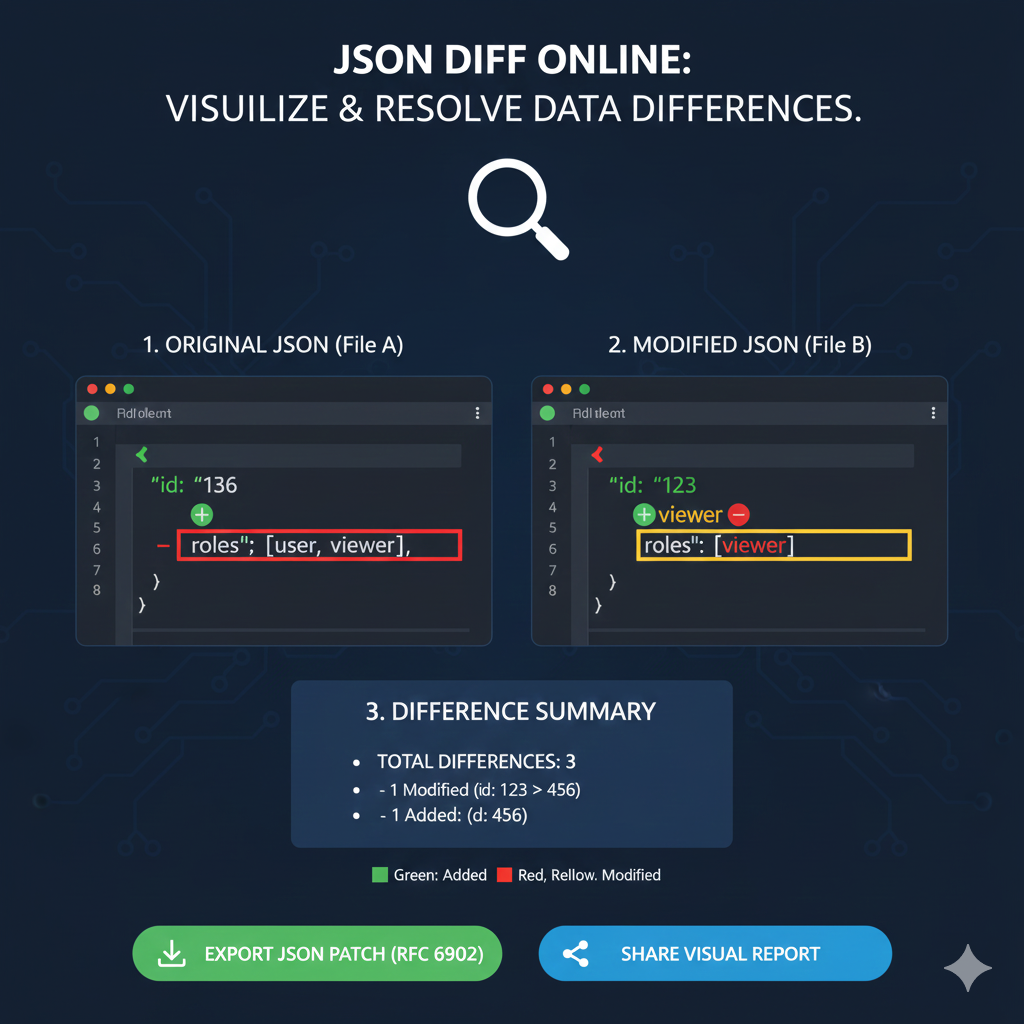
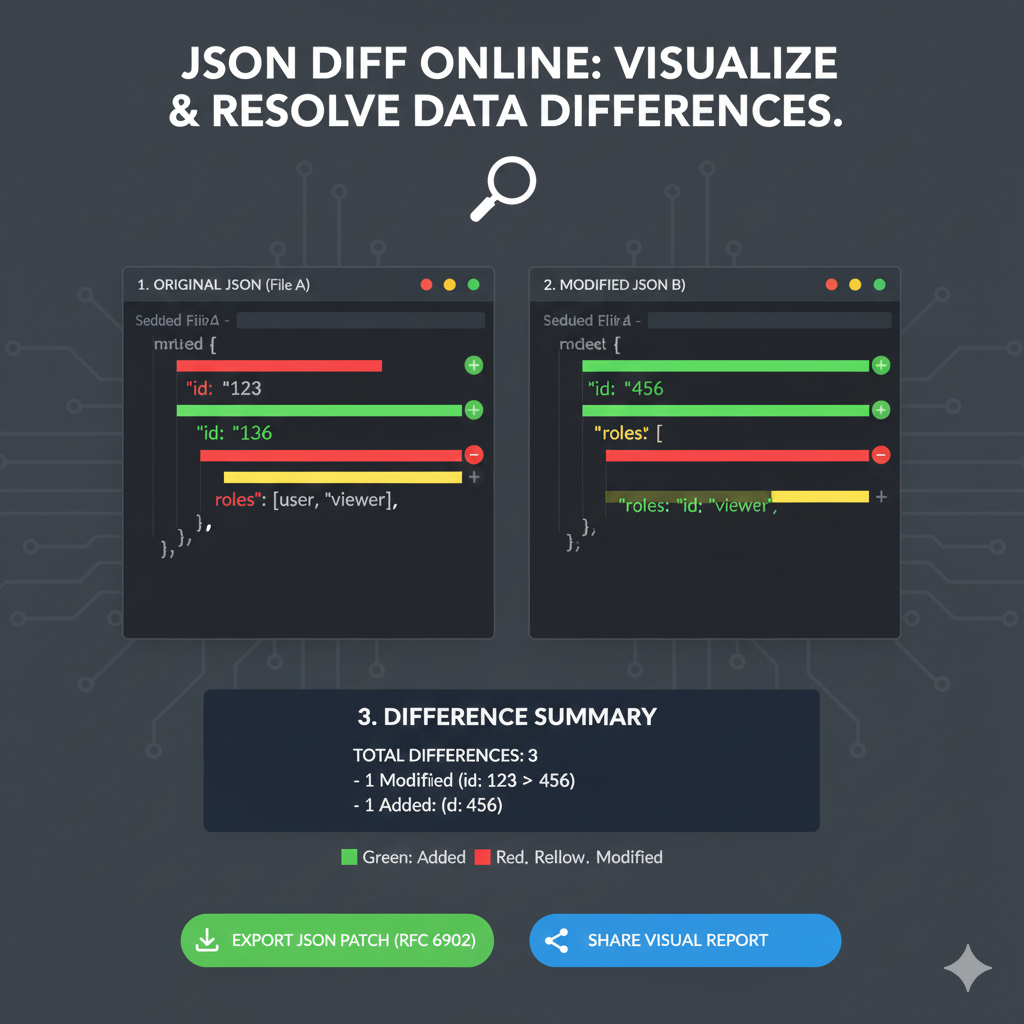
    JSON Diff Online: Visual Diff Report

    This infographic illustrates how an online tool compares two JSON documents (File A and File B) using color-coding to identify and summarize changes quickly.

    1. Original JSON (File A) vs. 2. Modified JSON (File B)

    The side-by-side view is the central feature, immediately highlighting differences between the baseline (File A) and the new version (File B).

    FeatureOriginal JSON (File A)Modified JSON (File B)Status Color
    id ValueShows id: "136" (implied original value).Shows id: "456" (the new value).Yellow (Modified)
    id Key (Example)Shows id: "123" and is marked as Removed (Red).The key id: "456" is marked as Added (Green).Red/Green (Removed/Added)
    roles ArrayShows roles: [user, viewer].Shows roles: [id: "viewer"], indicating the structure or contents were modified.Yellow (Modified)

    3. Difference Summary

    The tool provides an immediate, aggregated count of the changes found in the comparison.

    • TOTAL DIFFERENCES: 3
      • 1 Modified: (e.g., the change from id: 123 to id: 456).
      • 1 Removed: (e.g., the previous id: 123 or an element within the roles array).
      • 1 Added: (e.g., the new id: 456).

    Actionable Outputs

    The tool offers key outputs for integrating the differences into a development workflow:

    • Export JSON Patch (RFC 6902): Allows the user to download a standard document containing only the instructions to transform File A into File B.
    • Share Visual Report: Provides an option to easily share the comparison with others.
    comapre 2 json file

    learn for more knowledge

    Json Parser ->WHAT IS API JSON Parser – JSON Parser API – JSON.parse – json parse

    Json web token ->WHAT IS JWT Security, Web Security,-JSON Web Tokens – json web token

    Mykeywordrank ->SEO Ranking Checker -Keyword Rank Checker – keyword rank checker

    Fake Json –>What is Dummy JSON Data- Free Fake Rest Api JSON Data – fake api

  • Compare 2 JSON: Mastering the JSON Compare Tool for Data Validation and Debugging

    How to Effectively Compare Two JSON Objects

    In the world of web development, data validation, and API testing, encountering and needing to compare JSON (JavaScript Object Notation) objects is a common task. Whether you’re debugging an API response, ensuring data integrity, or migrating data, understanding the differences (diff) between two JSON structures is crucial. This guide will walk you through various methods to effectively compare 2 json structures.


    Why Compare JSON Objects?

    JSON is the de facto standard for data interchange on the web. As such, comparing two JSON payloads can help you:

    • Debug API Responses: Quickly spot discrepancies between expected and actual API outputs.
    • Validate Data Integrity: Ensure that data transformations or database updates maintain the correct structure and values.
    • Track Configuration Changes: Monitor alterations in configuration files stored as JSON.

    Methods for Comparing JSON (JSON Compare Tool)

    The best way to compare json depends on whether you need quick visual diff or robust programmatic control.

    1. Manual Comparison (Not Recommended)

    For very small JSON snippets, you might be able to visually scan and identify differences. However, this method is highly prone to errors and incredibly inefficient for anything beyond a few key-value pairs. It’s almost always better to automate this process using a dedicated compare tool.

    2. Programmatic Comparison (The JSON Compare Tool Approach)

    The most robust and repeatable way to compare 2 json objects is programmatically. This allows for deep comparison, ignoring irrelevant keys, or focusing on specific data points.

    Python Example: Using Deepdiff

    Python’s DeepDiff library treats JSON objects like nested Python dictionaries and lists, allowing for precise identification of changes between the two data json structures.

    Python

    # ... (Example Code Snippet) ...
    
    # Compare the two JSON objects
    diff = DeepDiff(data1, data2, ignore_order=True) 
    # ... (Output) ...
    

    JavaScript Example: Deep Comparison

    For deep comparison in JavaScript, a recursive function or a library like Lodash’s _.isEqual is needed to correctly compare all nested objects and data in the JSON documents.

    3. Online JSON Comparison Tools (JSON Compare Online)

    For quick, ad-hoc comparisons without writing code, online JSON comparison tools are incredibly useful. Websites like jsondiff.com or jsoncompare.com allow you to paste two JSON strings and visually highlight their differences. This method offers a visual diff view, making it easy to compare data instantly. You can usually save or share the results.

    • Pros: Quick, no setup, visual diff.
    • Cons: Security concerns for sensitive data, limited customization for comparison rules.

    Key Aspects to Consider When You Compare JSON

    When using a json compare tool or writing your own script, always consider these factors:

    • Order of Keys: Typically, the order of keys in a JSON object does not matter. Most comparisons handle this.
    • Order of Array Elements: This often matters. If the list order is irrelevant, ensure your compare tool or library supports ignoring array order.
    • Data Types: A number 123 is different from a string "123". A robust comparison will flag this.
    • Nested Structures: Ensure your method performs a deep comparison, traversing all nested json objects and arrays.
    • Ignoring Specific Keys: Advanced tools allow you to ignore certain keys (e.g., timestamps) that are expected to diff when you compare 2 json inputs.

    Conclusion: Make the Right Diff Choice

    Comparing two JSON objects is an essential skill for anyone working with JSON data formats. While manual inspection is suitable only for the smallest cases, programmatic solutions using libraries provide robust, automated, and customizable comparisons of the JSON documents. For quick checks, the json compare online method and its visual diff view offer a convenient alternative, effectively serving as a text compare tool tailored for the json format. Choose the compare tool or method that best suits your needs for accuracy, speed, and security.

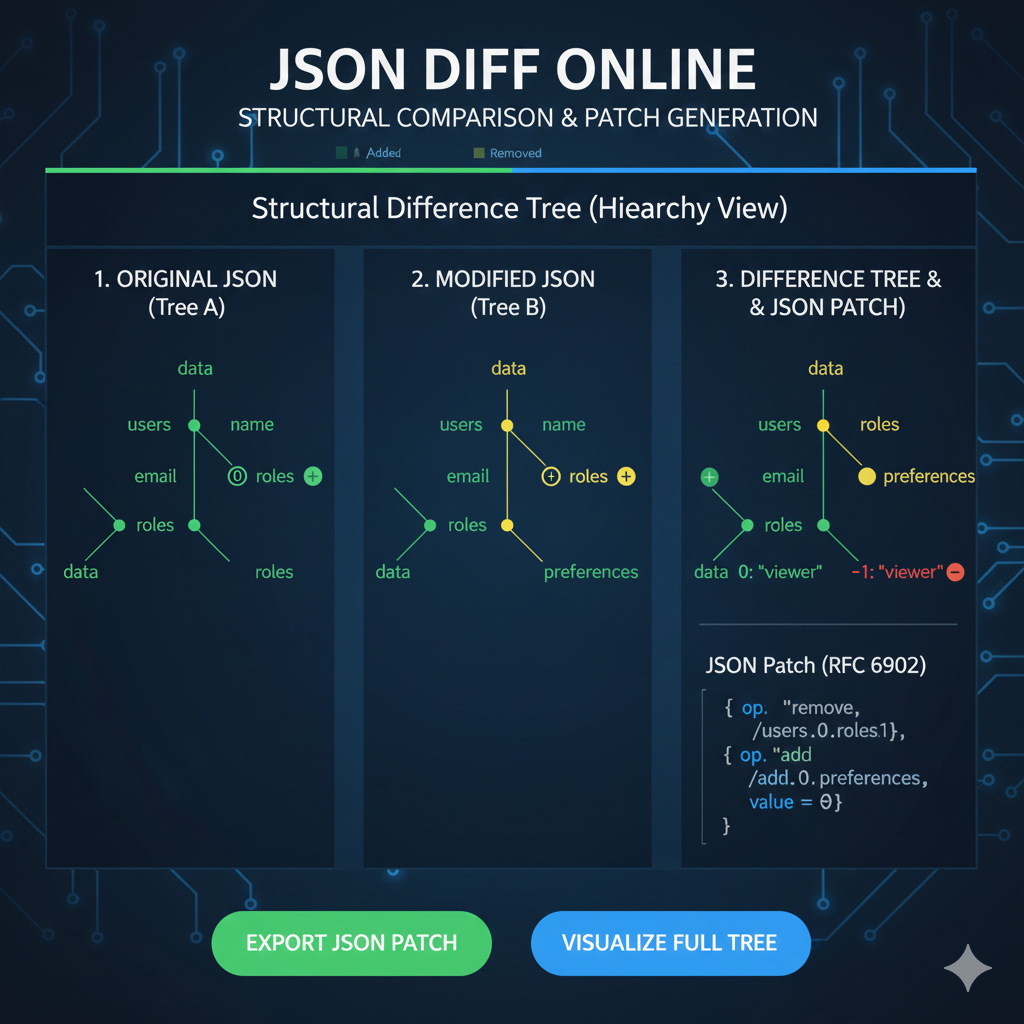
    The image provided is an infographic titled “JSON DIFF ONLINE: STRUCTURAL COMPARISON & PATCH GENERATION”. It illustrates the concept of the Structural Difference Tree for comparing two JSON documents and generating a standard JSON Patch.

    Here is the structured content for this infographic:

    Structural Difference Tree (JSON Diff)

    This infographic details the process of comparing two JSON files (Tree A and Tree B) using a structural, hierarchical view, which is essential for generating precise change instructions (JSON Patches).

    1. Original JSON (Tree A)

    This column represents the baseline or original JSON file, visualized as a hierarchical tree.

    • Structure: Shows the key hierarchy, starting from the data root, branching to users, and then to keys like name, email, and roles.
    • Status: All elements are initially marked as present (implied baseline status).

    2. Modified JSON (Tree B)

    This column represents the new or updated JSON file, showing the resulting structure after modifications.

    • Changes:
      • A new element, preferences, is introduced under users.
      • The roles key under users is marked with a plus and minus sign, indicating that its content has been altered.

    3. Difference Tree & JSON Patch

    This final column displays the comparison result and the resulting actionable output.

    • Difference Tree Visualization:
      • The email key has a Green plus sign, indicating it was Added or modified to a new state.
      • The roles key is Yellow, indicating it was Modified. The child node viewer is marked with a Red minus sign, showing it was Removed from the array.
      • The preferences key is Yellow, indicating a modification or addition to this branch.
    • JSON Patch (RFC 6902): The most important output is the JSON Patch, a standard format detailing only the required operations to transform Tree A into Tree B.
      • The patch includes operations like:
        • {"op": "remove", "/users/0/roles/1"}
        • {"op": "add", "/add/0/preferences", "value = 0"}

    learn for more knowledge

    Json Parser ->What Is Node.js Body Parser? express body-parser (Explanation) – json parse

    Json web token ->What Is Auth0 JWT, JSON Web Token – json web token

    Mykeywordrank ->What Is Seo Rank and seo analyzer – keyword rank checker

    Fake Json –>What is FakeStore API: Beginner-Friendly Guide to Using Fake E-Commerce Data – fake api

  • Online JSON Diff: How to Effectively Compare JSON Online

    How to Effectively Compare JSON Online: A Comprehensive Guide

    In the world of web development and data exchange, JSON (JavaScript Object Notation) has become the de-facto standard. Whether you’re working with APIs, configuration files, or data serialization, dealing with JSON is an everyday task. But what happens when you need to identify subtle differences between two JSON structures? Manually comparing them can be a tedious and error-prone process. This is where an online JSON diff tool becomes indispensable.


    What is an Online JSON Diff Tool?

    An online JSON diff tool is a web-based utility designed to visually compare two JSON inputs (JSON files, strings, or $\text{URLs}$) and highlight their differences. It helps developers, testers, and data analysts quickly pinpoint additions, deletions, and modifications, making the process of debugging, merging, and verifying data much more efficient. This is the ultimate json compare online tool.


    Why Use an Online JSON Diff and JSON Compare Tool?

    For effective data management, leveraging an online JSON diff or json compare tool is crucial for streamlining your workflow.

    • Efficiency: Save significant time compared to manual comparison.
    • Accuracy: Eliminate human error in identifying differences.
    • Visibility: Clearly visualize changes with color-coded highlighting in a diff view.
    • Collaboration: Easily share comparison results with team members.
    • Debugging: Quickly identify discrepancies in API responses.

    How to Compare JSON Online: A Step-by-Step Guide for Diff

    Using most online json diff tools to compare json is straightforward:

    1. Open the Tool: Navigate to your preferred online JSON diff website. Many tools are free online.
    2. Input JSON 1: Paste your first JSON string into the left input area.
    3. Input JSON 2: Paste your second JSON string into the right input area.
    4. Click “Compare”: Press the comparison button (often labeled “Diff”, “Compare”, or “Analyze”).
    5. Review Results: The tool will display the two JSON inputs side-by-side, highlighting differences (the diff).

    Key Features to Look For in a Diff Tool

    When selecting an online JSON diff tool to compare json, look for these features:

    • Side-by-Side Comparison: Clear visual distinction between inputs in the diff view.
    • Color-Coded Differences: Easily identify additions, deletions, and modifications.
    • JSON Formatting/Beautification: Automatically pretty-print unformatted JSON data.
    • Ignore Order of Keys/Arrays: Advanced options to handle non-strict comparisons.
    • Privacy: Ensure the tool doesn’t store your sensitive data.

    Example of JSON Diff (Compare Data)

    Consider two JSON objects (a common json example):

    JSON 1:

    JSON

    {
      "id": "user123",
      "name": "Alice Smith",
      "email": "alice.s@example.com",
      "roles": ["admin", "editor"]
    }
    

    JSON 2:

    JSON

    {
      "id": "user123",
      "name": "Alice Johnson",
      "email": "alice.j@example.com",
      "roles": ["admin", "viewer"],
      "status": "active" 
    }
    

    An online diff tool would highlight all the changes, allowing you to easily compare data and see the diff in the JSON files.


    Conclusion

    Leveraging an online JSON diff tool is a smart move for anyone frequently working with JSON data. It streamlines the comparison process, enhances accuracy, and significantly boosts productivity. Integrate a reliable json compare tool into your daily workflow to make managing JSON differences effortless and error-free.

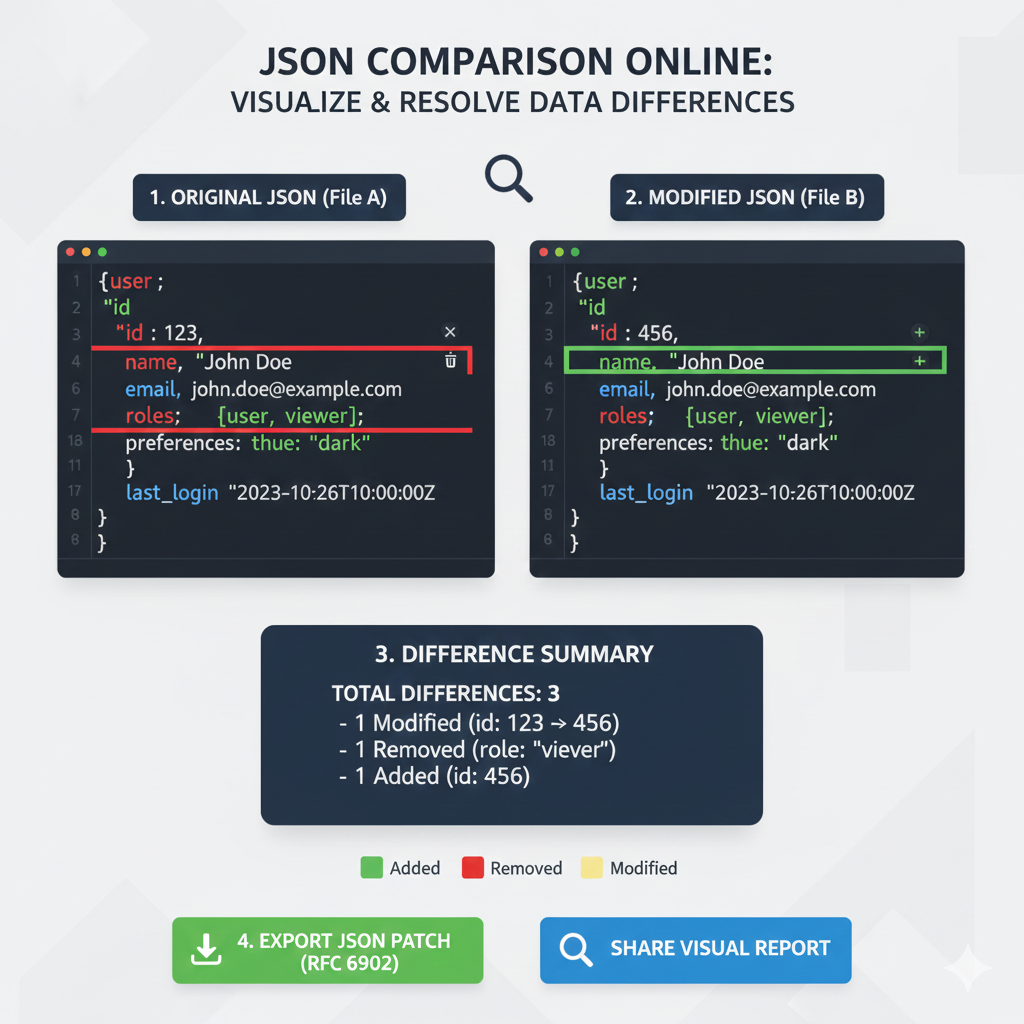
    JSON Diff Online

    This infographic illustrates how an online tool compares two JSON documents (File A and File B) to quickly identify and report changes, a crucial process for debugging and API version control.


    1. Side-by-Side Comparison

    The core of the infographic shows the original data versus the modified data, with color-coding to highlight the precise changes.

    Status1. ORIGINAL JSON (File A)2. MODIFIED JSON (File B)
    ModifiedThe id value is 123.The id value is changed to 456 (highlighted in Yellow).
    RemovedThe roles array contains the value viewer.The value viewer is missing from the roles array (highlighted in Red).
    AddedThe id key/value pair is missing.A new id key/value of 456 is added (highlighted in Green).
    UnchangedKeys like name, email, preferences, and last_login are identical in both files.These values remain the same and are unhighlighted.

    2. Difference Summary

    The tool provides an immediate, concrete count and description of the changes found.

    • TOTAL DIFFERENCES: 3
      • 1 Modified: (id: 123 to 456)
      • 1 Removed: (role: "viewer")
      • 1 Added: (id: 456)

    3. Actionable Output & Key

    • Actionable Outputs: The tool offers options to Export JSON Patch (RFC 6902) and Share Visual Report.
    • Color Key:
      • Green: Added
      • Red: Removed
      • Yellow: Modified

    learn for more knowledge

    Json Parser ->What Is jQuery JSON Parser, jQuery. Parse.Json, JSON.parse, jQuery.getJSON, ParseJSON Explanation) – json parse

    Json web token ->What is protegrity tokenization, data protection, tokenization, vaultless tokenization – json web token

    MyKeywordrank ->SEO Optimization Checker: Mastering Website SEO Optimization and Rankings – keyword rank checker

    Fake Json –Why Dummy JSON API Is Used? Complete Guide to Dummy API, JSON API, DummyJSON, JSONPlaceholder & Fake Data Tools – fake api

  • JSON Comparison Online: Your Ultimate Guide to Efficient Data Diff

    Understanding JSON Comparison

    JSON (JavaScript Object Notation) is a lightweight data-interchange format. It’s easy for humans to read and write and easy for machines to parse and generate. In modern web development, $\text{API}$ testing, and data validation, comparing two JSON objects or arrays is a common and crucial task. Whether you’re debugging an $\text{API}$ response, verifying data synchronization, or tracking configuration changes, an efficient JSON comparison can save a lot of time and prevent errors.


    Why Use an Online JSON Comparison Tool?

    While programmatic comparison tools and libraries exist, online JSON comparison tools offer several advantages, making them the preferred method to compare online:

    • Accessibility: No installation required; simply open your browser to compare online.
    • Speed: Quick and instant results, especially for smaller JSON structures and JSON data.
    • Visualization: Many tools highlight differences visually in a diff view, making them easy to spot.
    • Ease of Use: User-friendly interfaces often require just pasting your JSON string.
    • Collaboration: Easily share comparison results.

    How to Compare JSON Online: A Step-by-Step Guide

    Comparing JSON online is generally a straightforward process. Here’s a typical workflow using a json compare tool:

    1. Find a Reliable Tool: Search for “JSON comparison online” or “diff JSON tool”.
    2. Open the Tool: Navigate to the chosen online JSON comparison website.
    3. Paste JSON Input: You’ll typically find two input areas. Paste your first JSON string into one and your second JSON string into the other. These can be inputs for two json files or raw json data.
    4. Initiate Comparison: Click a “Compare,” “Diff,” or similar button.
    5. Review Results: The tool will display the json differences, often highlighted in distinct colors (e.g., green for added, red for removed, yellow for modified).

    Example JSON Comparison Scenario (Compare Data)

    Let’s say you have two JSON objects you need to compare data:

    JSON 1:

    JSON

    {
      "name": "Alice",
      "age": 30,
      "city": "New York",
      "hobbies": ["reading", "hiking"]
    }
    

    JSON 2:

    JSON

    {
      "name": "Alice",
      "age": 31,
      "city": "London",
      "hobbies": ["reading", "cycling"]
    }
    

    An online tool would clearly show that “age” has changed from $\text{30}$ to $\text{31}$, “city” from “New York” to “London”, and “hiking” in hobbies has been replaced by “cycling”. These are the key json differences found.


    Key Features to Look for in a JSON Compare Tool

    Not all online tools are created equal. To ensure an effective JSON comparison online, look for these features:

    • Clear Visual Diff: Easy-to-understand color-coded differences in the diff view.
    • Formatting Options: Ability to beautify or minify the JSON format.
    • Ignoring Order: Option to ignore array element order for more semantic comparisons.
    • Ignoring Whitespace: Crucial for comparing unformatted vs. formatted JSON.
    • Error Handling: Robust parsing for invalid JSON.
    • Privacy: Assurance that your data is not stored or shared when you compare online.

    Conclusion

    Mastering JSON comparison online is an essential skill for anyone working with data and $\text{APIs}$. By utilizing the right tools like a good json compare tool or json diff, you can quickly identify json differences, ensure data integrity, and streamline your development and testing workflows. Always choose an online comparison tools that offers clear visualization, robust features, and prioritizes your data’s privacy.

    JSON Comparison Online

    This infographic demonstrates the core function of a JSON comparison tool: identifying and summarizing data changes between an original file and a modified version.

    1. Side-by-Side Comparison

    The comparison contrasts the original data with the new data, using color to indicate the specific change.

    Status1. ORIGINAL JSON (File A)2. MODIFIED JSON (File B)
    ModifiedThe id value is 123.The id value is changed to 456 (highlighted in Yellow).
    RemovedThe roles array contains the value viewer.The value viewer is missing from the roles array (highlighted in Red).
    AddedThe id value is missing.A new id value of 456 is added (highlighted in Green).
    UnchangedKeys like name, email, preferences, and last_login are identical in both files.These values remain the same and are unhighlighted.

    2. Difference Summary

    The tool provides a concrete count and description of the changes found.

    • TOTAL DIFFERENCES: 3
      • 1 Modified: (id: 123 $\to$ 456)
      • 1 Removed: (role: "viewer")
      • 1 Added: (id: 456)

    3. Actionable Output & Key

    • Actionable Outputs: The tool offers options to Export JSON Patch (RFC 6902) and Share Visual Report.
    • Color Key:
      • Green: Added
      • Red: Removed
      • Yellow: Modified
    json comparision online data diff

    learn for more knowledge

    Json Parser ->What is JSON Parser Online? Complete Guide for Beginners – json parse

    Json web token ->What Is JWT Token? (JSON Web Token Explained for Beginners) – json web token

    Mykeywordrank ->Search Optimization and SEO: Mastering Visibility in Search Results – keyword rank checker

    Fake Json ->Testing Software Tools: Best Tools & Software to Create Fake JSON Data for Testing – fake api

  • JSON Comparator: The Ultimate Guide to JSON Compare Online and Offline Tools

    In the world of web development, APIs, and data exchange, JSON (JavaScript Object Notation) has become the de facto standard for structuring data. As applications grow in complexity, so does the need to ensure data integrity and identify discrepancies. This is where a JSON comparator becomes an indispensable tool. But how exactly do you compare JSON objects effectively?


    Why JSON Comparison is Crucial for Developers

    Comparing JSON objects is more than just checking if two JSON files or strings are identical. It involves understanding their structure, values, and potential json differences, regardless of property order. JSON comparison is vital in these common scenarios:

    • API Testing: Validating that API responses match expected outputs.
    • Data Synchronization: Identifying changes between two versions of data.
    • Debugging: Pinpointing subtle differences in JSON data structures causing issues.
    • Configuration Management: Ensuring consistency across different environments.
    • Database Migrations: Verifying data transformation accuracy when you compare data.

    Understanding JSON Comparators: Diff Tool vs. Text Comparison

    A JSON comparator is a tool or library designed to highlight the json differences between two JSON objects, often ignoring whitespace or key order, and sometimes even allowing you to ignore specific fields. Unlike a simple string compare text, a JSON comparator performs a structural and value-based analysis. This is the difference between a simple text diff and a powerful JSON diff capability.

    How to Use a JSON Compare Online Tool

    Using an online JSON compare or desktop comparison tool is the quickest way to compare JSON objects. These often include features of a robust JSON editor online:

    1. Input Your JSON: Paste your first JSON object into the “Original” or “Left” panel and your second into the “New” or “Right” panel. Many comparison tools can also load JSON files (CSV or YAML files need conversion).
    2. Configure Options: Advanced options often include ignoring key order, sorting arrays, and specifying key paths to exclude from the comparison.
    3. Initiate Comparison: Click the “Compare” button, “Diff”, or similar button.
    4. Analyze Results: The tool displays the json differences side-by-side in a diff view, highlighting additions, deletions, and modifications using different colors.

    Programmatic JSON Diff for Automation

    For automated tasks, developers use programming libraries (Python, JavaScript, Java, etc.) to perform the JSON comparison.

    Conceptual Python Example (using a json diff library): This method converts the raw JSON format into an object, then uses a specialized library to report the specific json differences (e.g., modified value, added element).


    Best Practices for Effective JSON Comparison

    To ensure your JSON comparator provides meaningful results, follow these practices:

    • Normalize Your JSON: Use a JSON editor or formatter to clean up the JSON format before you compare.
    • Sort Arrays: If the order of items in an array doesn’t matter, ensure your compare tool can sort them to avoid false differences.
    • Ignore Dynamic Fields: Fields like timestamps or unique IDs should be excluded from the comparison via the tool’s options.
    • Understand the Diff View: Learn to interpret the visual cues in the diff view (colors, +/- signs) used by your online JSON compare tool to indicate changes between the original file and the modified file.
    • Choose the Right Comparison Tools: Online JSON editor online tools are great for one-off checks; libraries are essential for automated testing and continuous integration.

    Conclusion

    Mastering JSON comparison is a critical skill for anyone working with data and APIs. By leveraging the power of dedicated JSON comparator tools and libraries, you can efficiently identify json differences, maintain data quality, and streamline your development and testing workflows. Whether you’re debugging an elusive bug or validating complex API responses, a reliable JSON compare online tool is your best ally.

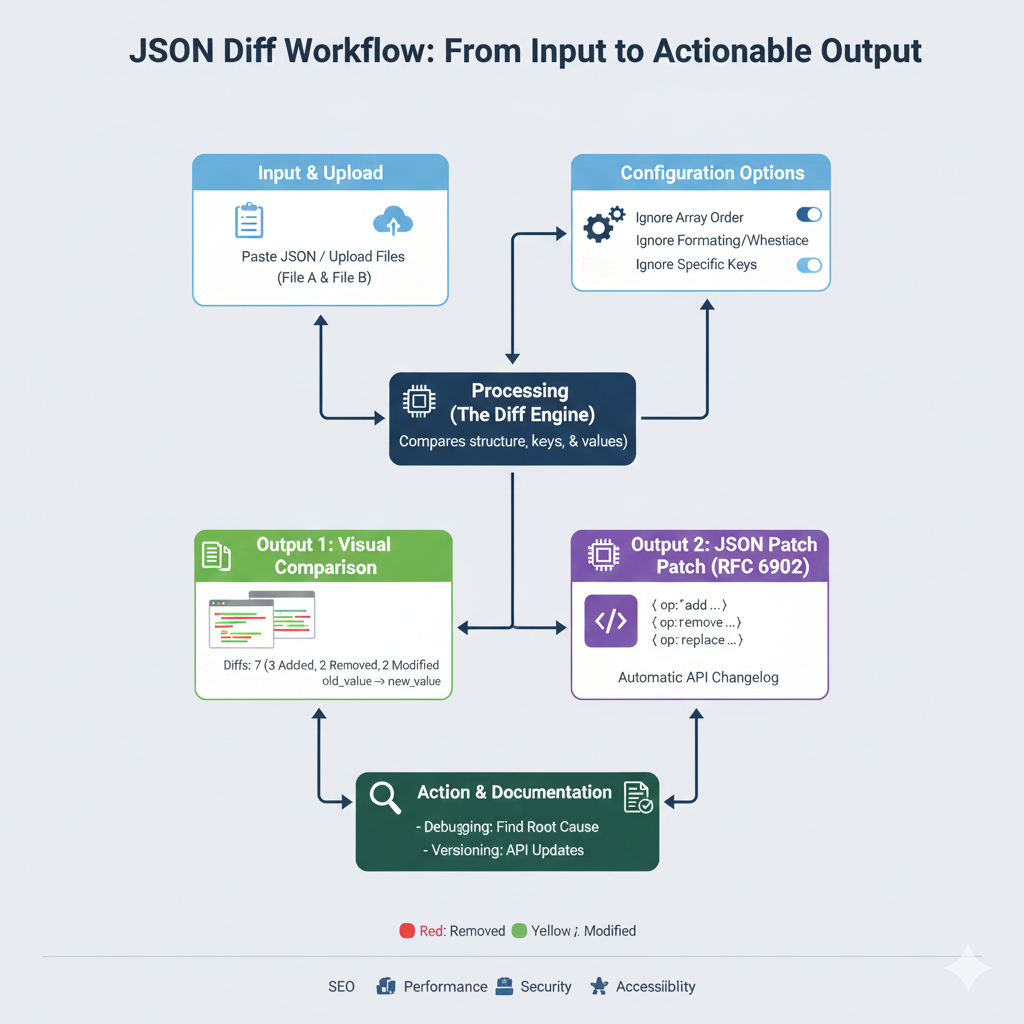
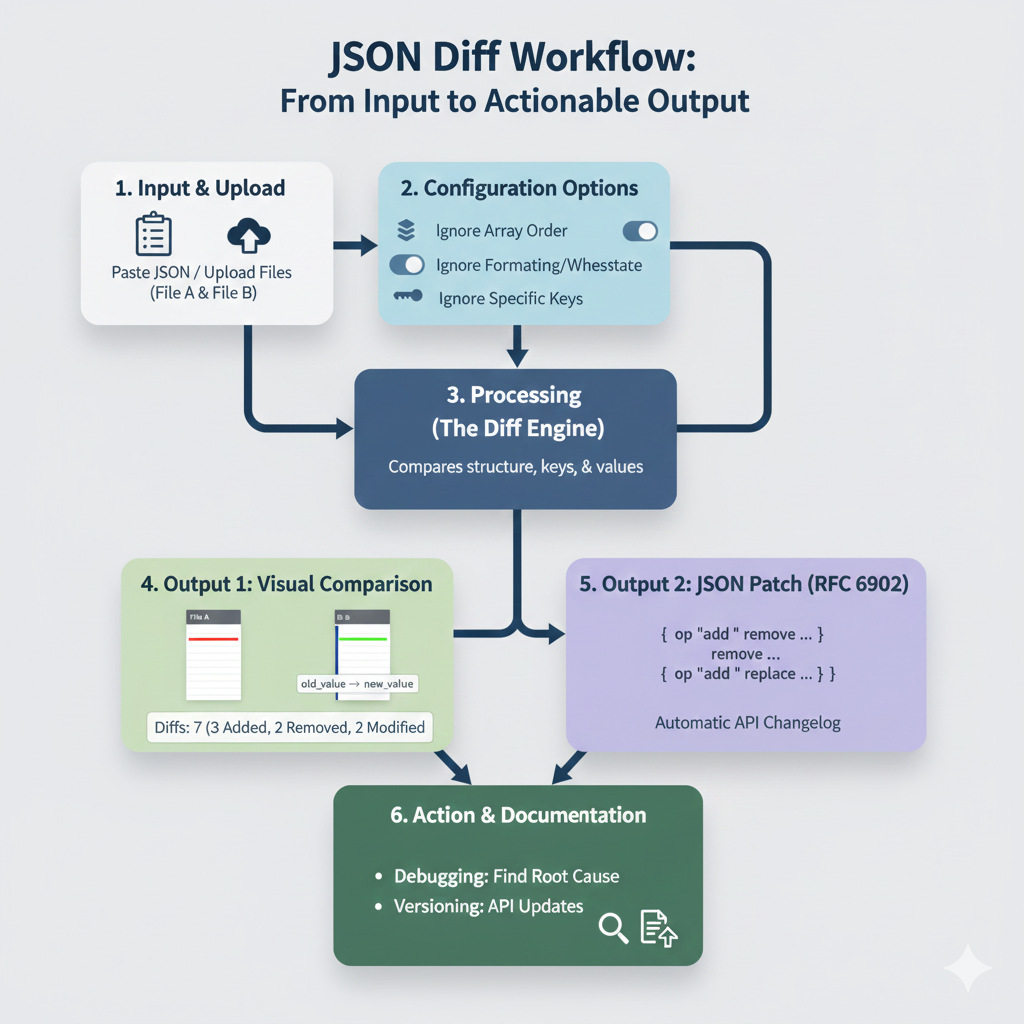
    JSON Diff Workflow

    This infographic details the process of comparing two JSON files to find differences, generate a patch, and use the output for debugging and documentation.

    1. Input & Processing

    StepTitleAction/Description
    1.Input & UploadUser Paste[s] JSON / Upload[s] Files (File A & File B).
    2.Configuration OptionsUser can refine the comparison by toggling options like Ignore Array Order, Ignore Formatting/Whitespace, and Ignore Specific Keys.
    3.Processing (The Diff Engine)The core function that Compares structure, keys, & values between the two files.

    2. Outputs Generated

    The processing engine generates two distinct types of output for different uses:

    OutputTitleDetails & Example
    4.Output 1: Visual ComparisonDisplays a side-by-side view with color-coding. The summary shows: “Diffs: 7 (3 Added, 2 Removed, 2 Modified)”. Visual cues show old_value -> new_value for modifications.
    5.Output 2: JSON Patch (RFC 6902)Generates an Automatic API Changelog in machine-readable format. Operations include: { op: "add" ... }, { op: "remove" ... }, and { op: "replace" ... }.

    3. Action & Documentation

    StepTitleKey Uses
    6.Action & DocumentationDebugging: Find Root Cause (e.g., when an API response schema changes unexpectedly). Versioning: API Updates (using the JSON Patch to document changes).

    learn for more knowledge

    Json Parser ->What is JSON Parser Online? Complete Guide for Beginners – json parse

    Json web token ->What Is JWT Token? (JSON Web Token Explained for Beginners) – json web token

    MyKeyword rank ->Best Strategies to Rank on Google’s First Page in 2025 (Complete SEO Guide) – keyword rank checker

    Fake Json ->Testing Software Tools: Best Tools & Software to Create Fake JSON Data for Testing – fake api

  • Diff JSON Online- The Ultimate Guide to Comparing JSON Files for Developers

    Instantly find differences between two JSON files with the best online JSON Diff tool. Understand why developers, QA and DevOps teams rely on JSON comparison for validation. This guide focuses on helping you compare JSON accurately.


    Introduction: Why You Need an Online JSON Diff Tool

    Imagine debugging an API where the response suddenly changes, or managing a complex application configuration that someone just updated. Manually scanning hundreds of lines of code to spot a single missing comma or a changed value is a recipe for errors and lost time.

    This is where an Online JSON Diff Tool (or JSON Compare Tool) becomes your best friend. A JSON Diff tool is a web-based utility that compares two pieces of JSON data (usually labeled as “Original” and “Modified”) and highlights the precise differences in a clean, side-by-side, color-coded diff view. For any developer, QA engineer, or DevOps professional, mastering this comparison tool is crucial for data validation, version control, and rapid debugging when working with JSON data.

    In this ultimate guide, we will explain exactly what a JSON Diff tool does, the key features you must look for, and why a semantic comparison is superior to a simple line-by-line text diff.


    What Is an Online JSON Diff Tool and How Does It Work

    At its core, “diffing” is the process of finding differences between two sets of data. When applied to JSON (JavaScript Object Notation)—the universal data-interchange format—it requires a specialized approach. The goal is to successfully diff JSON online.

    Understanding JSON Structure

    Unlike a simple text file, JSON has a rigid, hierarchical structure built on:

    • Key-Value Pairs: E.g., "name": "Alice"
    • Objects: Denoted by curly braces {}
    • Arrays: Denoted by square brackets []

    A basic text-diff utility might flag an entire block as changed if a single piece of indentation or a key’s order is different. A sophisticated Online JSON Diff Tool uses a three-step process to provide meaningful results:

    1. Parsing: It first reads both JSON documents and converts them into a structured data tree. The compare tool relies on a robust JSON format formatter to handle both prettified and minified JSON.
    2. Semantic Comparison (JSON Comparison): It compares the data trees, ignoring non-data-related changes like whitespace, key order (in objects), and line breaks. It focuses purely on structural and value differences when you compare JSON files.
    3. Visualization: It maps the differences back to your original text, highlighting them clearly: Added data (unique to the ‘Modified’ version), Deleted data (unique to the ‘Original’ version), Modified/Changed values.

    Top 5 Use Cases for JSON Comparison

    Using an online JSON diff tool can dramatically speed up your workflow in several critical areas of software development. It makes it easy to compare data accurately.

    1. API Response Validation: Compare the current API response with the expected, known-good response to ensure the API is working correctly. This is the ultimate json compare online use case.
    2. Configuration Management: Check for unintended changes between different environment configuration files (often stored in JSON format).
    3. Data Migration & Synchronization: Verify that all data was transferred accurately during a database migration.
    4. Version Control and Code Review: Quickly review changes made to JSON files in Git/SVN using a diff view.
    5. Debugging: Compare a failing JSON output with a working one to pinpoint the exact line or value causing a bug.

    Must-Have Features of the Best JSON Compare Tools

    Not all online json diff tools are created equal. To boost your productivity and ensure accuracy when you compare json files, look for these advanced features:

    Semantic Diffing Versus Text Diffing

    This is the single most important feature for a good online json comparison tool. A semantic diff is structure-aware. It knows that reordering keys in an object does not constitute a structural difference and will show NO difference. A basic text diff would flag the whole file as changed.

    Handling Unordered Arrays

    Arrays are a common headache in JSON comparison. The best tools offer options to treat arrays as:

    • Ordered: Position matters (standard array comparison).
    • Unordered/Keyed: Tries to match items by a common ID field even if items are re-arranged.

    Ignore Options

    Advanced options should allow you to:

    • Ignore Whitespace/Formatting: Essential for comparing minified JSON against prettified JSON.
    • Ignore Key Paths: Specify fields (like timestamps or unique IDs to exclude from the comparison when you compare data.

    Visualization and Navigation

    • Side-by-Side View: Clear, indexed, and color-coded diff view.
    • Tree View: Offers an interactive, collapsable tree view for deeply nested JSON objects.
    • Diff Navigation: Buttons or shortcuts to jump directly to the Next Previous difference.

    Conclusion: Choose the Right Tool for Reliability

    An Online JSON Diff Tool is an indispensable part of the modern developer toolskit. By choosing a tool that offers semantic comparison and smart features, you ensure that you are focusing on genuine data changes, not just formatting noise. This leads to faster debugging, more accurate validation, and more robust software deployments. Mastering how to diff JSON online is key to professional development.

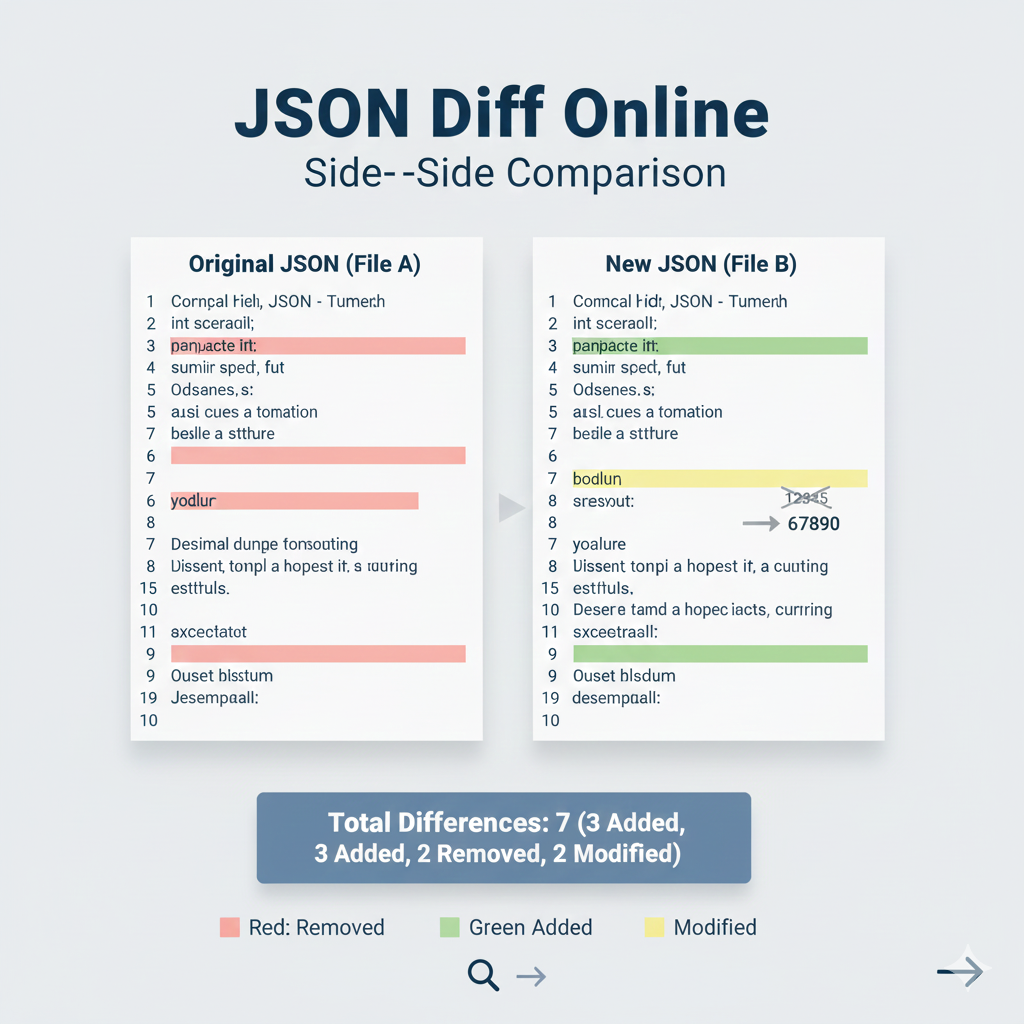
    JSON Diff Online: Side-by-Side Comparison”

    This infographic visually demonstrates the core utility of an online JSON Diff tool: quickly identifying structural and value differences between two JSON documents.

    Title: JSON Diff Online: Side-by-Side Comparison

    FeatureOriginal JSON (File A)New JSON (File B)
    InputRepresents the base or Original JSON file.Represents the modified or New JSON file.
    RemovedLine 6, key yodlur is present.The key yodlur is absent.
    AddedLine 9, key Ouset blsstum is absent.Line 9, key Ouset blsstum is present (highlighted in Green).
    ModifiedLine 7, key sresout has an old value.Line 7, key sresout has a new value: 67890 (highlighted in Yellow). A visual cue shows old_value -> new_value.

    Summary & Color Key

    • Total Differences:7
      • 3 Added
      • 2 Removed
      • 2 Modified
    • Color Key:
      • Red: Removed
      • Green: Added
      • Yellow: Modified
    json diff online

    learn for more knowledge

    Json Parser ->APIDevTools JSON Schema Ref Parser: Resolving JSON Schema References – json parse

    Json web token ->What Is JWT? (JSON Web Token Explained) – json web token

    mykeywordrank->Google Search Engine Optimization (SEO)-The Key to Higher Rankings – keyword rank checker

    Fake Json ->Fake API: Why Fake JSON APIs Are Useful for Developers – fake api

  • What Is JSON Diff Online? (Beginner-Friendly Explanation)

    JSON Diff Online is a web-based tool that helps you compare two JSON files or JSON data. It highlights all the differences so you can easily see what has changed — such as added keys, removed keys, updated values, or structural changes.

    It is commonly used by developers, testers, and API engineers who work with JSON data on a daily basis.


    ✨ Why JSON Diff Online Is Used

    JSON Diff tools make it easy to:

    • Find mistakes in JSON
    • Compare API responses
    • Detect changes in configurations
    • Debug faster
    • Save time during development

    🔍 What JSON Diff Tools Highlight

    Most JSON diff tools show:

    🟩 Added Fields

    New keys or values that were not present before.

    🟥 Removed Fields

    Keys or values that existed earlier but are now missing.

    🟨 Modified Fields

    Values that have been changed between the two JSON inputs.


    ⚙️ Popular Features in JSON Diff Tools

    • Side-by-side view
    • Color-coded differences
    • JSON formatter / beautifier
    • Copy–paste support
    • Upload JSON file option
    • Collapsible JSON structure

    👨‍💻 Who Uses JSON Diff Online?

    • Front-end developers
    • Back-end developers
    • QA testers
    • Students learning APIs
    • Anyone working with JSON data

    🎯 Final Summary

    JSON Diff Online is a simple but powerful comparison tool that helps you understand differences between two JSON inputs quickly. It improves debugging, accuracy, and productivity — especially when dealing with large JSON files.

    “JSON Diff Workflow” Infographic

    This content breaks down the process of using an online tool to compare two JSON documents and generate useful, actionable outputs.

    Title: JSON Diff Workflow: From Input to Actionable Output

    StepSectionDescription & Details
    1Input & UploadThe user pastes JSON or uploads File A (Original) and File B (New/Modified) to the tool.
    2Configuration OptionsUsers can enable settings to refine the comparison: * Ignore Array Order * Ignore Formatting/Whitespace * Ignore Specific Keys
    3Processing (The Diff Engine)The engine compares the structure, keys, and values of the two files.
    4Output 1: Visual ComparisonDisplays a side-by-side view highlighting differences. * Example shown: “Diffs: 7 (3 Added, 2 Removed, 2 Modified)” * Visual cue: old_value -> new_value is shown for modifications.
    5Output 2: JSON Patch (RFC 6902)Generates an array of operations (op: "add", op: "remove", op: "replace") to serve as an Automatic API Changelog.
    6Action & DocumentationThe final output is used for: * Debugging: Find Root Cause of issues. * Versioning: Document API Updates.
    json diff workflow

  • JSONCompare: The Ultimate JSON Compare Tool

    JSONCompare is an online tool or software used to compare two JSON objects or files. It highlights differences between the JSON structures, making it easier for developers to identify changes, added or removed keys, and modified values. JSONCompare is commonly used in API testing, debugging, and data validation. This powerful utility helps developers compare JSON quickly and accurately.


    Why JSONCompare Is Important for API Testing and Data Validation

    JSONCompare is important because JSON data is widely used in web applications and APIs. Tracking differences between JSON files manually can be time-consuming and error-prone, particularly with large or complex JSON objects. JSONCompare helps you:

    • Quickly spot differences in JSON files or long JSON strings.
    • Save time during debugging or API testing. You can use a JSONCompare utility like a JSON editor online to easily compare the actual API response with the expected JSON object.
    • Validate API responses against expected data structures.
    • Improve application development workflow and accuracy.

    How JSONCompare Works: The Comparison Process

    You provide two JSON objects—the original (or expected) and the modified (or actual) version. The JSONCompare tool scans both JSON files and generates a JSONCompareResult, which highlights the differences using a comprehensive comparison mechanism.

    The tool highlights:

    • Added keys.
    • Removed keys.
    • Modified values (the core compare data function).

    Some tools also show nested differences, handle various format issues, and provide a side-by-side or inline comparison view for clarity.

    Key Features of JSONCompare and Other Data Formats

    Side-by-Side Comparison

    The tool displays two JSON objects next to each other for easy visualization of differences. This feature is crucial when trying to compare JSON structures efficiently.

    Highlight Changes

    It uses color coding to show added, removed, or modified keys and values. This instant visual feedback from the JSON editor makes spotting differences trivial.

    Supports Nested JSON and Data JSON

    A robust JSONCompare tool can compare deeply nested JSON objects without losing clarity. It is designed specifically to handle the complex structure of data JSON.

    JSON Editor Online, YAML, and CSV Support

    Many advanced versions of JSONCompare offer features of a JSON editor online for cleaning or formatting the input before the comparison. Some tools can also handle comparisons for other data formats beyond JSON, such as YAML (a similar data serialization format) or allow exporting results to CSV or other file types.


    Benefits of Using JSONCompare

    Using a reliable JSONCompare utility offers significant advantages in the application development lifecycle:

    • Speeds up debugging and API testing by providing immediate, clear feedback on differences.
    • Reduces human error inherent in manual comparison of large JSON strings.
    • Improves API and application development quality by enforcing data consistency.
    • Helps teams identify and fix issues quickly using the comparison results.

    How to Use JSONCompare Effectively

    To leverage the full power of the JSON compare tool:

    1. Paste or upload the two JSON files to compare (the expected and the actual JSON data).
    2. Use the side-by-side or inline view for clarity during the comparison.
    3. Review the color-coded differences in the JSONCompareResult.
    4. Validate your API responses against expected results, which is a key step in effective API testing.
    5. Export results for records or team collaboration.

    Final Thoughts

    JSONCompare is a must-have tool for developers working with JSON data and performing intensive API testing. It simplifies comparison, saves time, and ensures accuracy in testing and debugging APIs or applications. Using JSONCompare helps maintain data consistency and reduces errors in your projects, making it an essential part of your web security and quality assurance toolkit.

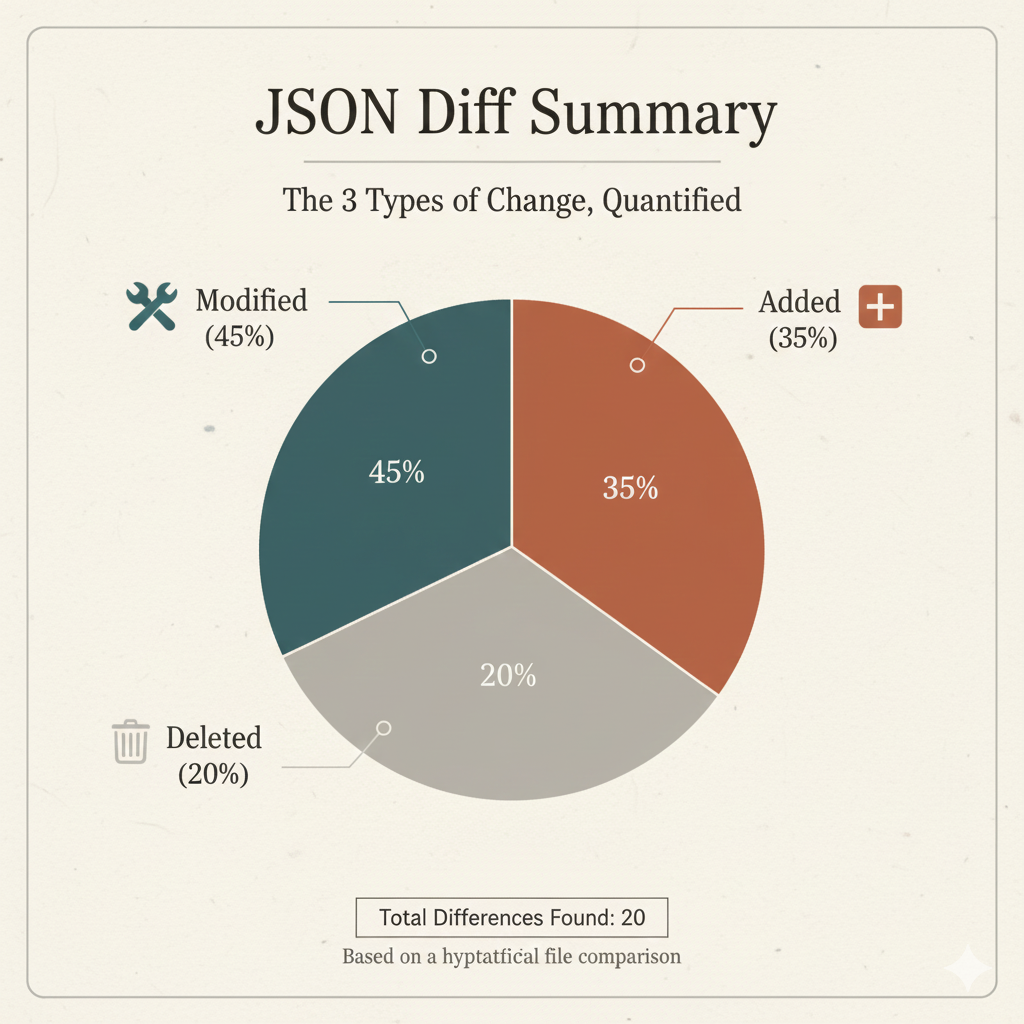
    JSON Diff Summary: The 3 Types of Change, Quantified

    This pie chart provides a high-level summary of the differences found when comparing two versions of a JSON file or object. It quantifies the three fundamental categories of changes, helping users instantly understand the nature of the file modifications.

    (Based on the hypothetical data: Total Differences Found: 20)


    Key Difference Categories

    CategoryProportionCount (Out of 20)Description & Impact
    🛠️ Modified45%9Value Alteration. This is the largest segment and represents elements (keys) that exist in both the original and new files, but whose values have been changed. This often signifies data updates or corrections.
    ➕ Added35%7New Data. This represents keys, objects, or arrays that were introduced in the new file and did not exist in the original. This is common when adding new features, fields, or records.
    🗑️ Deleted20%4Data Removal. This represents elements that were present in the original file but have been removed in the new version. This segment is important for auditing data deprecation or cleanup.

    Strategic Insights

    • Focus on Modification (45%): The high percentage of Modified elements suggests the change was primarily focused on updating existing records or configuration values rather than major structural overhaul (which would result in more Added or Deleted keys).
    • Structural Health: A low percentage of Deleted items (20%) often indicates that the file structure remains largely intact, minimizing the risk of broken dependencies in code relying on those fields.
    • Total Scope: Knowing the Total Differences Found (20) provides context, showing that the 45% modification rate applies to a relatively small, manageable set of changes.
    json diff summary

  • Online Compare JSON, JSON Compare, JSON Compare Tool, JSON Diff

    Online Compare JSON tools are essential for developers, testers, and API engineers who work with structured data. These tools allow you to quickly compare JSON files, view differences, and ensure data consistency across environments. Using a JSON compare tool or JSON diff viewer simplifies debugging and helps maintain accuracy in your JSON documents. Whether you need a JSON comparator, formatter, or validator, these online JSON tools make your workflow faster and more efficient.

    What Is Online Compare JSON?

    Online Compare JSON refers to web-based tools that enable you to compare two or more JSON files. They instantly identify differences, such as missing keys, modified values, or newly added data fields. These tools are widely used for validating API responses, detecting structural issues, and formatting JSON for easier readability. With a reliable JSON compare tool, you can maintain consistency across your development, staging, and production environments.

    Why Online JSON Comparison Tools Are Used

    Online JSON comparison tools are designed to help you:

    • Find differences quickly between two JSON objects
    • Identify missing keys, values, or structure changes
    • Validate API responses during development or testing
    • Format and beautify JSON for better readability
    • Ensure data integrity across multiple environments

    By providing a clear diff view and highlighting modified, deleted, or added data, these tools make working with JSON files easier and more efficient.

    How Online Compare JSON Tools Work

    Most online JSON comparison tools work as follows:

    • Paste two JSON texts (JSON A and JSON B) or upload JSON files
    • The tool automatically parses and analyzes both JSON objects
    • It highlights differences: deleted or missing values, modified keys or data, and new or added fields

    These tools use JSON parsers internally to validate structure and ensure accurate comparison. Many also provide a diff tool, JSON validator, and formatter to help you clean and structure your data.

    Common Features of Online JSON Compare Tools

    Popular JSON compare tools include the following features:

    • JSON diff checker
    • JSON formatter and beautifier
    • JSON minifier
    • Syntax validation
    • Tree view and side-by-side comparison
    • Highlighting added, removed, or changed elements
    • JSON upload and URL-based comparison
    • Support for comparing JSON documents and files

    Who Uses JSON Comparison Tools?

    Online JSON tools are widely used by:

    • Frontend developers
    • Backend and API developers
    • QA testers
    • Automation engineers
    • DevOps teams
    • Students working on JSON-based projects

    These tools are ideal for anyone needing to compare JSON files, validate data, or maintain consistency across environments.

    Benefits of Using Online Compare JSON Tools

    Using a reliable online compare JSON tool offers several advantages:

    • Saves time and simplifies debugging
    • Prevents errors in JSON data
    • Makes complex JSON easier to read
    • Helps maintain consistency between API versions
    • Works directly in the browser — no installation required

    Conclusion

    Online Compare JSON tools are a must-have for developers, testers, and anyone working with JSON files or APIs. By providing features like JSON compare, JSON diff, JSON comparator, formatter, and validator, these tools ensure your JSON documents are accurate, structured, and error-free. Using an online JSON tool helps streamline your workflow, detect differences quickly, and maintain consistent data across all environments.

    Side-by-Side Visual Diff Infographic:

    Example Comparison

    Left JSON:

    {
      "id": 1001,
      "status": "active",
      "config": {
        "timeout": 30,
        "max_retries": 5,
        "features": [
          "logging",
          "caching",
          "monitoring"
        ]
      },
      "user": {
        "name": "Alice",
        "age": 30,
        "email": "alice@example.com",
        "settings": {
          "theme": "light",
          "notifications": true
        },
        "isAdmin": true
      },
      "version": 1.0,
      "deprecated_field": "remove_me"
    }
    

    Right JSON:

    {
      "id": 1001,
      "status": "inactive",                           // MODIFIED (1/9)
      "config": {
        "timeout": 60,                               // MODIFIED (2/9)
        "max_retries": 5,
        "features": [
          "logging",
          "caching_new",                              // MODIFIED (3/9)
          "telemetry"                                // MODIFIED (4/9) (Note: "monitoring" was deleted, "telemetry" is a new value/modification)
        ],
        "region": "US-EAST"                          // ADDED (1/7)
      },
      "user": {
        "name": "Bob",                               // MODIFIED (5/9)
        "age": 31,                                   // MODIFIED (6/9)
        "settings": {
          "theme": "dark",                           // MODIFIED (7/9)
          "notifications": false                     // MODIFIED (8/9)
        },
        "lastLogin": "2025-01-01T00:00:00Z"          // ADDED (2/7)
        // "isAdmin": true is DELETED (4/4)
      },
      "version": 2.0,                                // MODIFIED (9/9)
      "new_api_key": "xyz123",                       // ADDED (3/7)
      "last_updated": "2025-11-27",                  // ADDED (4/7)
      "metadata": {
        "source": "manual",                          // ADDED (5/7)
        "checksum": "abcde"                          // ADDED (6/7)
      },
      "audit_flags": [
        "reviewed"                                   // ADDED (7/7)
      ]
      // "email": "alice@example.com" is DELETED (2/4)
      // "deprecated_field": "remove_me" is DELETED (3/4)
    }
    

    Comparison Output:

    • 9 Modified: Keys that exist in JSON A but have a different value in JSON B.
    • 7 Added: New keys/values not present in JSON A.
    • 4 Deleted: Keys/values present in JSON A but removed in JSON B.
    Side-by-Side Visual Diff Infographic